
Key Takeaways
- Microsoft Intune will end support for CNAME auto-discovery in Windows MDM-only enrollment starting January 15, 2027, or soon after.
- The change affects organizations that rely on the EnterpriseEnrollment DNS CNAME record to discover the enrollment service.
- Users may need to manually enter the Microsoft enrollment server URL during enrollment.
- Windows MDM-only enrollment will continue to be supported, but CNAME-based auto-discovery will no longer be available.
In this post, we are discussing Microsoft Intune Ends Support for CNAME Auto-Discovery in Windows MDM-Only Enrollment. Microsoft recently announced that Microsoft Intune will end support for DNS CNAME-based auto-discovery in Windows MDM-only enrollment scenarios starting January 15, 2027, or soon after. This change affects organizations that use DNS CNAME records to automatically discover the Microsoft enrollment service during Windows device enrollment.
Table of Contents
Table of Contents
Microsoft Intune Ends Support for CNAME Auto-Discovery in Windows MDM-Only Enrollment
Currently, organizations can configure an Enterprise Enrollment DNS CNAME record to help Windows devices automatically locate the Microsoft enrollment service. This allows users to begin the enrollment process without manually entering the enrollment server URL. This change does not affect existing enrolled devices or Windows MDM-only enrollment itself. Organizations using Microsoft Entra join, Microsoft Entra hybrid join, and other enrollment methods that do not depend on CNAME discovery are also unaffected. Administrators should review their enrollment configurations and update their documentation before the change takes effect.
- Microsoft Introduces New Windows Enrollment Attestation Feature in Intune
- FIX Intune Enrollment Something went wrong Error 801c0003
- Fix Intune Enrollment Errors 0x80180014 80180003 Unknown Win32 Error Code Failed Issue
What Is Changing in Windows MDM-Only Enrollment?
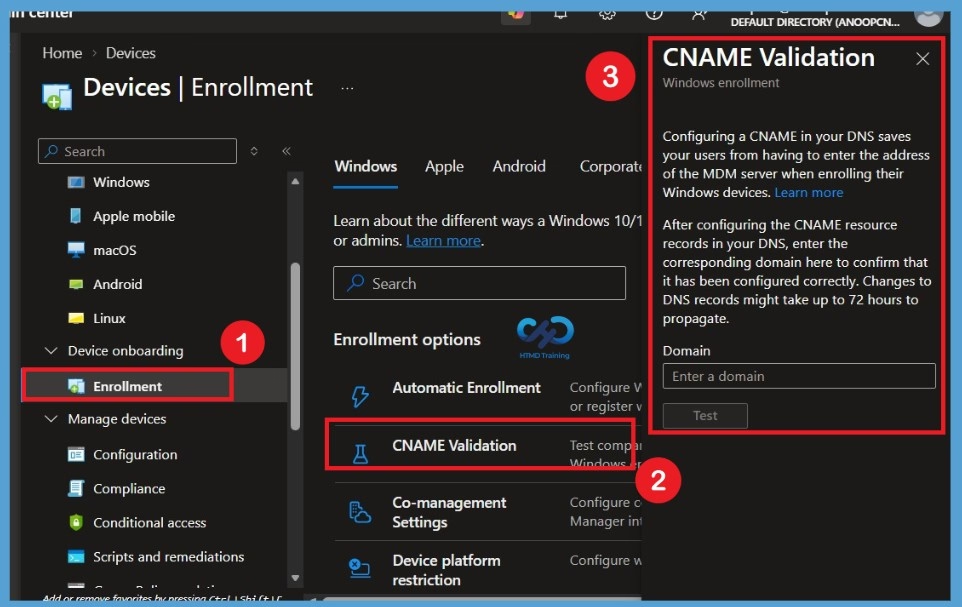
Microsoft Intune allows administrators to check their DNS CNAME records using the CNAME Validation option. This helps confirm that the records are configured correctly for Windows MDM-only enrollment. To access this option, go to Microsoft Intune admin center > Devices > Enrollment > Windows > CNAME Validation. Starting January 15, 2027, or soon after, Intune will stop supporting CNAME-based auto-discovery for Windows MDM-only enrollment. If the enrollment URL is not provided automatically, users will need to enter it manually.
How the User Experience will Change
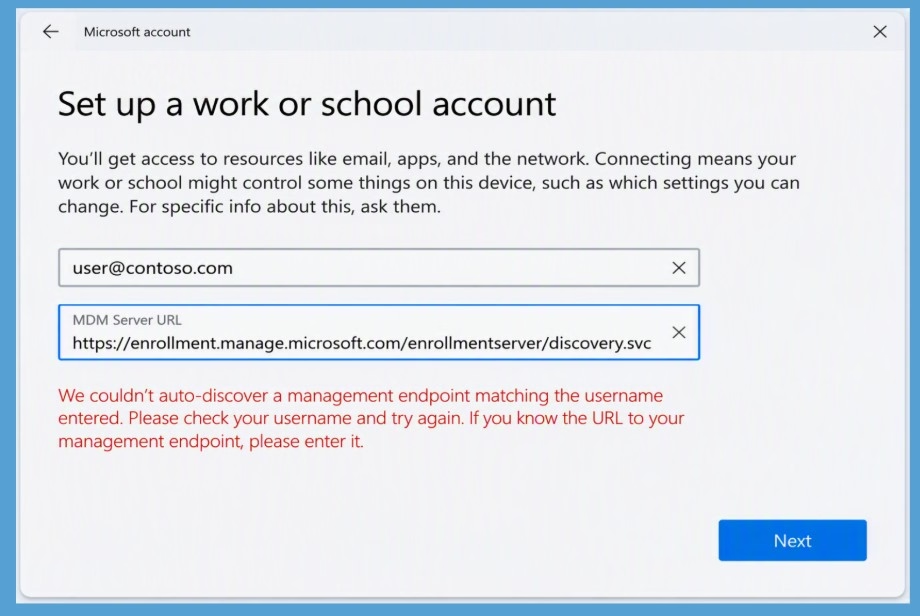
Currently, Windows can automatically find the Microsoft enrollment service during Windows MDM-only enrollment by using a DNS CNAME record. After January 15, 2027, or soon after, this method will no longer be supported. If the enrollment server URL is not provided automatically, users will need to enter it manually to continue the enrollment process.

| Who This Change Affects |
|---|
| You use Windows MDM-only enrollment. |
| You have configured an EnterpriseEnrollment DNS CNAME record. |
| Your enrollment process depends on DNS record to automatically discover the enrollment service. |
| Microsoft Entra join enrollment |
| Microsoft Entra hybrid join enrollment |
| Other enrollment methods that don’t rely on EnterpriseEnrollment CNAME discovery |
Need Further Assistance or Have Technical Questions?
Join the LinkedIn Page and Telegram group to get the latest step-by-step guides and news updates. Join our Meetup Page to participate in User group meetings. Also, join the WhatsApp Community and the Whatsapp channel to get the latest news on Microsoft Technologies. We are there on Reddit as well.
Author
Anoop C Nair is Workplace Technology solution architect with 25+ years of experience in global enterprise organizations such as JP Morgan, Capgemini, etc. He is Microsoft Certified Trainer. Microsoft MVP from 2015 onwards for consecutive 11 years! He also conducts Intune and modern workplace tech training for enterprise organizations. He is Blogger, Speaker, and Founder of HTMD Community and HTMD Conference. His focus is on Device Management technologies such as Intune, Windows, Cloud PC. He writes about technologies like Intune, SCCM, Windows, Cloud PC, Windows, Entra, Microsoft Security.