
Key Takeaways
- From November 4, 2026, non-admin users will be allowed to register agent identity blueprints by default.
- The agent identity blueprint setting is separate from the application registration setting.
- Agents without the required permission may receive HTTP 403 errors when creating agent identities.
- Administrators should review user settings and agent permissions before November 4 to avoid issues.
In this post, we are discussing Microsoft Entra Agent ID Changes Default Blueprint Registration and Agent Permissions. Microsoft is introducing important changes to Microsoft Entra Agent ID in November 2026. These changes will affect how users register agent identity blueprints and how agents get permission to create other agent identities. Starting November 4, 2026, non-admin users will be allowed to register agent identity blueprints by default. Administrators can control this setting in the Microsoft Entra admin center.
Table of Contents
Table of Contents
Microsoft Entra Agent ID Blueprint Registration to Prevent Unauthorized Agent Creation and Permission Issues
Microsoft recommends that administrators review their existing agent configurations before the upcoming changes take effect. Agents that depend on automatic permission grants may fail to create new agent identities after enforcement begins. Administrators should identify these agents and grant the required permissions to avoid HTTP 403 errors.
- Introduction To App Lifecycle Management Agent In Entra For Unified App Control And Visibility
- AI Agent Tool that Brings the Power of Microsoft Graph and MS Entra
- Best Guide To Configure App Registration In Microsoft Entra
- How to Track User Registration Details in Entra ID using Microsoft Graph API
What’s New in Microsoft Entra Agent ID
According to some reports Microsoft is making two important changes to Microsoft Entra Agent ID. The first change affects who can register agent identity blueprints. The second changes how agents receive permission to create other agent identities.
Changes to AgentIdentity.CreateAsManager Permissions
Microsoft is removing the automatic assignment of the AgentIdentity.CreateAsManager permission to agent blueprint principals. Administrators must explicitly grant this permission to agents that need to create other agent identities. Explicit permission grants will be available from October 16, 2026. Enforcement will begin on November 4, 2026, and the rollout is expected to finish by late November 2026. Agents that rely on automatic permissions may receive HTTP 403 errors after enforcement begins.

Configure Agent Identity Blueprint Registration in Microsoft Entra
Administrators can find the agent identity blueprint registration setting in the Microsoft Entra admin center under User settings. For that first Sign in to the Microsoft Entra admin center. Navigate to Entra ID and select Users from the left navigation menu. On the Users page, select User settings to access the default user role permissions and other user-related settings.
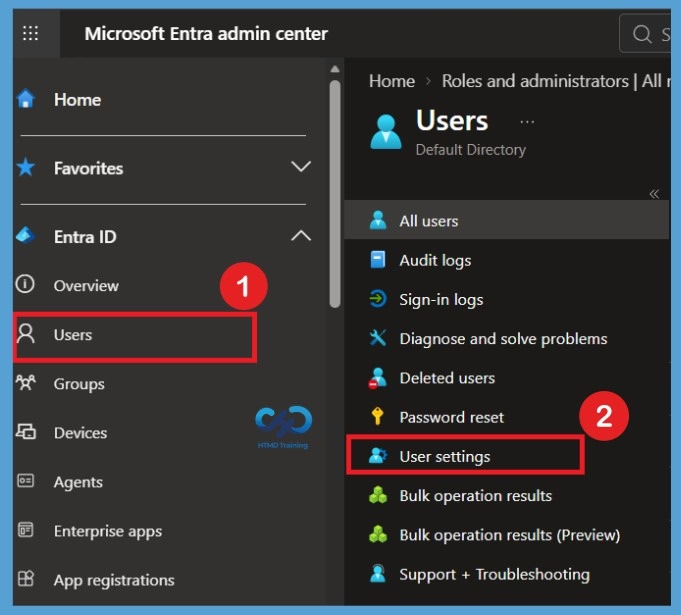
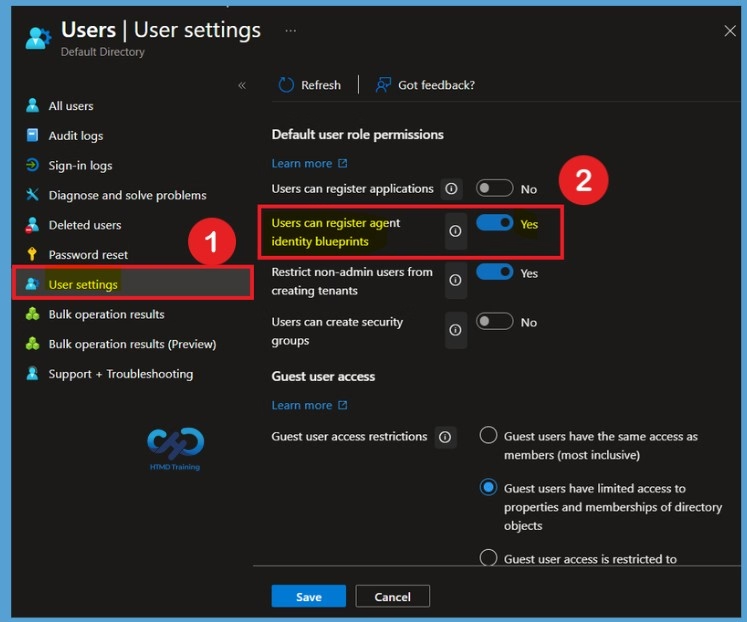
On the User settings page, find the Default user role permissions section. Here, you can see the Users can register agent identity blueprints option. This setting controls whether users can register agent identity blueprints. It is separate from the Users can register applications setting. Administrators can review this option and configure it according to their organization’s requirements.
| Default User Role Permissions | Info |
|---|---|
| Users can register applications | Indicates whether the default user role can create applications. |
Users can register agent identity blueprints | Indicates whether the default user role can create agent identity blueprints. |
| Restrict non-admin users from creating tenants | “Yes” restricts the creation of Microsoft Entra ID tenants to the global administrator or tenant creator roles. “No” allows non-admin users to create Microsoft Entra ID tenants. Anyone who creates a tenant will become the global administrator for that tenant. |
| Users can create security groups | Indicates whether the default user role can create security groups. |
Need Further Assistance or Have Technical Questions?
Join the LinkedIn Page and Telegram group to get the latest step-by-step guides and news updates. Join our Meetup Page to participate in User group meetings. Also, join the WhatsApp Community and the Whatsapp channel to get the latest news on Microsoft Technologies. We are there on Reddit as well.
Author
Anoop C Nair is Workplace Technology solution architect with 25+ years of experience in global enterprise organizations such as JP Morgan, Capgemini, etc. He is Microsoft Certified Trainer. Microsoft MVP from 2015 onwards for consecutive 11 years! He also conducts Intune and modern workplace tech training for enterprise organizations. He is Blogger, Speaker, and Founder of HTMD Community and HTMD Conference. His focus is on Device Management technologies such as Intune, Windows, Cloud PC. He writes about technologies like Intune, SCCM, Windows, Cloud PC, Windows, Entra, Microsoft Security.