
Key Takeaways
- Microsoft introduced MAM support for the Windows App at Ignite 2026.
- Users can access Windows 365 Cloud PCs through the Windows App.
- Additional data protection is available when users access corporate resources through the Windows App on managed and unmanaged devices.
- The capability helps organizations protect corporate data when employees use personal or unmanaged devices.
In this post we are discussing about Intune MAM Support for Windows App Introduces New 8 Windows 365 Capabilities for Unmanaged Devices. Microsoft has announced a new addition to Windows Mobile Application Management (MAM) at Microsoft Ignite 2026. This update, allowing users to access their Windows 365 Cloud PCs with additional data protection. This update introduces MAM support for the Windows App, allowing users to securely access their Windows 365 Cloud PCs from managed and unmanaged Windows devices. With this new capability, organizations can provide additional protection for corporate data accessed through the Windows App.
Table of Contents
Table of Contents
Intune MAM Support for Windows App Introduces New 8 Windows 365 Capabilities for Unmanaged Devices
This is particularly useful when employees use personal or unmanaged Windows devices to connect to their work environments. This is useful for organizations that allow employees to use personal or unmanaged devices to access their work environments.
This new improvement for data protection while providing users with flexible access to their Cloud PCs. By extending MAM support to the Windows App, organizations can apply additional security protections to corporate data accessed through the application, even when the device is not managed by the organization. The Windows App MAM support is currently available in Public Preview.
- Windows App Adds Remote PC Connections for a Unified Remote Access Experience
- 4 Primary Ways to Connect Windows 365 on Windows and Microsoft Teams Optimizations on Windows App
- Securing AI Agents with Runtime Protection using Microsoft Defender and Intune
What’s New in Intune
Microsoft has introduced Mobile Application Management (MAM) support for the Windows App. This capability provides additional protection for corporate data accessed through the Windows App when users connect to Windows 365 Cloud PCs. MAM support is particularly useful for organizations that allow employees to use personal or unmanaged Windows devices. Instead of relying only on device management, organizations can extend application-level protection to corporate data accessed through the Windows App. This helps organizations support flexible working environments while improving the protection of business information.

The new Windows 365 admin assistant in Microsoft Intune will help IT administrators investigate connectivity issues, identify possible causes, and get troubleshooting recommendations. Microsoft is also improving Cloud PC monitoring and reporting to make management easier.
- Along with these improvements Microsoft is introducing new security and flexibility features across Windows 365.
- These include MAM support for Windows App to protect corporate data on managed and unmanaged devices, improvements to Windows 365 Reserve and Flex, and a new in-session connection experience in Windows App.
- Along with Windows App MAM support, Microsoft announced several new capabilities, enhancements, and upcoming improvements across Windows 365 and Azure Virtual Desktop you can check on the below table.
Automate Business Tasks with Windows 365 for Agents
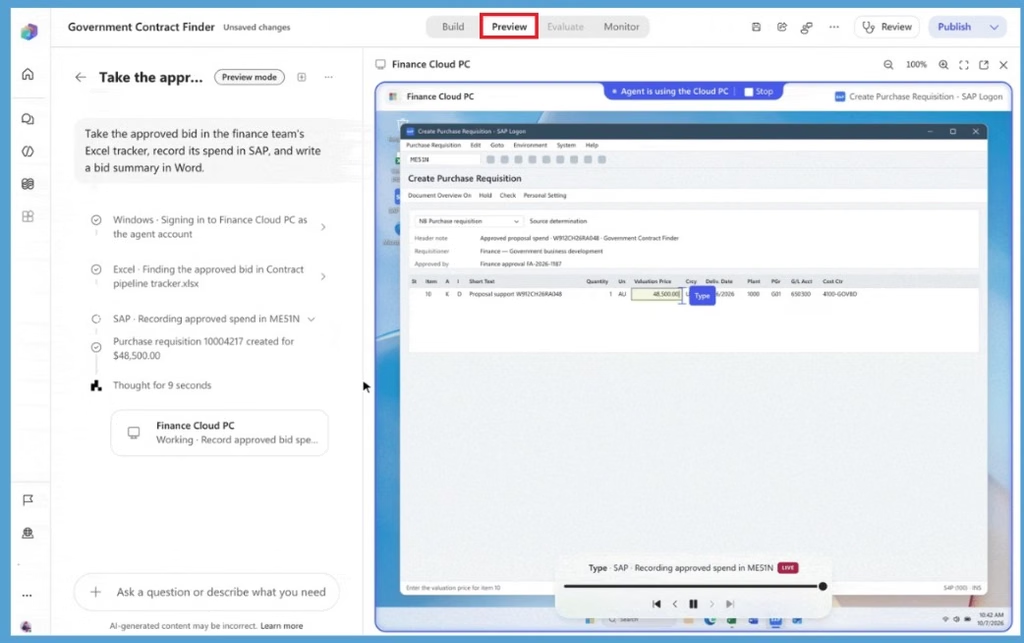
Windows 365 for Agents lets AI agents use a secure Cloud PC to work across business applications just like a user. As shown in the image, the agent accesses Excel, enters information into SAP, and completes a purchase request automatically. This helps organizations automate tasks across applications, including legacy systems that don’t have APIs, while maintaining enterprise security and governance
Intelligence Built into Cloud PC
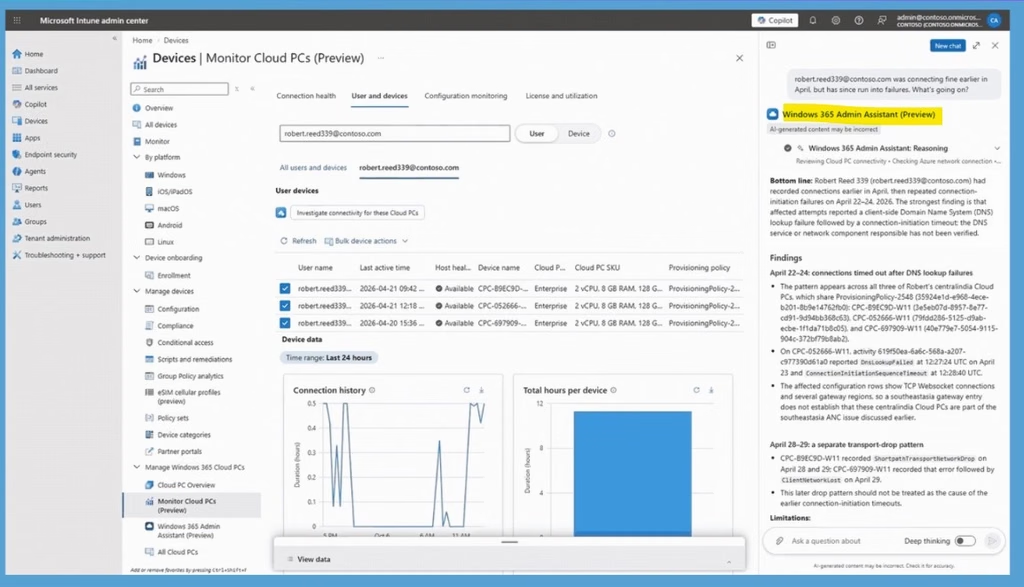
Microsoft is introducing the Windows 365 Admin Assistant in the Microsoft Intune admin center to help IT administrators manage and troubleshoot Cloud PCs more easily. Currently available in Public Preview, the assistant can investigate Cloud PC connectivity problems based on the issues reported by administrators. It analyzes available diagnostic signals, identifies possible root causes, and recommends actions to resolve connection issues.
In the below screenshot, the administrator asks why a user’s Cloud PCs are experiencing connection failures, and the assistant investigates the issue and identifies DNS lookup failures followed by connection timeouts as the cause. IT administrators can use the assistant to investigate Cloud PC connectivity problems, identify possible root causes, and receive recommended troubleshooting actions.
- The monitoring experience also provides connection health, user and device details, and configuration information in a centralized view.
Need Further Assistance or Have Technical Questions?
Join the LinkedIn Page and Telegram group to get the latest step-by-step guides and news updates. Join our Meetup Page to participate in User group meetings. Also, join the WhatsApp Community and the Whatsapp channel to get the latest news on Microsoft Technologies. We are there on Reddit as well.
Author
Anoop C Nair is Workplace Technology solution architect with 25+ years of experience in global enterprise organizations such as JP Morgan, Capgemini, etc. He is Microsoft Certified Trainer. Microsoft MVP from 2015 onwards for consecutive 11 years! He also conducts Intune and modern workplace tech training for enterprise organizations. He is Blogger, Speaker, and Founder of HTMD Community and HTMD Conference. His focus is on Device Management technologies such as Intune, Windows, Cloud PC. He writes about technologies like Intune, SCCM, Windows, Cloud PC, Windows, Entra, Microsoft Security.