
Key Takeaways
- Microsoft Entra PIM for App Roles to Enable Just-in-Time Access and Reduce Persistent Application Privileges
- Users can activate application roles only when they need access and deactivate them after completing their tasks.
- Administrators can assign users to application-defined roles with eligibility or time-bound assignments.
- Organisations can require MFA, approval, or justification before users activate application roles.
- Organisations can manage existing application roles directly through PIM without an additional onboarding process.
- Administrators can configure app role settings, manage assignments, control activation duration, and review activation history.
- Helps organisations reduce permanent privileges and strengthen Zero Trust security through controlled, temporary application access.
Microsoft Entra PIM for App Roles to Enable Just-in-Time Access and Reduce Persistent Application Privileges. PIM for App Roles allows administrators to give users eligible access to application roles. Users can activate these roles only when needed and deactivate them after completing their tasks. This helps reduce permanent access and improve application security.
Table of Content
Table of Contents
Microsoft Entra PIM for App Roles to Enable Just-in-Time Access and Reduce Persistent Application Privileges
Applications with existing app roles can be managed directly through PIM without any additional application onboarding. To configure PIM for App Roles, administrators must first configure the app role settings and activation requirements, then assign eligible roles to users. Finally, they can enable Just-in-Time (JIT) activation so users can activate their assigned application roles only when needed.
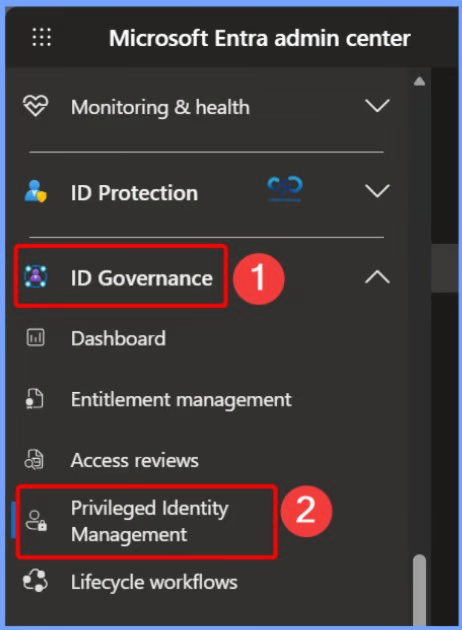
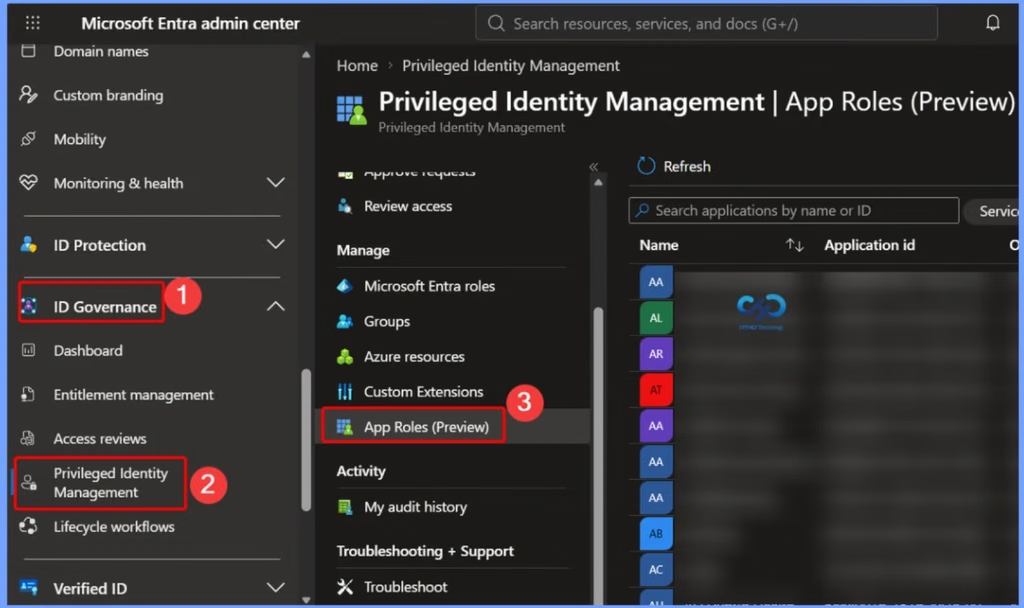
You can access this feature from the Microsoft Entra admin center → ID Governance → Privileged Identity Management → App Roles (Preview).
- Add Microsoft Entra Users to Group Membership using Microsoft Graph API and PowerShell Script
- Create Custom Intune Role
This feature allows administrators to assign eligible or time-bound application roles and enable Just-in-Time (JIT) access. They can require MFA, justification, or approval before activation, configure activation duration and notification settings, manage application role assignments, and review activation history.

| What is New in this Feature |
|---|
| Assign users eligible or time-bound application roles Enable Just-in-Time activation of application permissions Require MFA, justification, or approval before activation Configure activation duration and notification policies. Manage application role assignments and review activation history |
Need Further Assistance or Have Technical Questions?
Join the LinkedIn Page and Telegram group to get the latest step-by-step guides and news updates. Join our Meetup Page to participate in User group meetings. Also, join the WhatsApp Community and the Whatsapp channel to get the latest news on Microsoft Technologies. We are there on Reddit as well.
Author
Anoop C Nair is Workplace Technology solution architect with 25+ years of experience in global enterprise organizations such as JP Morgan, Capgemini, etc. He is Microsoft Certified Trainer. Microsoft MVP from 2015 onwards for consecutive 11 years! He also conducts Intune and modern workplace tech training for enterprise organizations. He is Blogger, Speaker, and Founder of HTMD Community and HTMD Conference. His focus is on Device Management technologies such as Intune, Windows, Cloud PC. He writes about technologies like Intune, SCCM, Windows, Cloud PC, Windows, Entra, Microsoft Security.