

Key Takeaways
- Enterprise App Management makes managing apps easier with updates and version tracking.
- EAM offers enterprise-ready apps, while the Microsoft Store is for users and WinGet is community-based.
- Admins use the Intune Portal to add, assign, and update apps, while the service tracks them.
- The pipeline handles deployment, installation, detection, retries, and reporting via the Intune Management Extension.
Hey, let’s discuss about What is Enterprise App Management and How EAM Apps are Delivered. Enterprise App Management includes preconfigured metadata, update availability, guided updating, and version visibility.
Table of Contents
Table of Contents
What is Enterprise App Management and How EAM Apps are Delivered
Enterprise App Management provides a curated list of enterprise-ready Win32 apps, while Microsoft Store focuses on simplicity and end user experience, and WinGet serves as a community source package delivery mechanism.
- 6 Exciting Features coming to Intune Enterprise App Management
- Intune Adds Inventus OEMConfig App to Enhance Android Enterprise Management
- New Update Button is Available for Intune Enterprise Application Management to Update Catalog Apps
How EAM Apps are Delivered
EAM apps are delivered starting from theIntune Admin Portal, where admins add catalog apps, assign apps, and update apps. This connects to the Intune App Management Service (Control Plane), which stores app assignment intent, maintains catalog app metadata, tracks provisioned versus available versions, and exposes reporting and Graph APIs.
From there, the process continues through the Win32 App Delivery and Enforcement Pipeline, which handles content delivery, install or upgrade execution, detection rules evaluation, and retry and error handling. Finally, the Intune Management Extension executes the install or upgrade, runs detection rules, and reports status and the detected version.

Ingestion Flow
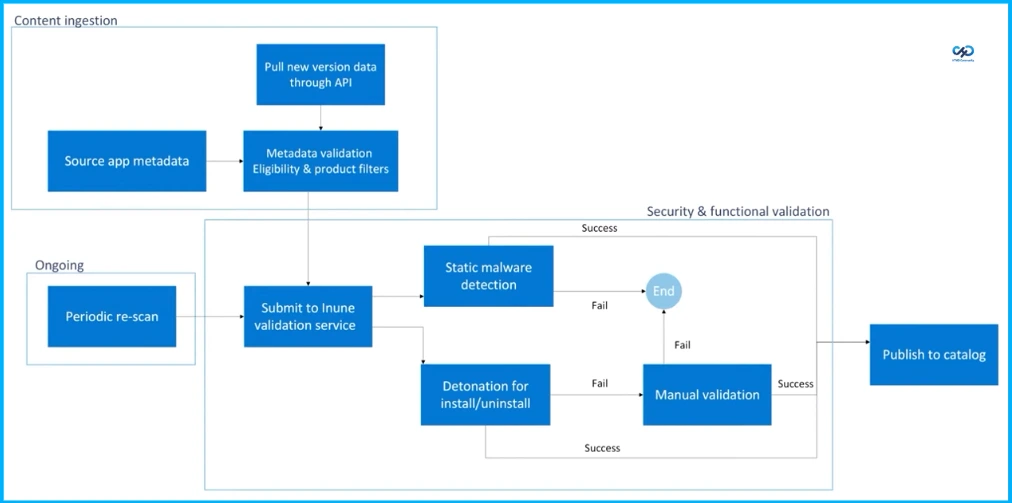
The ingestion flow begins with collecting source app metadata and pulling new version data through an API, followed by metadata validation that applies eligibility and product filters. Once validated, the app is submitted to the Intune validation service, where it undergoes static malware detection and detonation testing for install and uninstall scenarios.
If any step fails, the process moves to manualvalidation or ends, while successful validation allows the app to be published to the catalog. Additionally, periodic re-scans are performed as part of an ongoing process to ensure continued security and functionality.
Method of Updating
Manual supersedence is fully admin-driven, offering high control but making updates feel like re-authoring. Guided upgrades simplify the process by surfacing updates and pre-filling steps.
| Method | Idea |
|---|---|
| Manual supersedence | Manual supersedence is entirely admin-driven with high control and upgrades feel like re-authoring, not maintaining. |
| Guided upgrades | reduce mistakes by surfacing updates + pre-filling the flow while preserving rollout control via targeting. |
Need Further Assistance or Have Technical Questions?
Join the LinkedIn Page and Telegram group to get the latest step-by-step guides and news updates. Join our Meetup Page to participate in User group meetings. Also, join the WhatsApp Community and the Whatsapp channel to get the latest news on Microsoft Technologies. We are there on Reddit as well.
Author
Anoop C Nair is a Workplace Technology solution architect with 25+ years of experience. Microsoft Certified Trainer. Microsoft MVP from 2015 onwards for consecutive 11+ years! He is a blogger, Speaker, and Founder of HTMD Community and HTMD Conference. His main focus is on Device Management technologies like Intune, Windows, and Cloud PC. He writes about technologies like Intune, SCCM, Windows, Cloud PC, Entra, and Microsoft Security.