
Key Takeaways
- Microsoft Entra Identity Verification Integration with Conditional Access
- Conditional Access: Integrates Identity Verification into CA policies.
- Verify identity before accessing sensitive sites.
- Unmanaged Devices: Trigger verification for unmanaged device access.
- Risk-Based Security: Require verification when user risk increases.
- Stronger Protection: Make access decisions based on context and risk.
Microsoft Entra Identity Verification is being integrated with Conditional Access to strengthen access security. Organisations can require identity verification before users access sensitive SharePoint sites or resources from unmanaged devices. It also enables additional verification when user risk increases, helping organisations make smarter access decisions based on user context and risk.
Table of Content
Table of Contents
Microsoft Entra Identity Verification Integration with Conditional Access
Microsoft Entra Identity Verification helps administrators manage and monitor users’ identity verification details. Admins can check verification status, review verification history, and track identity verification events. With Identity Verification coming to Conditional Access, organisations can add an extra verification step before users access sensitive resources. This helps improve access security and supports better identity protection.
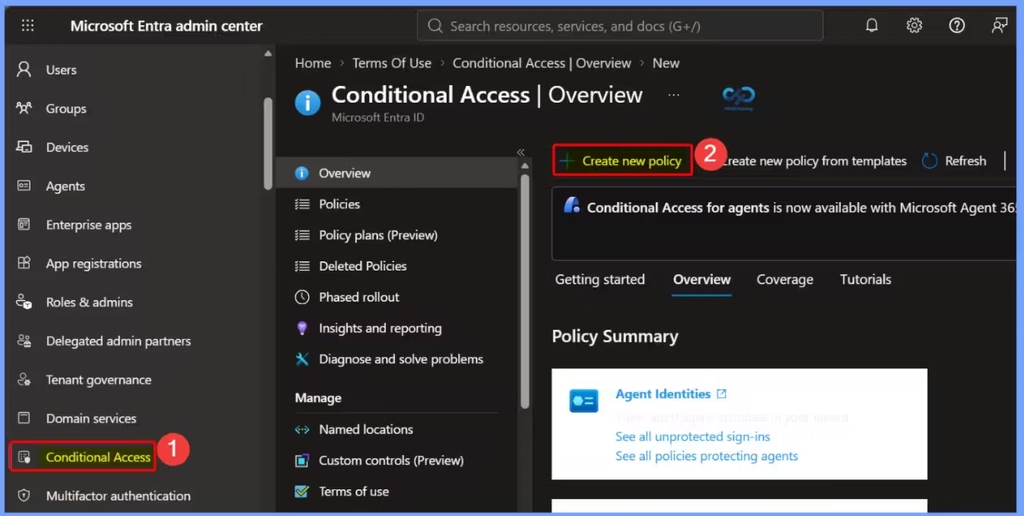
- Sign in to Entra Admin Center
- Go to Conditional Access > +Create New Policy
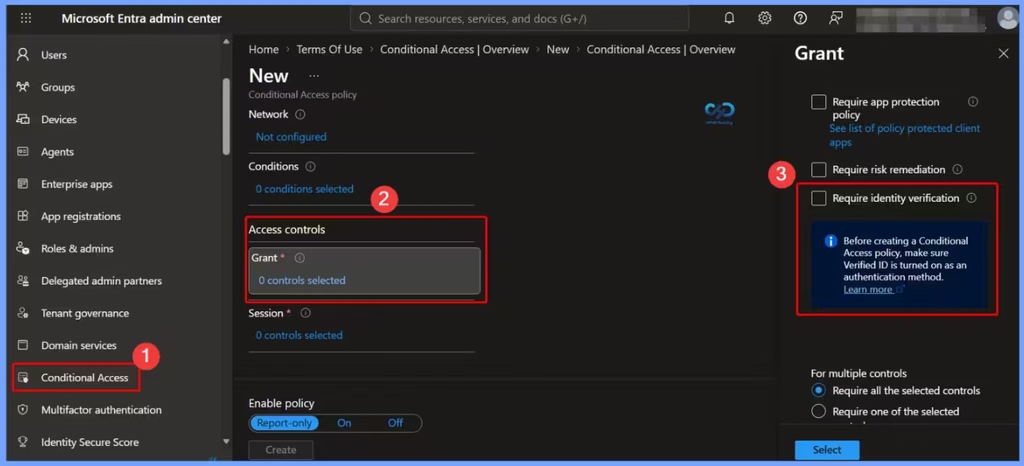
| Require identity verification |
|---|
| Users must present a Verified ID and complete Face Check |
Require identity verification
Users must present a valid Verified ID and complete a Face Check to confirm their identity before accessing the protected resources. This adds an extra layer of security and helps ensure that only verified users can gain access.
- MS Entra Face Check Strengthens Identity Verification for Onboarding Access Requests and Account Recovery
- Non-Human Identities and Agent Identities Gain Access Package Support with Entra Identity Governance for AI Agents
- Understanding Entra Agentic AI in Security From Manual Work to Fully Autonomous Agents
- AI Agent Tool that Brings the Power of Microsoft Graph and MS Entra
Need Further Assistance or Have Technical Questions?
Join the LinkedIn Page and Telegram group to get the latest step-by-step guides and news updates. Join our Meetup Page to participate in User group meetings. Also, join the WhatsApp Community and the Whatsapp channel to get the latest news on Microsoft Technologies. We are there on Reddit as well.

Author
Anoop C Nair is Workplace Technology solution architect with 25+ years of experience in global enterprise organizations such as JP Morgan, Capgemini, etc. He is Microsoft Certified Trainer. Microsoft MVP from 2015 onwards for consecutive 11 years! He also conducts Intune and modern workplace tech training for enterprise organizations. He is Blogger, Speaker, and Founder of HTMD Community and HTMD Conference. His focus is on Device Management technologies such as Intune, Windows, Cloud PC. He writes about technologies like Intune, SCCM, Windows, Cloud PC, Windows, Entra, Microsoft Security.