
Key Takeaways
- Administrators can configure network changes using an Elevation System Settings policy.
- Microsoft Intune EPM now supports approved network configuration changes for standard users.
- Users can modify IPv4, IPv6, and DNS server settings without receiving local administrator rights.
- Users can perform approved network changes through Company Portal.
In this post we are discussing how to Intune New Elevation System Settings Policy in EPM to Enable Network Changes Without Admin Privileges. Microsoft recently introduced a new capability in Endpoint Privilege Management (EPM) that allows users to make approved network configuration changes without requiring local administrator rights. This enhancement helps organizations provide users with more flexibility while maintaining security and restricting unnecessary administrative privileges.
Intune New Elevation System Settings Policy in EPM to Enable Network Changes Without Admin Privileges
Previously, changing network settings such as IP addresses and DNS server values required administrator permissions. Because of this, standard users had to contact the IT administrator or help desk whenever they needed to make these changes, even for simple network configuration tasks. With this new capability, Microsoft Intune allows administrators to configure an Elevation System Settings policy through Endpoint Privilege Management.
Using this policy, standard users can change IPv4, IPv6, and DNS server values on their device’s network adapters without requiring local administrator rights. Users can access this dedicated network settings experience through the Company Portal.
- How to Configure Support Approved EPM Elevation using Intune | Highly secured option
- Configure User Confirmed EPM Elevation Settings Policy using Microsoft Intune
- Configure Endpoint Privilege Management EPM Reusable Settings Policy using Intune
- Most Restrictive Elevation Behaviour with Intune Endpoint Privilege Management using Intune
What’s New
The new capability in Intune Endpoint Privilege Management allows standard users to perform approved network configuration changes without requiring full administrator permissions. Using the Elevation System Settings policy, administrators can control which network settings users are allowed to modify. This includes IPv4, IPv6, and DNS server values on network adapters.

| Feature | Details |
|---|---|
| Microsoft Intune EPM | Supported Settings- IPv4, IPv6, and DNS |
| Elevation Options | Automatic and User Confirmed |
Navigate to Endpoint Privilege Management
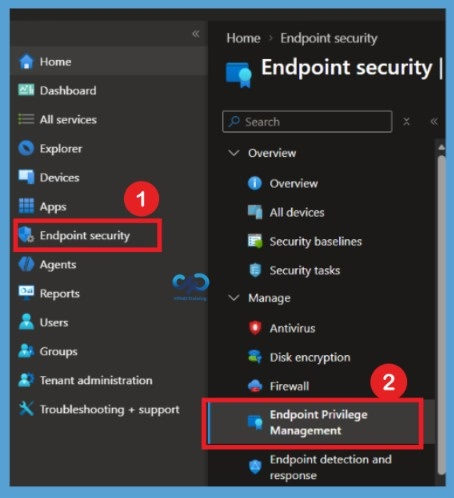
With this enhancement, EPM provides a controlled elevation experience that allows standard users to make IT-approved changes. Open the Microsoft Intune admin center and navigate to Endpoint security. From the available options, select Endpoint Privilege Management to access the EPM configuration page. Endpoint security>Endpoint Privilege Management.
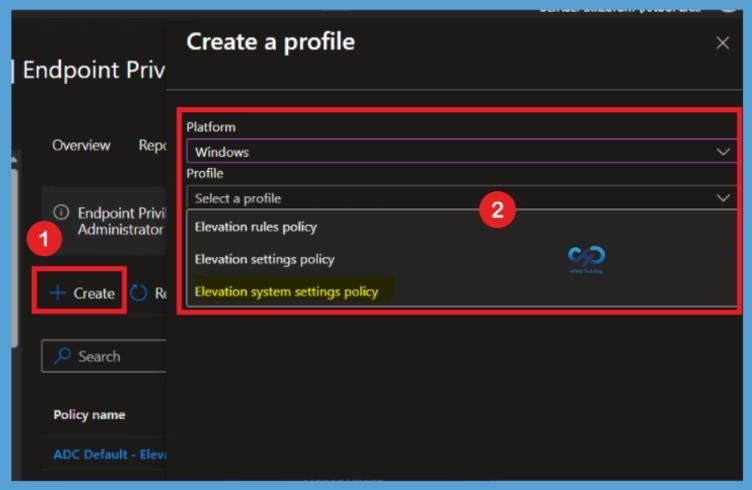
In the Endpoint Privilege Management section, click + Create. In the Create a profile window, select Windows as the platform. Under the Profile dropdown, select Elevation system settings policy to create a new policy for managing network settings without granting users full administrator rights. In profile type you can also see options like Elevation rules policy, Elevation settings policy,Elevation system settings policy.
Need Further Assistance or Have Technical Questions?
Join the LinkedIn Page and Telegram group to get the latest step-by-step guides and news updates. Join our Meetup Page to participate in User group meetings. Also, join the WhatsApp Community and the Whatsapp channel to get the latest news on Microsoft Technologies. We are there on Reddit as well.
Author
Anoop C Nair is Workplace Technology solution architect with 25+ years of experience in global enterprise organizations such as JP Morgan, Capgemini, etc. He is Microsoft Certified Trainer. Microsoft MVP from 2015 onwards for consecutive 11 years! He also conducts Intune and modern workplace tech training for enterprise organizations. He is Blogger, Speaker, and Founder of HTMD Community and HTMD Conference. His focus is on Device Management technologies such as Intune, Windows, Cloud PC. He writes about technologies like Intune, SCCM, Windows, Cloud PC, Windows, Entra, Microsoft Security.