

Key Takeaways
- Track the entire lifecycle of feature updates from request to final installation status.
- Analyze deployment progress over time and quickly spot delays or rollout issues.
- Filter by update policy or target release to manage multiple deployment rings efficiently.
- Identify and troubleshoot issues faster with categorized failure details (download, install, reboot, cancellation).
Microsoft Intune Introduces Feature Update Journey Report for End-to-End Windows Update Visibility! This report shows how devices move through each stage of the update process in a simple and clear way. Instead of only showing final status, it highlights transitions like request received to download, download to installation, and installation to reboot and completion. This helps administrators easily understand how updates are progressing across devices, rather than just seeing static results.
Table of Content
Table of Contents
Microsoft Intune Introduces Feature Update Journey Report for End-to-End Windows Update Visibility
Microsoft is improving how administrators can track Windows updates. A new report in the Microsoft Intune admin center gives a clear view of how feature updates are progressing. Instead of only showing the final result, like installed or failed, the Feature Update Journey report shows each step a device goes through during the update process, helping IT admins understand what is happening at every stage.
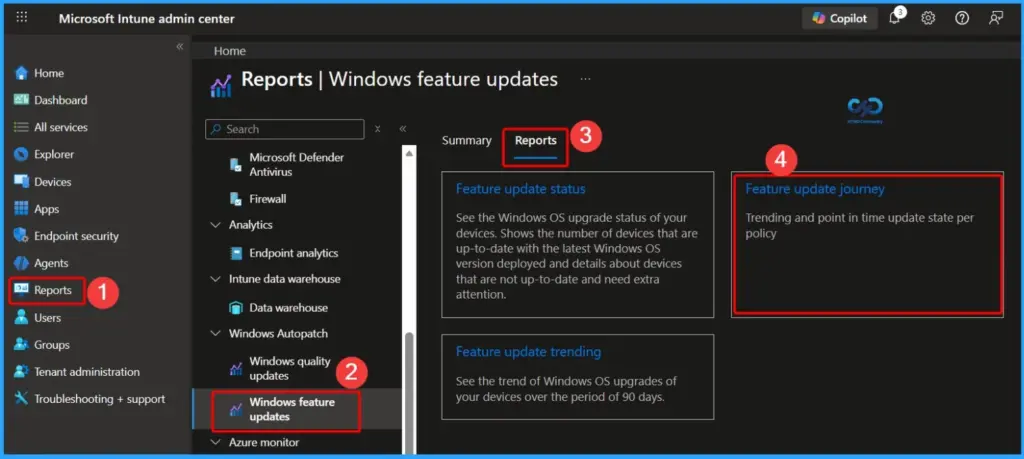
If you use Microsoft Intune to manage Windows updates, you can find this report in Reports > Windows Feature Updates > Feature update journey. It helps you easily track update progress and fix issues.
| Feature Update Journey |
|---|
| Trending and point in Time update state per Policy |
- Windows 11 23H2 Upgrade using Intune Feature Updates Policy
- Windows 11 Minimum System Requirements Updated
- Best way Intune to Stop Sending New Policy Updates to Windows Devices Pause Config Refresh Feature
- Easily Create New Intune EPM Rules directly from the Elevation Reports
Makes the Feature Update Journey Report Useful
The Feature Update Journey report in Microsoft Intune provides clear and detailed insights into how Windows updates are progressing across devices. Instead of just showing the outcome. It helps administrators understand every stage of the update process, making monitoring and troubleshooting much easier.

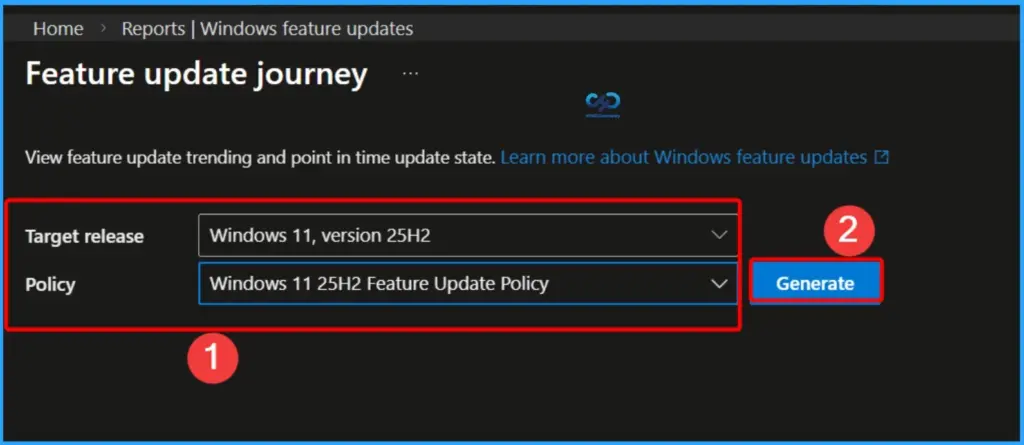
- Target Release – Select the Target Version
- Policy – Select Version First
- Generate – Helps to generate the Report
| Feature | Details |
|---|---|
| End-to-end visibility | See the full update process from start to finish |
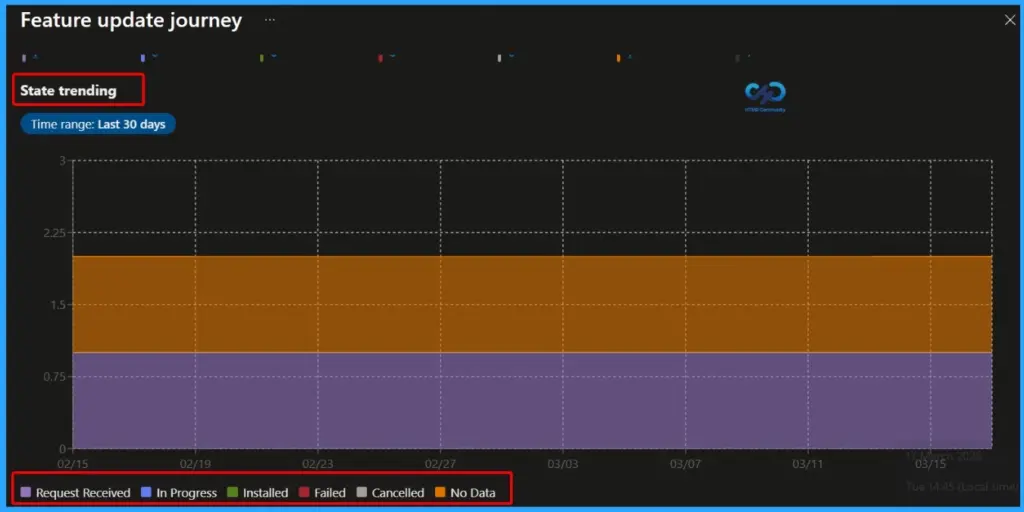
| Trend analysis | Check update progress over the last 30 days |
| Policy insights | Filter updates based on policy or version |
| Failure details | Quickly understand why updates failed |
Visual Deployment Journey Insights
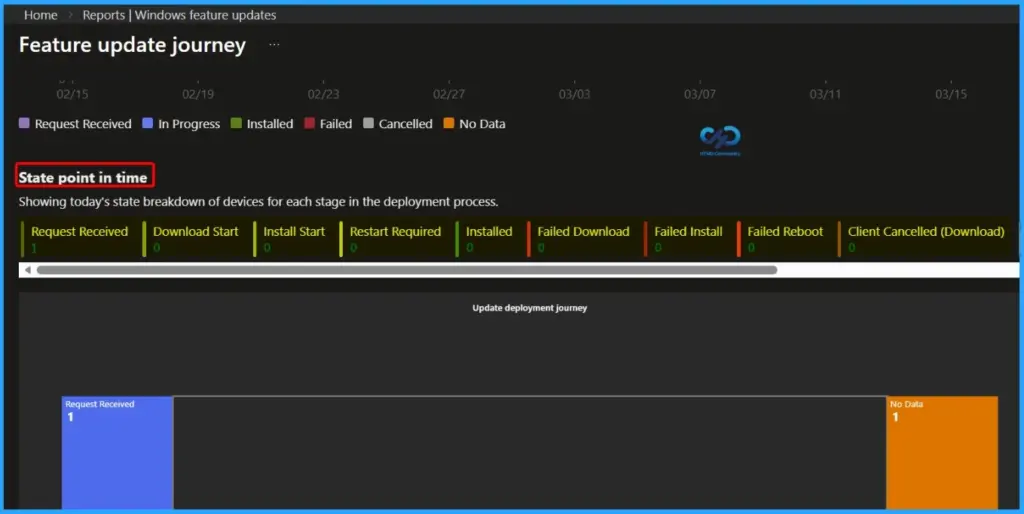
One of the most valuable features is the visual deployment journey, which shows how devices move through each stage of the update process. It helps administrators easily identify where devices are getting stuck, whether issues are happening during download, installation, or reboot, and if updates are being cancelled by users or interrupted by policies.
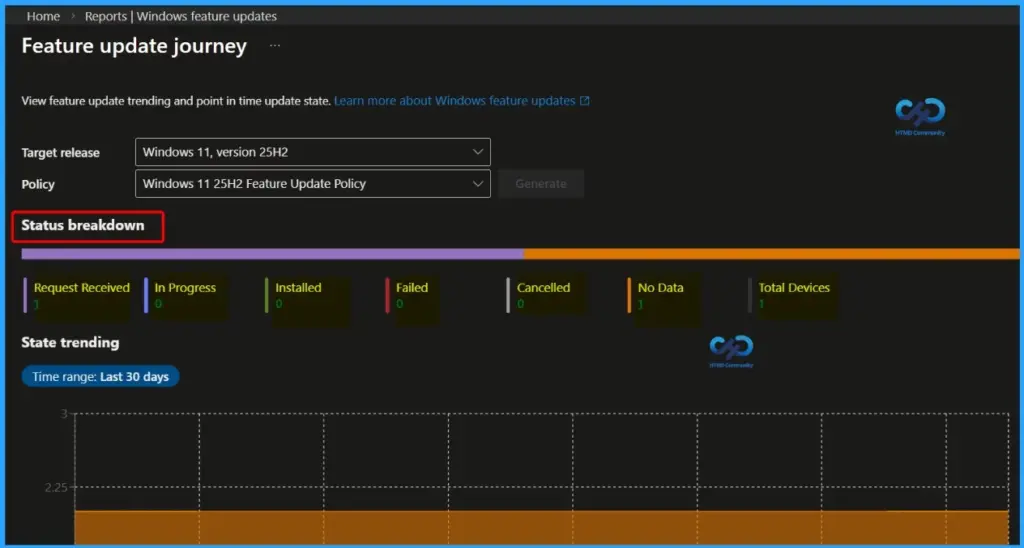
- Request Received
- In Progress
- Installed
- Failed
- Cancelled
- No Data
- Total Devices
Clear Insights into the Update Process
Managing feature updates across thousands of devices can be challenging. This report helps administrators stay ahead by giving clear insights into the update process. Instead of reacting to issues after they happen, admins can identify problems early and take action, ensuring devices remain secure and up to date.
- Request Received
- Download Start
- Install Start
- Restart Required
- Installed
- Failed Download
- Failed Install
- Failed Reboot
- Client Cancelled (Download)
- Client Cancelled (Install)
- Service Cancelled
- No Data
Feature Update Journey Report Improves Update Management
This report helps organisations and administrators manage Windows updates more effectively by providing clear visibility into the entire update process. It allows admins to quickly identify where issues are happening and fix them faster, reducing downtime and manual effort.
Need Further Assistance or Have Technical Questions?
Join the LinkedIn Page and Telegram group to get the latest step-by-step guides and news updates. Join our Meetup Page to participate in User group meetings. Also, join the WhatsApp Community and the Whatsapp channel to get the latest news on Microsoft Technologies. We are there on Reddit as well.
Author
Anoop C Nair is a Workplace Technology solution architect with 25+ years of experience. Microsoft Certified Trainer. Microsoft MVP from 2015 onwards for consecutive 11+ years! He is a blogger, Speaker, and Founder of HTMD Community and HTMD Conference. His main focus is on Device Management technologies like Intune, Windows, and Cloud PC. He writes about technologies like Intune, SCCM, Windows, Cloud PC, Entra, and Microsoft Security.