
Key Takeaways:
- Microsoft will require HTTPS for Connected Cache nodes
- Change is aimed at reducing network bandwidth
- Admins must generate a CSR on the cache node
- Current limitations exist with certificate import on certain Windows Server
Let’s discuss Intune HTTPS Support for Connected Cache for Enterprise to Reduce Network Bandwidth Impact. Microsoft plan to enforce HTTPS content delivery for customers using Microsoft Connected Cache for Enterprise and Education from June 16th, 2026, or soon after.
Table of Contents
Table of Contents
Intune HTTPS Support for Connected Cache for Enterprise to Reduce Network Bandwidth Impact
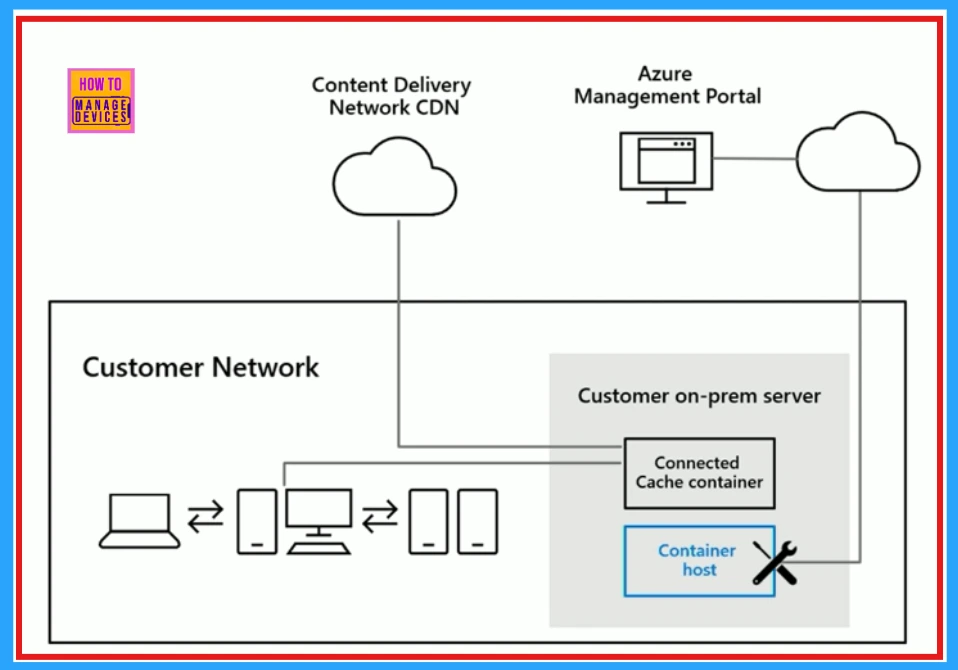
HTTPS for Microsoft Connected Cache nodes is require in Intune for delivering Win32 apps downloads and reduce the bandwidth impact on your network. Without this, devices will fall back to CDN, losing caching benefits.
| Scope |
|---|
| Applies to Enterprise and Education environments using Connected Cache. |
| Other content (Windows updates, Office apps) can still be served via HTTP after the deadline. |
- Microsoft Connected Cache Container Instances In Azure
- Host Connected Cache on Windows Linux VMs without SCCM DP | Intune Peer to Peer Story is Super Powered
- Microsoft Connected Cache Issue for Enterprise Customers Fixed
Workflow Overview
There are some workflow includes with Intune HTTPS Support for Connected Cache. They are Generate CSR, Sign CSR, Import Certificate, Validate HTTPS.
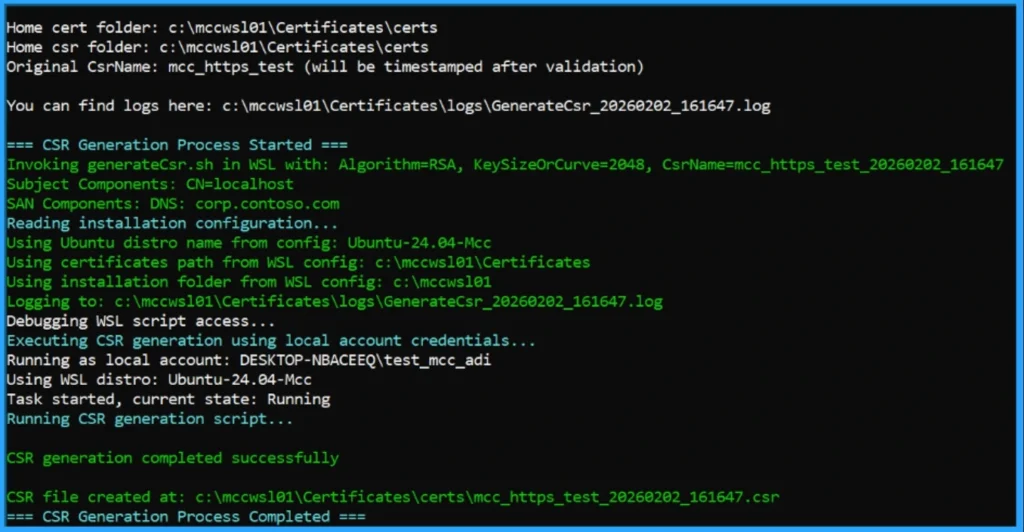
- Generate CSR – On the Connected Cache node (must be created locally to retain the private key).
- Sign CSR – With a trusted CA (public CA recommended; only unencrypted
.crtformat supported). - Import Certificate – Back into Connected Cache using provided scripts.
- Validate HTTPS – Both server-side (port 443 binding, certificate correctness) and client-side (TLS handshake, CA trust).
Note- Linux Support: Same CSR → sign → import workflow, but handled with bash scripts (generateCsr.sh, importCert.sh) and Linux-specific paths/logs.

HTTPS Support Configuration’s Known Issue
Almost, all customers will complete the HTTPS workflow without any problems, but there are a few known issues we want to call out. Microsoft addressed this issue and work to resolve.
- ImportCert failures on Windows Server 2022/2025 with gMSA accounts.
- Similar issues on Windows 11 with local runtime accounts.
- Bug in container version 2119_e causing importCert to hang. Fixes are planned in upcoming releases.
Need Further Assistance or Have Technical Questions?
Join the LinkedIn Page and Telegram group to get the step-by-step guides and news updates. Join our Meetup Page to participate in User group meetings. Also, Join the WhatsApp Community and WhatsApp Channel to get the latest news on Microsoft Technologies. We are there on Reddit as well.
Author
Anoop C Nair has been Microsoft MVP for 10 consecutive years from 2015 onwards. He is a Workplace Solution Architect with more than 22+ years of experience in Workplace technologies. He is a Blogger, Speaker, and Local User Group Community leader. His primary focus is on Device Management technologies like SCCM and Intune. He writes about technologies like Intune, SCCM, Windows, Cloud PC, Windows, Entra, Microsoft Security, Career, etc.