
Key Takeaways
- LAPS is now integrated directly into macOS enrollment in Microsoft Intune
- Automatic creation of a secure local admin account during ADE
- Support for existing devices is planned for future updates
- Enhanced flexibility in account configuration during setup
In this post, we are discussing Microsoft Intune Expands macOS Enrollment with LAPS Integration. Microsoft has newly introduced an enhancement in Microsoft Intune that brings Local Admin Password Solution (LAPS) integration directly into macOS enrollment. This update enables organisations to configure secure local administrator access during Automated Device Enrollment (ADE), ensuring devices are set up with stronger security controls.
Table of Contents
Table of Contents
Microsoft Intune Expands macOS Enrollment with LAPS Integration
With this update, Microsoft is improving Intune by adding better tools to manage local accounts on macOS devices. By integrating LAPS into the enrollment workflow, IT administrators can now automatically create and manage a dedicated local admin account while allowing end users to operate with standard accounts. This approach improves security while also simplifying device provisioning.
In addition to secure password management, organizations gain more control over account configuration during setup, along with password rotation capabilities. Altogether, this update helps streamline macOS device deployment while maintaining strong security standards.
- Most Restrictive Elevation Behaviour with Intune Endpoint Privilege Management
- Windows LAPS Integration with Local Device MaximumPasswordAge Policy
- Windows LAPS Configurations from Azure AD and Intune
- New Automatic Account Management Enable Account settings on Windows LAPS Policy in Intune
LAPS Integration During Enrollment
One of the Important of this update is the integration of LAPS directly within the enrollment profile. IT administrators can now configure a local admin password solution as part of the ADE setup, ensuring that every newly enrolled macOS device automatically receives a securely managed local administrator account.
This eliminates the need for separate scripts or additional configurations after deployment, simplifying the overall setup process while strengthening endpoint security.

Managed Admin Account with LAPS
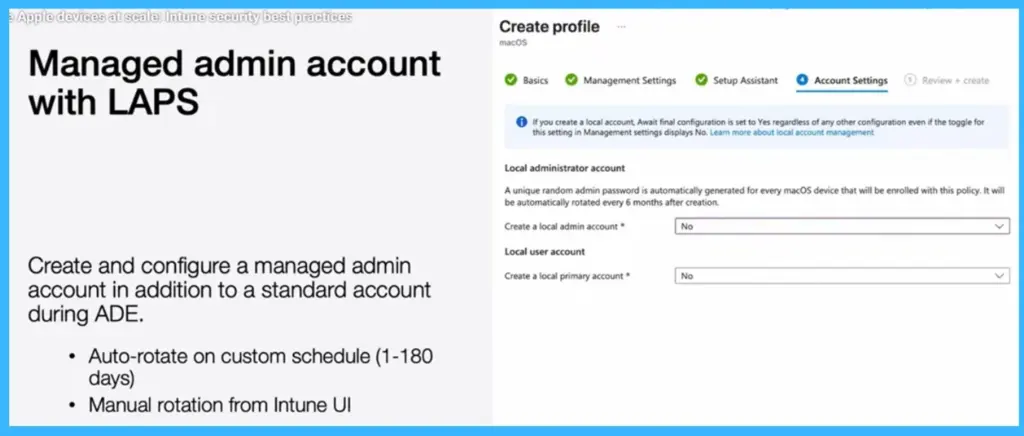
Microsoft has enhanced macOS enrollment in Microsoft Intune by introducing the ability to create and configure a managed local admin account alongside a standard user account during Automated Device Enrollment (ADE). This feature ensures that a secure admin account is automatically provisioned with a unique password for each device. The password is managed through LAPS and can be rotated automatically based on a customizable schedule ranging from 1 to 180 days, with an option for manual rotation directly from the Intune portal.
- This helps in security management while ensuring strong protection for administrative access.
| Managed admin account with LAPS |
|---|
| Create and configure a managed admin account in addition to a standard account during ADE. |
| Auto-rotate on custom schedule (1-180 days) |
| Manual rotation from Intune UI |
Advanced Account Configuration and User Setup
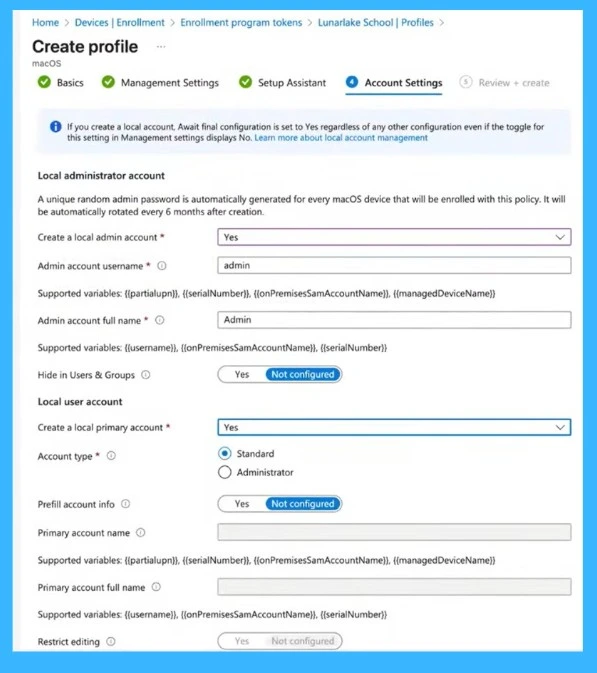
The admin account setup, Microsoft provides more flexibility in configuring both admin and primary user accounts during enrollment. IT administrators can define account details such as username, full name, and visibility, including the option to hide the admin account from users. At the same time, a local primary account can be created with either standard or administrator privileges, along with options to prefill user information and restrict modifications.
- This improves device provisioning by separating end-user access from IT administrative control, enhancing both security and user experience.
Need Further Assistance or Have Technical Questions?
Join the LinkedIn Page and Telegram group to get the latest step-by-step guides and news updates. Join our Meetup Page to participate in User group meetings. Also, join the WhatsApp Community and the Whatsapp channel to get the latest news on Microsoft Technologies. We are there on Reddit as well.
Author
Anoop C Nair is a Workplace Technology solution architect with 25+ years of experience. Microsoft Certified Trainer. Microsoft MVP from 2015 onwards for consecutive 11+ years! He is a blogger, Speaker, and Founder of HTMD Community and HTMD Conference. His main focus is on Device Management technologies like Intune, Windows, and Cloud PC. He writes about technologies like Intune, SCCM, Windows, Cloud PC, Entra, and Microsoft Security.