
Key Takeaways
- Windows 365 now makes it easier to Cloud PC Recovery
- Restore points help to fix problems without completely resetting the device.
- Users can restore settings and apps during first sign-in on Windows 11 Cloud PCs.
- IT admins manage restores through the Microsoft Intune admin center.
In this post we are discussing the Microsoft Simplifies Cloud PC Recovery with New Restore Enhancements. Microsoft has improved the restore experience for Windows 365 Cloud PCs, making it easier for users and IT admins to recover a Cloud PC when something goes wrong. A restore feature allows a Cloud PC to go back to an earlier working state, just like restoring a normal Windows computer. This is useful if a recent update, app installation, or configuration change causes problems.
Table of Contents
Table of Contents
What Is a Cloud PC Restore?
Cloud PC restore in Windows 365 is a way to take a Cloud PC back to an earlier working condition. If something goes wrong, like a bad update, wrong setting, or app issue, IT admins can choose a previous restore point and roll the Cloud PC back to that time.
Microsoft Simplifies Cloud PC Recovery with New Restore Enhancements
Windows 365 automatically creates restore points at regular intervals. IT admins can also create restore points manually before making important changes. If a Cloud PC starts having issues, it can be restored to one of these earlier points in time. However, any apps, settings, or changes made after that restore point will be removed.
- How Time Zone Restoration and UAC Settings Cause a UAC Dialog After Windows Backup Restore
- Best Method to Create Windows 11 System Image Backup
- Easy way to Enable Windows Backup using Microsoft Intune Configuration
What We can Expect
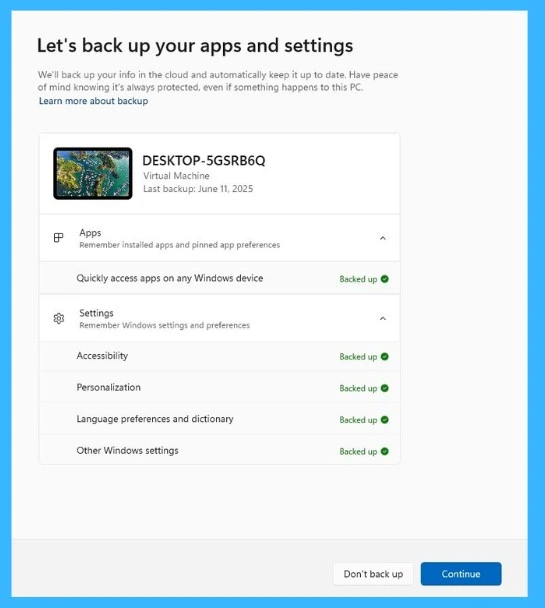
Users can now restore their settings and apps during the first sign-in on a Windows 365 Cloud PC.
Previously, restore points were mostly used by IT admins after a Cloud PC started having problems. With the latest update, Windows 11 users can choose to bring back their personal settings and Microsoft Store apps right when they first sign in to a new Cloud PC.

- This improvement makes the recovery experience smoother and more user-friendly.
| Key Features | Info |
|---|---|
| Broader coverage | It works on Microsoft Entra hybrid joined devices, multi-user setups, and Windows 365 Cloud PCs. Also Expands resilience beyond the out-of-box experience (OOBE). |
| Same seamless experience | Now users can restore Windows settings and Microsoft Store app lists at first sign-in and provides the same flow as OOBE, minimizing downtime and accelerating productivity. |
| Continued focus on user-centric recovery | If users miss the restore option during OOBE (accidentally or due to technical issues), they still have a chance at first sign-in. It Ensures users don’t have to start from scratch when moving to a new PC or recovering after an incident |

Need Further Assistance or Have Technical Questions?
Join the LinkedIn Page and Telegram group to get the step-by-step guides and news updates. Join our Meetup Page to participate in User group meetings. Also, Join the WhatsApp Community and WhatsApp Channel to get the latest news on Microsoft Technologies. We are there on Reddit as well.
Author
Anoop C Nair has been Microsoft MVP for 10 consecutive years from 2015 onwards. He is a Workplace Solution Architect with more than 22+ years of experience in Workplace technologies. He is a Blogger, Speaker, and Local User Group Community leader. His primary focus is on Device Management technologies like SCCM and Intune. He writes about technologies like Intune, SCCM, Windows, Cloud PC, Windows, Entra, Microsoft Security, Career, etc.