
Key Takeaways
- Microsoft is reducing Copilot visibility in Windows 11 apps
- Notepad replaces Copilot branding with “Writing tools”
- AI features in Notepad still exist but can be turned off
- Snipping Tool removes Copilot integration completely
- Changes are currently rolling out to Windows Insiders
In this post, we are discussing Microsoft Starts Removing Copilot from Windows 11 Apps like Notepad and Snipping Tool. Microsoft is planning to reduce the visibility of Copilot across Windows 11, starting with built-in apps where users felt AI features were unnecessary. This marks a shift from its earlier strategy of heavily promoting AI throughout the system. Apps like Notepad and Snipping Tool are now seeing changes in the latest Insider updates. The company is removing or minimizing Copilot branding while still keeping useful features available in the background.
Table of Contents
Table of Contents
Microsoft Starts Removing Copilot from Windows 11 Apps like Notepad and Snipping Tool
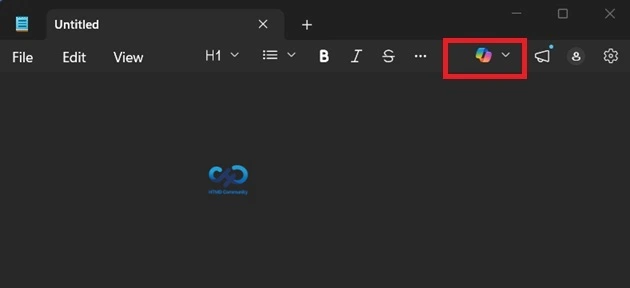
Microsoft is slowly rolling out these changes through Windows Insider updates. With these changes make the user interface cleaner and less distracting, especially for those who prefer a simple Windows experience without too many AI elements. These updates also show that Microsoft is not removing AI completely but changing how it is visible to a user. Below you can see the old Notepad with Copilot features.
- How to use AI Summarization and Recent Files Feature in Notepad on Windows 11
- How Good Notepad Spell Check for Regional Languages such as Malayalam
- How to Check Character Count in the Notepad App in Windows 11
What’s Changing in Notepad
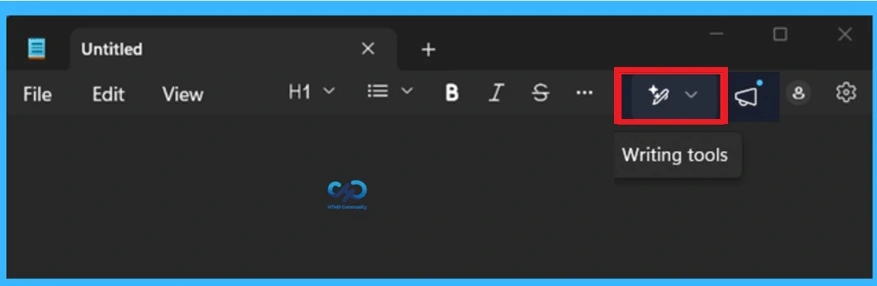
The latest version of Notepad introduces an important redesign. The Copilot logo, which was once displayed, has now been replaced with a simpler “Writing tools” icon. This new name is simpler and does not directly mention AI, which makes the app feel cleaner and less confusing. Even though the name and icon have changed, the features are still the same. Users can still use options like rewrite, summarize, and change tone or format while working on text.
- These features are now grouped under “Writing tools,” making it easier to understand what they do.
| Writing Tool Options |
|---|
| Rewrite |
| Summarise |
| Make shorter |
| Make longer |
| Change tone |
| Change format |
Changes in the Snipping Tool
In the latest update of Snipping Tool on Windows 11, Microsoft has made a clear and simple change by removing Copilot completely from the app. Earlier, after taking a screenshot or selecting an area, users could see a Copilot icon, Now, that icon is no longer visible. AI features are still available under a different name, the Snipping Tool does not show any AI-related features.

- Overall, the update makes the Snipping Tool easier to use, especially for users who only need simple screenshot and editing features. It shows that Microsoft is focusing on keeping essential tools simple while reducing unnecessary additions.
Need Further Assistance or Have Technical Questions?
Join the LinkedIn Page and Telegram group to get the latest step-by-step guides and news updates. Join our Meetup Page to participate in User group meetings. Also, join the WhatsApp Community and the Whatsapp channel to get the latest news on Microsoft Technologies. We are there on Reddit as well
Author
Anoop C Nair is a Workplace Technology solution architect with 25+ years of experience. Microsoft Certified Trainer. Microsoft MVP from 2015 onwards for consecutive 11+ years! He is a blogger, Speaker, and Founder of HTMD Community and HTMD Conference. His main focus is on Device Management technologies like Intune, Windows, and Cloud PC. He writes about technologies like Intune, SCCM, Windows, Cloud PC, Entra, and Microsoft Security.