
Key Takeaways
- New public guidance has been released for Independent Software Vendor (ISVs) to help implement better SAML certificate rotation support.
- Many SaaS applications still use SAML 2.0 for Single Sign-On (SSO) with identity providers like Microsoft Entra ID.
- SAML authentication relies on certificates to establish trust between the Identity Provider (IdP) and the Service Provider (SaaS app).
- Certificate rotation is required when certificates expire, and the new certificate must be updated on both the IdP and the SaaS application.
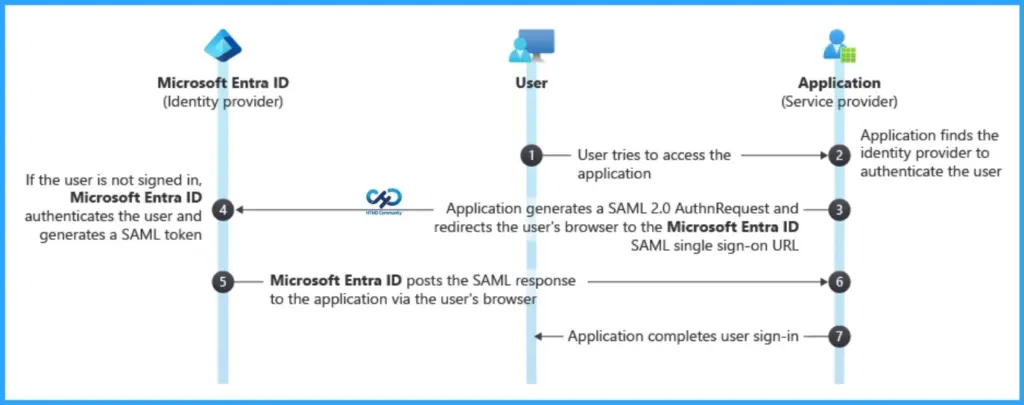
How to Fix SAML Certificate Rotation Issues in Microsoft Entra ID for SaaS Apps! Many SaaS applications still rely on SAML 2.0 for Single Sign-On (SSO) with identity providers such as Microsoft Entra ID. One common challenge in SAML integrations is certificate rotation. SAML authentication uses certificates to establish trust between the Identity Provider (IdP) and the Service Provider (SaaS application). When these certificates expire, administrators must update the new certificate on both the IdP and the SaaS application.
Table of Content
Table of Contents
How to Fix SAML Certificate Rotation Issues in Microsoft Entra ID for SaaS Apps
If the updated certificate is not configured correctly, SSO sign-ins can fail and interrupt user access to applications integrated with Microsoft Entra ID using SAML 2.0. Because of this, certificate rotation has often been a complex and time-consuming process for both organizations and SaaS providers.
To address this challenge, new public guidance has been introduced for Independent Software Vendor (ISVs). The guidance outlines best practices for supporting SAML certificate rotation more effectively, helping reduce authentication issues and improve the reliability of SSO integrations.
- How Microsoft M365-E7 2026 Delivers an AI-First Premium Experience with Integrated Copilot Governance and Entra Identity
- How to Configure Windows Cloud Keyboard Input Protection on Entra Joined Devices
- Faster Work Environment Recovery with Windows First Sign-In Restore for Entra and Hybrid Devices
Best Practices for Automating SAML Certificate Rotation with Microsoft Entra ID
Organizations using SAML 2.0 for federated Single Sign-On (SSO) with Microsoft Entra ID rely on signing certificates to validate authentication assertions. These certificates typically expire every 1–3 years, and replacing them requires coordination between the customer and the SaaS application provider. If the certificate is not updated properly on both sides, it can interrupt authentication and cause application downtime.

To reduce this risk, Independent Software Vendor (ISVs) are encouraged to implement automated certificate rollover mechanisms. Instead of manually updating certificates, SaaS applications should automatically detect and trust new certificates published by Microsoft Entra ID.
How Automatic SAML Certificate Rotation Works in Microsoft Entra ID
When a SAML certificate is about to expire in Microsoft Entra ID, the administrator creates or uploads a new certificate. Instead of manually updating the SaaS application, the app can automatically detect this new certificate through the federation metadata provided by Entra ID.
The SaaS application should regularly check this metadata endpoint to see if a new certificate has been added. When it finds a new certificate, the application temporarily adds it as a secondary certificate while the old certificate continues to work.
Once the new certificate is activated in Entra ID, the application can start using it as the primary certificate. This approach ensures SAML-based Single Sign-On using SAML 2.0 continues without interruption, avoiding login failures for users.
ISVs to Support SAML Certificate Rotation
To enable automated certificate rotation for applications integrated with Microsoft Entra ID using SAML 2.0, Independent Software Vendor (ISVs) should follow a few important best practices.
| Important Best Practices |
|---|
| Support federation metadata ingestion from Microsoft Entra ID using per-tenant and per-application metadata URLs. |
| Provide certificate lifecycle management APIs to list, add, remove, and promote certificates. |
| Allow multiple signing certificates (primary and secondary) to avoid authentication outages during certificate rotation. |
| Monitor federation metadata regularly (at least every 24 hours) to detect newly published certificates. |
| Apply least-privilege access controls when performing certificate management operations. |
| Optionally notify administrators when new certificates are detected or close to activation. |
Resources
Tutorial: Manage federation certificates – Microsoft Entra ID | Microsoft Learn
Need Further Assistance or Have Technical Questions?
Join the LinkedIn Page and Telegram group to get the latest step-by-step guides and news updates. Join our Meetup Page to participate in User group meetings. Also, join the WhatsApp Community and the Whatsapp channel to get the latest news on Microsoft Technologies. We are there on Reddit as well.
Author
Anoop C Nair is a Workplace Technology solution architect with 25+ years of experience. Microsoft Certified Trainer. Microsoft MVP from 2015 onwards for consecutive 11+ years! He is a blogger, Speaker, and Founder of HTMD Community and HTMD Conference. His main focus is on Device Management technologies like Intune, Windows, and Cloud PC. He writes about technologies like Intune, SCCM, Windows, Cloud PC, Entra, and Microsoft Security.