
Key Takeaways
- Catalog Access Reviews allow reviewers to review a user’s access to groups, applications, and custom resources in one place.
- Resources must first be added to an Entra ID catalog before they can be included in a catalog access review.
- Organisations can use multi-stage reviews, allowing managers and resource owners to participate.
- Reviewers can use the My Access portal to approve or deny access and provide justification when required.
- At the end of the review period, the system automatically applies approved or denied decisions, except for custom disconnected resources.
Catalog Access Reviews in Microsoft Entra ID Governance allow organizations to review a user’s access to multiple resources, including groups, applications, and custom disconnected resources, in a single review experience. This makes it easier for managers and resource owners to verify that users have the appropriate access and remove unnecessary permissions.
Table of Content
Table of Contents
Unified User-Centric Access Reviews Across Multiple Resources in Microsoft Entra ID
To use this capability, resources must first be added to an Entra ID catalog. Organizations can then create a catalog access review, assign reviewers, and optionally configure multi-stage reviews. The feature requires Microsoft Entra ID Governance or Microsoft Entra Suite licensing. Note that changes made within 12 hours before a review starts may not be reflected in that review.
| Action |
|---|
| Sign in to the Microsoft Entra admin center with at least the Identity Governance Administrator role. |
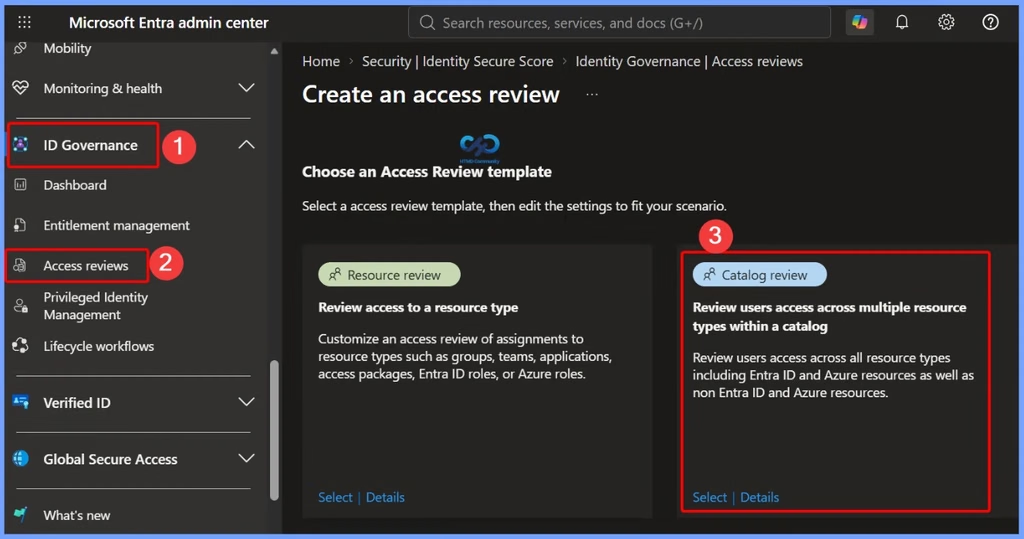
| Go to ID Governance > Access Reviews > New access review. |
| In the Access Reviews template, select “Review users access across multiple resource types within a catalog“. |
| Select the Catalog Review template to review user access across multiple resources. |
| Enter the basic information for the access review and select Next. |
| Under Resources, select the catalog containing the resources and select Next. |
| Under Reviewers and schedule, select the required reviewers. |
| Optionally enable multi-stage reviews, where group or application owners can act as secondary reviewers. |
| Configure reviewer experience settings, such as notifications, reminders, and justification requirements. |
| Configure the completion settings and select Create to start the access review. |
- Non-Human Identities and Agent Identities Gain Access Package Support with Entra Identity Governance for AI Agents
- Explicit Forward Proxy In Microsoft Entra Internet Access Helps Secure VDI BYOD And Clientless Browsing
- Setup Risk-Based Conditional Access for Entra Agents to Automatically Protect against Compromised Agents
- How to Manage Agents through Microsoft Entra Agent ID Interface for Security and Zero Trust Enforcement
- Best Guide to Invite B2B Guest Users to Entra ID using Intune
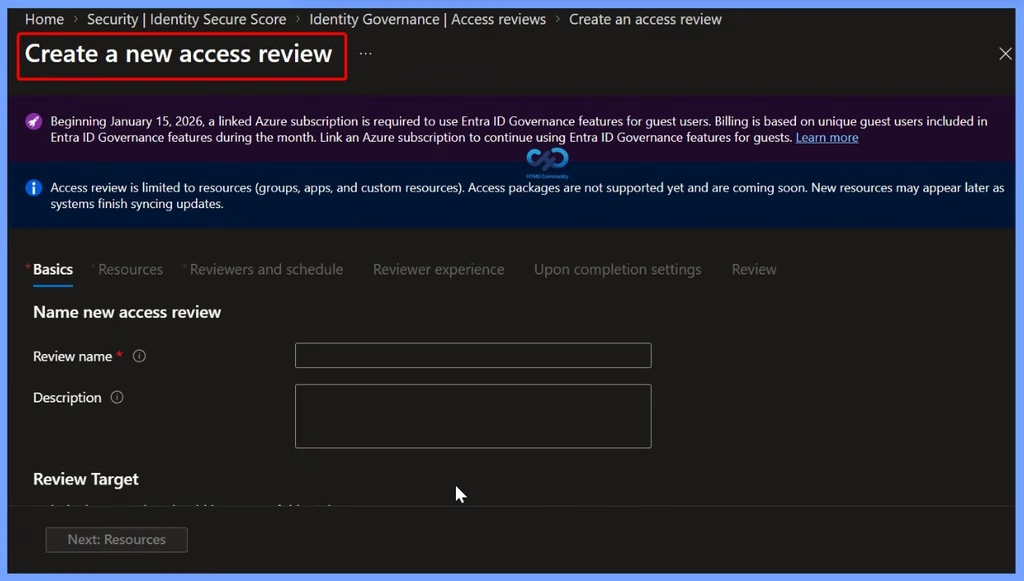
Create a New Access Review
Beginning January 15, 2026, a linked Azure subscription is required to use Entra ID Governance features for guest users. Billing is based on unique guest users included in Entra ID Governance features during the month. Link an Azure subscription to continue using Entra ID Governance features for guests.
Access review is limited to resources (groups, apps, and custom resources). Access packages are not supported yet and are coming soon. New resources may appear later as systems finish syncing updates.

- Set the core configuration, including the Review Name and Description.
- Define the specific resources (groups, apps, or custom resources) to include in the review.
- Specify who will perform the review and set the recurrence/timeline.
- Configure settings to customize the review interface and workflow for reviewers.
- Determine automatic actions to take once the review period ends.
- Finalize and verify all configured settings before launching the access review.
Details and Prerequisite
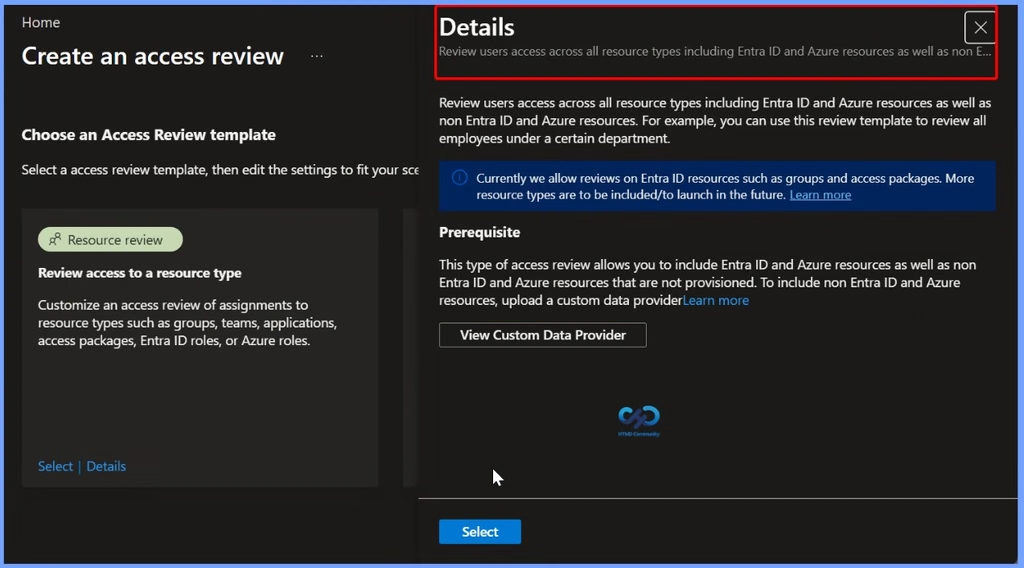
Review users’ access across all resource types including Entra ID and Azure resources as well as non-Entra ID and Azure resources. For example, you can use this review template to review all employees under a certain department. Currently it reviews Entra ID resources such as groups and access packages. More resource types are to be included/to launch in the future.
| Prerequisite |
|---|
| This type of access review allows you to include Entra ID and Azure resources as well as non Entra ID and Azure resources that are not provisioned. To include non Entra ID and Azure resources, upload a custom data provider. |
| > Entra ID resources: Groups and access packages > Azure resources: Included in current access reviews > Non Entra ID and Azure resources: Requires uploading a custom data provider |
Resources
Catalog Access Reviews – Microsoft Entra ID Governance | Microsoft Learn
Need Further Assistance or Have Technical Questions?
Join the LinkedIn Page and Telegram group to get the latest step-by-step guides and news updates. Join our Meetup Page to participate in User group meetings. Also, join the WhatsApp Community and the Whatsapp channel to get the latest news on Microsoft Technologies. We are there on Reddit as well.
Author
Anoop C Nair is Workplace Technology solution architect with 25+ years of experience in global enterprise organizations such as JP Morgan, Capgemini, etc. He is Microsoft Certified Trainer. Microsoft MVP from 2015 onwards for consecutive 11 years! He also conducts Intune and modern workplace tech training for enterprise organizations. He is Blogger, Speaker, and Founder of HTMD Community and HTMD Conference. His focus is on Device Management technologies such as Intune, Windows, Cloud PC. He writes about technologies like Intune, SCCM, Windows, Cloud PC, Windows, Entra, Microsoft Security.