
Key Takeaways:
- Update M365 Apps on macOS and iOS
- Devices running unsupported versions will enter read-only mode
- Microsoft 365 apps on macOS and iOS take effect on July 13, 2026
- Identify affected devices using Intune or SCCM reports
Let’s discuss Update M365 Apps on macOS and iOS Before July 2026 to Avoid Certificate Expiration Issues. Microsoft announced the biggest change in licensing update for Microsoft 365 apps on macOS and iOS takes effect on July 13, 2026. Apps that are updated to the minimum required versions already include the renewed certificate and continue to function normally. Apps on older versions enter reduced functionality mode after the certificate expires. Due to this change, admins should prepare their organisation.
Table of Contents
Table of Contents
Update M365 Apps on macOS and iOS Before July 2026 to Avoid Certificate Expiration Issues
By the impact Microsoft 365 Apps Certificate Expiry, Devices not updated to supported app versions will enter reduced functionality mode. Users can open/view files, but cannot edit, save, or create new ones. This issue affects macOS and iOS only. Windows and Android devices are not impacted. Administrators should ensure that all managed macOS and iOS devices run the versions needed to keep Microsoft 365 apps fully functional after July 13, 2026.
| Resolution |
|---|
| Update Microsoft 365 apps to the minimum required versions of macOS: Version 16.83 on macOS 12 (Monterey) or later |
| Update Microsoft 365 apps to the minimum required versions iOS/iPadOS: Version 2.93 on iOS 17.0 or later |
- Significant Impact Accessing Microsoft 365 Apps and Windows 365 Services
- Update Security Baselines for Microsoft 365 Apps from Intune
- Deploy Microsoft 365 Apps MS Teams Using Intune MEM
What Administrator Should Do?
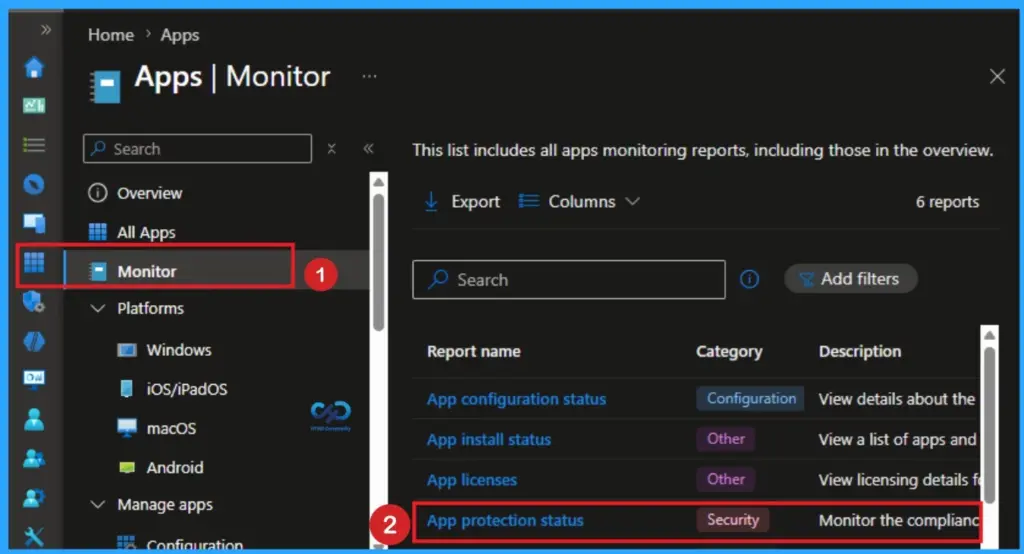
Admins can identify affected devices by checking the inventory for apps below the required versions. Use Intune, SCCM/MECM, or Microsoft AutoUpdate (MAU) policies to push updates. If devices can’t be upgraded, plan to transition affected users to hardware that meets the minimum requirements.
To handle unsupported devices, Upgrade OS where possible, Transition users to supported hardware if upgrades aren’t feasible, and provide interim access via Microsoft 365 for the web. Use Intune reports, Configuration Manager baselines, or manual checks and inform them that updates are being deployed and direct unmanaged device users to support articles.

Impact on Users
After July 13, 2026, affected apps switch to read-only mode until updated. No data loss or security risk occurs; functionality is restored once apps are updated.
Recommended Action
Identify devices below required versions. Deploy updates using management tools. Address unsupported devices (upgrade OS or refresh hardware). Verify compliance with reporting tools. Communicate proactively to users.
Need Further Assistance or Have Technical Questions?
Join the LinkedIn Page and Telegram group to get the latest step-by-step guides and news updates. Join our Meetup Page to participate in User group meetings. Also, join the WhatsApp Community and the WhatsApp channel to get the latest news on Microsoft Technologies. We are there on Reddit as well.
Author
Anoop C Nair is a Workplace Technology solution architect with 25+ years of experience. Microsoft Certified Trainer. Microsoft MVP from 2015 onwards for consecutive 11+ years! He is a blogger, Speaker, and Founder of HTMD Community and HTMD Conference. His main focus is on Device Management technologies like Intune, Windows, and Cloud PC. He writes about technologies like Intune, SCCM, Windows, Cloud PC, Entra, and Microsoft Security.