
Key Takeaways
- Microsoft released the Windows 11 25H2 security baseline in Intune
- It provides preconfigured, recommended security settings for Windows devices
- Organizations can customize the baseline based on their needs
- Older baseline versions become read-only but can be upgraded
In this post, we are discussing New Windows 11 25H2 Security Baseline Released in Microsoft Intune. Microsoft has introduced the latest Windows 11 version 25H2 security baseline for Microsoft Intune, aiming to help organizations strengthen endpoint security with updated recommended settings. This release is part of Microsoft’s effort to keep enterprise environments secure from cybersecurity threats.
Table of Contents
Table of Contents
New Windows 11 25H2 Security Baseline Released in Microsoft Intune
The new baseline provides a collection of preconfigured security settings that IT teams can deploy across managed Windows devices. These settings are based on Microsoft’s Security Compliance Toolkit and focus on improving protection across system, network, and user levels while maintaining ease of deployment.
- Intune Security Baselines Policies for Windows 10 or Windows 11 Deployment Guide
- Intune Security Baseline Microsoft Defender Policy Troubleshooting Tips for Cloud PCs
- Update Security Baselines for Microsoft 365 Apps from Intune
What’s New in Version 25H2?
The Windows 11 25H2 Intune security baseline brings tougher settings to better protect enterprise devices. It blocks outdated protocols like SMBv1, adds stronger safeguards for credentials with tools like Credential Guard, and improves system defenses through SmartScreen and exploit protection. It also controls over device installations and drivers, helping prevent unsafe or unauthorized components. Altogether, these changes reduce vulnerabilities and make devices more resilient against modern attacks.
- Preconfigured groups of Windows settings recommended by Microsoft security teams.
- Provide a consistent, enforceable template for device security across an organization.
- Admins can tailor baselines to enforce only the settings they require.
- Each new baseline replaces the previous one. Old profiles become read-only but can be updated to the latest version for editing.
What Is the Windows Security Baseline?
A security baseline in Intune is a ready-made template of recommended settings that helps organizations quickly apply strong security configurations. Instead of configuring policies one by one, IT administrators can deploy a baseline and customize it based on their specific requirements. Each baseline version reflects the latest Microsoft security guidance and is designed to simplify device protection at scale

How Version Updates Work
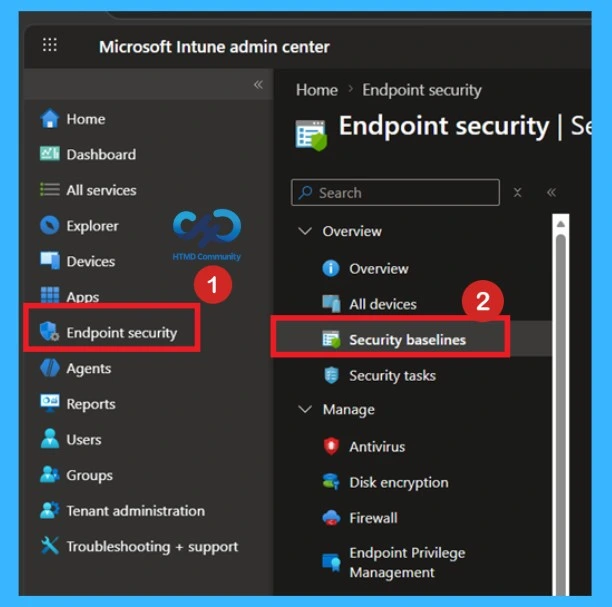
When a new Intune security baseline is released, older versions become read‑only, so they can still be applied but not changed. Organizations can then upgrade their existing profiles to the latest version, and once upgraded, the settings can be adjusted to fit business needs. This process keeps things stable while ensuring devices benefit from the newest security improvements.
| Area | New / Updated Setting | Baseline Default (25H2) |
|---|---|---|
| Account and Authentication | Credential Guard with UEFI lock | Enabled |
| Smart card removal behavior | Lock workstation | |
| Network Security | Hardened UNC paths for SYSVOL & NETLOGON | Require mutual auth + integrity |
| SMBv1 client/server | Disabled | |
| ICMP redirects | Disabled | |
| System Protection | SEHOP (Structured Exception Handling Overwrite Protection) | Enabled |
| Hypervisor-Protected Code Integrity | Enabled with UEFI lock | |
| LSA as protected process | Enabled with UEFI lock | |
| Audit and Logging | Expanded auditing (logon, policy changes, object access, integrity) | Success + Failure |
| Security log size | 196,608 KB | |
| Microsoft Defender | Block obfuscated scripts | Block |
| Block Office macros creating child processes | Block | |
| Block unsigned processes from USB | Block | |
| PUA protection | On | |
| Network Protection | Enabled (block mode) | |
| Applications & Components | BitLocker removable drives | Required |
| SmartScreen across Explorer, Edge, IE | Enabled | |
| PowerShell script block logging | Enabled |
Video
We have a YouTube video titled “Intune Security Baseline Decoded”, which explains the simplest way to configure security policies for your organization. The session also highlights the common challenges IT admins face when working with Security Baseline templates. This presentation is delivered by Mr. Anoop C Nair, a distinguished Microsoft MVP who has held the award for ten consecutive years, starting from 2015.
Need Further Assistance or Have Technical Questions?
Join the LinkedIn Page and Telegram group to get the latest step-by-step guides and news updates. Join our Meetup Page to participate in User group meetings. Also, join the WhatsApp Community and the Whatsapp channel to get the latest news on Microsoft Technologies. We are there on Reddit as well.
Author
Anoop C Nair is a Workplace Technology solution architect with 25+ years of experience. Microsoft Certified Trainer. Microsoft MVP from 2015 onwards for consecutive 11+ years! He is a blogger, Speaker, and Founder of HTMD Community and HTMD Conference. His main focus is on Device Management technologies like Intune, Windows, and Cloud PC. He writes about technologies like Intune, SCCM, Windows, Cloud PC, Entra, and Microsoft Security.