
Key Takeaways
- Microsoft now allows up to 25 apps during Autopilot device preparation.
- Users don’t have to wait long for apps after logging in
- Cloud PC users can start work without extra setup.
- Supports user-driven, automatic, and cloud-based setups.
In this post we are discussing, How to Add Up to 25 Apps in Intune Autopilot Deployment Profile Policy Including Windows 365. Microsoft has announced an important update to Windows Autopilot Device Preparation Policy in Microsoft Intune, making the initial setup of new Windows devices more flexible and complete. According to Microsoft, administrators can now configure up to 25 apps to be installed during Autopilot device preparation.
Table of Contents
Table of Contents
Windows Autopilot Now Supports Up to 25 Apps During Setup
This update was officially added on January 30, 2026, and applies to organizations using Windows deployment methods. With a new update, Microsoft has made Autopilot Device Preparation more helpful. IT teams can now set up more apps before the user starts using the device.
- Best Guide to Deploy New Intune Company Portal App on Windows using Intune
- Easy Guide to Set Feature Updates for Windows 11 as Optional with Intune
- Intune Win32 App Supersedence and Auto App Update Explained
What’s new
Before the update, only a limited number of apps could be installed during the Autopilot setup. With this update, Microsoft has increased the limit to 25 apps, allowing IT teams to include more essential applications during the out-of-box experience (OOBE).
- Now Deployment Profile Policy (DPP) in Microsoft Intune Autopilot now supports adding up to 25 apps, including Windows 365 profiles.
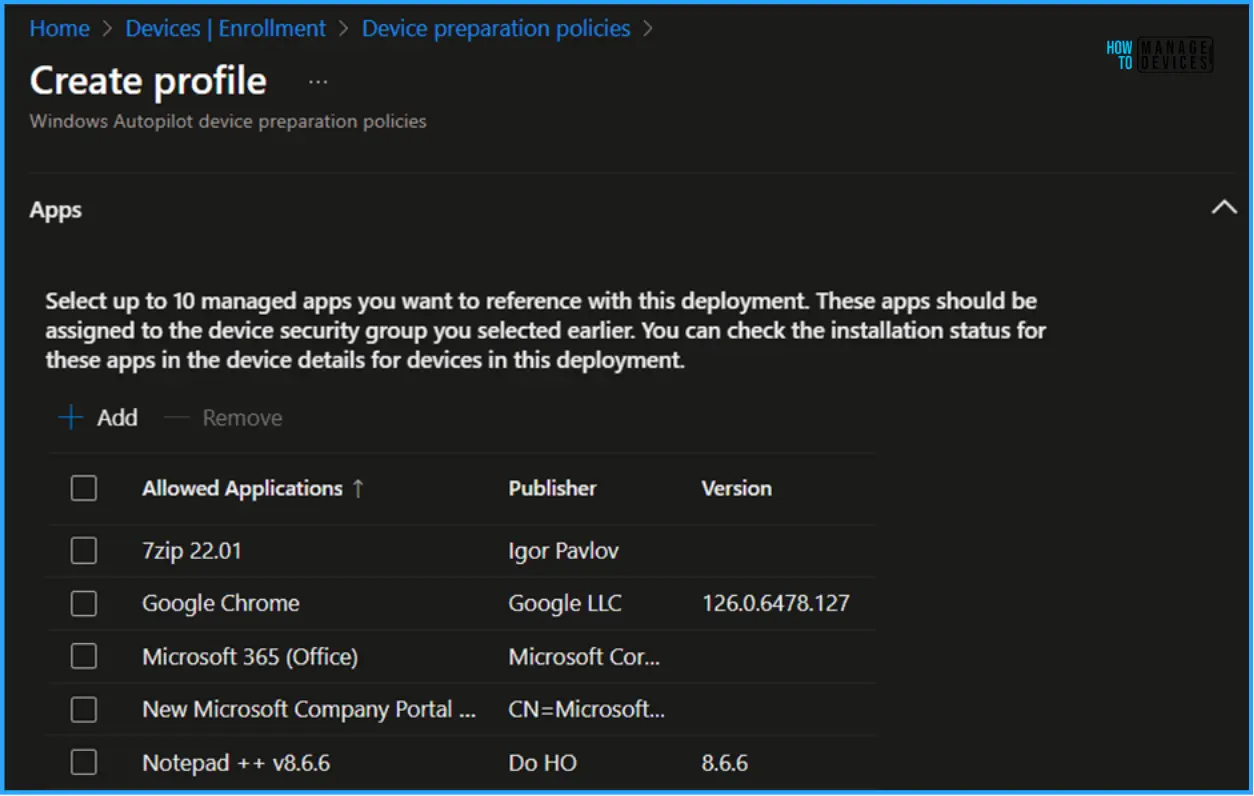
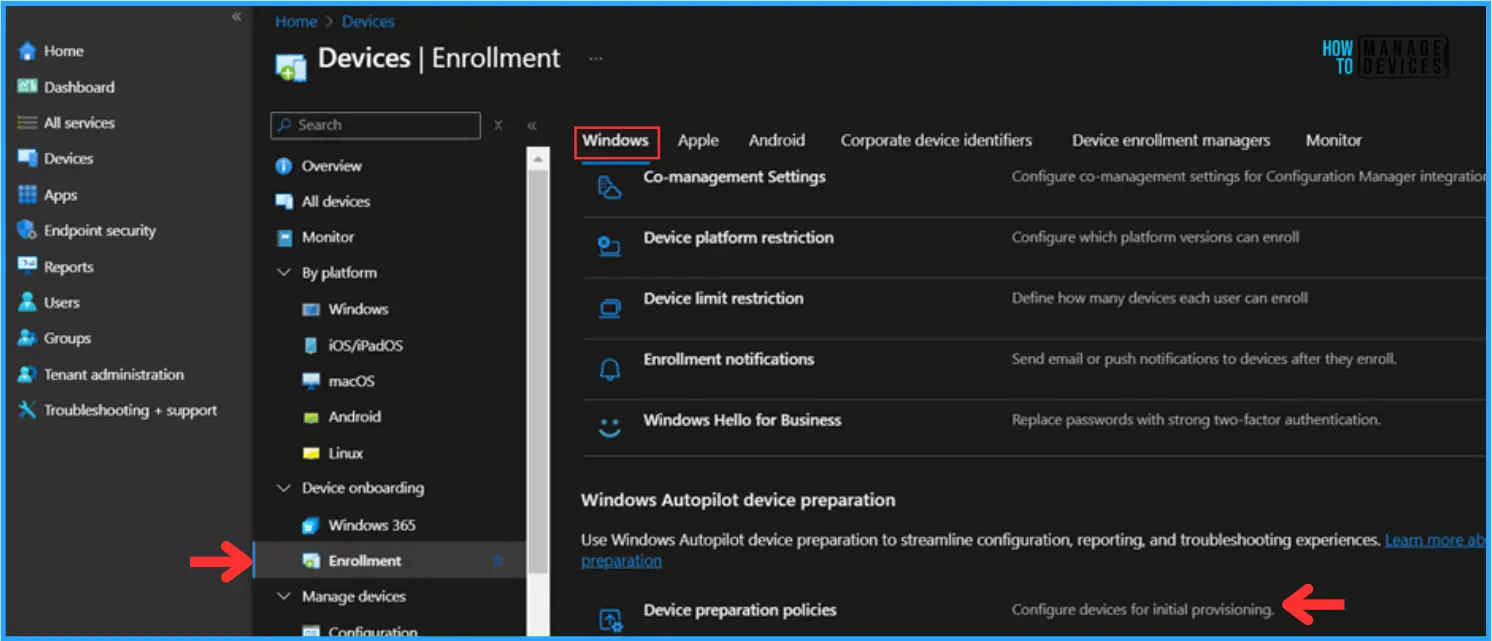
- The below screenshot is from Windows Autopilot device preparation policy.
- This will help to Reduce waiting time during first sign-in
- Improve reliability of device setup
- Deliver a smoother and more predictable onboarding experience
See More: Guide to Configure Windows Autopilot Next Generation Device Preparation Policy with Intune

| Update Details |
|---|
| The maximum number of apps that can be configured in a Windows Autopilot device preparation policy has been increased to 25. This update supports organizations that require more apps to be delivered during the out-of-box experience (OOBE). The increased limit applies to both user-driven and automatic modes, including all Cloud PC offerings. Review and adjust your deployment timeout settings as needed to help avoid unexpected timeouts. |
Configuring Apps During Autopilot Setup
In the Apps section, click + Add and select the managed apps you want to include for this deployment. With the latest Microsoft update, administrators can configure up to 25 apps during Windows Autopilot device preparation. These apps must already be assigned to the selected device security group. The installation status of each app can be monitored from the device details page in Intune.
- Previously, this section allowed selecting up to 10 apps.
Need Further Assistance or Have Technical Questions?
Join the LinkedIn Page and Telegram group to get the step-by-step guides and news updates. Join our Meetup Page to participate in User group meetings. Also, Join the WhatsApp Community and WhatsApp Channel to get the latest news on Microsoft Technologies. We are there on Reddit as well.
Author
Anoop C Nair has been Microsoft MVP for 10 consecutive years from 2015 onwards. He is a Workplace Solution Architect with more than 22+ years of experience in Workplace technologies. He is a Blogger, Speaker, and Local User Group Community leader. His primary focus is on Device Management technologies like SCCM and Intune. He writes about technologies like Intune, SCCM, Windows, Cloud PC, Windows, Entra, Microsoft Security, Career, etc.