
Key Takeaways
- Azure Site Recovery protects virtual machines from regional outages in Microsoft Azure.
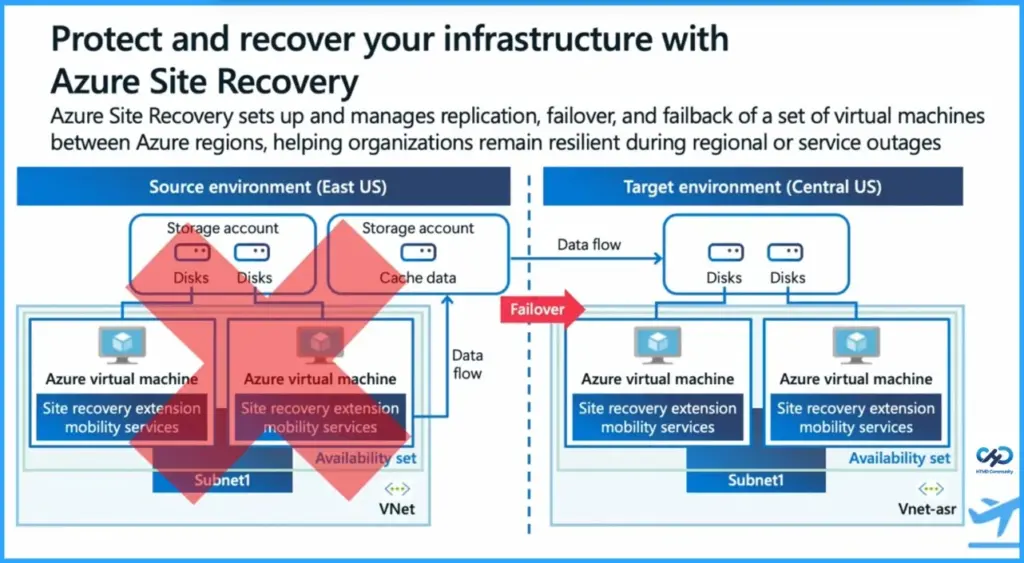
- It replicates VM disks to another region (e.g., East US > Central US).
- A Mobility Service extension tracks and replicates disk changes efficiently.
- During outages, failover automatically starts VMs in the backup region.
- Alternatively, new VMs can be quickly deployed using Azure DevOps and base images.
Azure Site Recovery is a disaster-recovery service in Microsoft Azure that helps keep your applications running if a cloud region fails. Normally, your virtual machines (VMs) run in one region. ASR creates a copy of those machines in another region so that if the main region goes down, your services can continue running from the backup region.
Table of Content
Table of Contents
How to Protect and Recover your Infrastructure with Azure Site Recovery
Azure Site Recovery is a disaster-recovery service in Microsoft Azure that helps keep your applications running if a cloud region fails. Normally, your virtual machines (VMs) run in one region. ASR creates a copy of those machines in another region so that if the main region goes down, your services can continue running from the backup region.
The session titled “Protect and Recover Your Infrastructure with Azure Site Recovery” was presented during the Microsoft Technical Takeoff by Tom Hickling, a Principal Product Manager at Microsoft. In this session, he explained how organizations can protect their infrastructure and maintain business continuity using Azure Site Recovery.
| Protect and Recover your Infrastructure with Azure Site Recovery |
|---|
| Azure Site Recovery sets up and manages replication failover and failback of a set of virtual machines between Azure regions helping organizations remain resilient during regional or service outages. |
- Ensuring Fast and Reliable Windows Device to Cloud PC Connections using Azure Front Door
- Built-In-Resilience-and-Reliable-Architecture-Highlights-for-Windows-365-and-Azure-Virtual-Desktop
- 3 Key Areas of Resiliency in Windows 365 and AVD Connectivity Management and Workload
Continuous VM Disk Replication to a Backup Region with Azure Site Recovery
ASR works by replicating the disks of your VMs from the main region to another region continuously. This means any changes made to the VM data are copied to the backup location. For example, if your VM is running in East US, ASR can keep a replicated copy in Central US. The backup machines stay ready but are not actively running until they are needed.

Automatic VM Failover to the Backup Region with Azure Site Recovery
If the main region has an outage, ASR performs something called failover. Failover simply means Azure starts the copied VMs in the backup region using the replicated disks. Because the data and configuration are already there, the machines can start quickly and your applications become available again.
VM Deployment Using Azure DevOps Instead of VM Replication
Another option instead of copying VMs is to create new machines quickly during an outage. Tools like Azure DevOps can automatically deploy new VMs from a prepared base image. This method can be faster for some workloads, but it requires having automation and images ready beforehand. Both approaches help ensure users can continue working even if a region fails.
Need Further Assistance or Have Technical Questions?
Join the LinkedIn Page and Telegram group to get the latest step-by-step guides and news updates. Join our Meetup Page to participate in User group meetings. Also, join the WhatsApp Community and the Whatsapp channel to get the latest news on Microsoft Technologies. We are there on Reddit as well.
Author
Anoop C Nair has been Microsoft MVP for 10 consecutive years from 2015 onwards. He is a Workplace Solution Architect with more than 22+ years of experience in Workplace technologies. He is a Blogger, Speaker, and Local User Group Community leader. His primary focus is on Device Management technologies like SCCM and Intune. He writes about technologies like Intune, SCCM, Windows, Cloud PC, Windows, Entra, Microsoft Security, Career, etc.