
Key Takeaways
- Certificate-Based Authentication (CBA) is moving from the last position to third in the system-preferred MFA order.
- Previous issues between CBA and system-preferred MFA have now been resolved.
- This change improves overall MFA reliability and user experience.
- The update will be applied gradually as part of the rollout.
Entra CBA Moves from Last to Third in System-Preferred MFA Order to Improve Reliability and User Experience! When you sign in, the system checks the ways you can verify your identity, like an app, text code, or certificate. It suggests the safest method first, but you can choose another one if you want. The order can change as security improves. If your organisation requires a specific method, those rules come first. The goal is to make sign-ins both safe and easy for users.
Table of Content
Table of Contents
Entra CBA Moves from Last to Third in System-Preferred MFA Order to Improve Reliability and User Experience
System-preferred MFA helps users to sign in using the most secure method they have registered, like using an app instead of SMS. It improves security and reduces the use of less safe methods. Users can still choose another method, but the system suggests the safest one first.
This setting is managed by Microsoft and is usually enabled by default. Administrators can turn it off or exclude certain users if needed. Once enabled, the system automatically decides the most secure method for each sign-in, so users don’t need to set a default.
| Important |
|---|
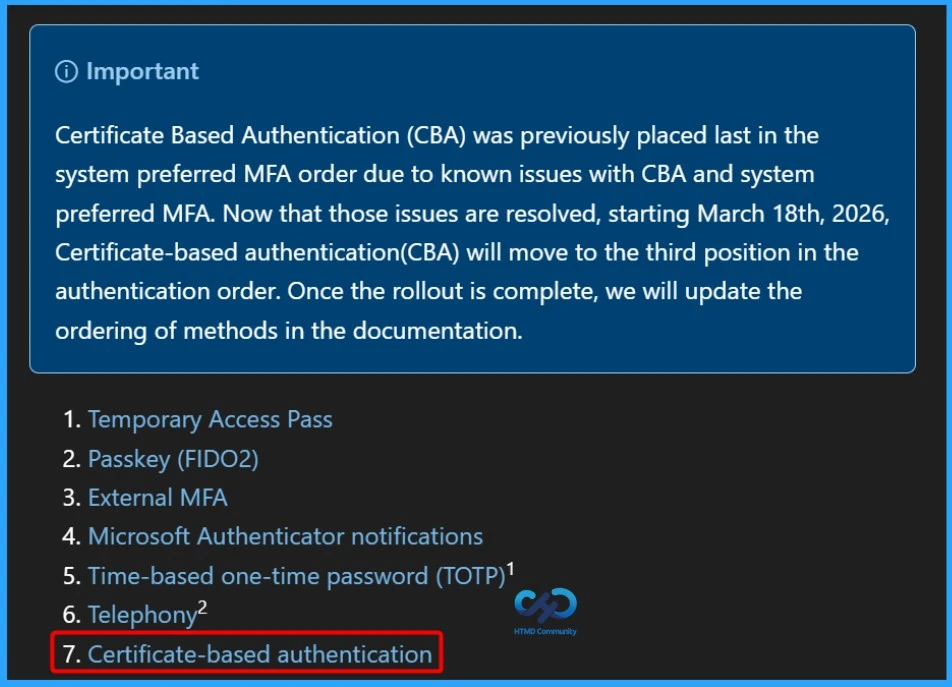
| Certificate Based Authentication (CBA) was previously placed last in the system preferred MFA order due to known issues with CBA and system preferred MFA. Now that those issues are resolved, starting March 18th, 2026, Certificate-based authentication(CBA) will move to the third position in the authentication order. Once the rollout is complete, we will update the ordering of methods in the documentation. |
- Enable Microsoft MFA For Admins Using Azure AD Conditional Access
- Entra External ID Now Supports SMS as an MFA Option
- MFA Authentication now Added to WhatsApp
- Quick Guide To Enforce Multifactor Authentication MFA For Users
Microsoft Entra Certificate-Based Authentication (CBA) – Secure, Phishing-Resistant Sign-In with X.509 Certificates
Microsoft Entra Certificate-Based Authentication (CBA) lets users sign in to applications and browsers using X.509 certificates directly through Microsoft Entra ID. This method is phishing-resistant and works with your organisation’s public key infrastructure (PKI).

Previously, organisations had to use federated CBA with AD FS to authenticate certificate-based sign-ins. With Microsoft Entra CBA, users can authenticate directly against Entra ID, which simplifies the setup and reduces costs by removing the need for federated AD FS. CBA is a secure, certificate-based way to sign in without needing extra federation servers.
Need Further Assistance or Have Technical Questions?
Join the LinkedIn Page and Telegram group to get the latest step-by-step guides and news updates. Join our Meetup Page to participate in User group meetings. Also, join the WhatsApp Community and the Whatsapp channel to get the latest news on Microsoft Technologies. We are there on Reddit as well.
Author
Anoop C Nair is a Workplace Technology solution architect with 25+ years of experience. Microsoft Certified Trainer. Microsoft MVP from 2015 onwards for consecutive 11+ years! He is a blogger, Speaker, and Founder of HTMD Community and HTMD Conference. His main focus is on Device Management technologies like Intune, Windows, and Cloud PC. He writes about technologies like Intune, SCCM, Windows, Cloud PC, Entra, and Microsoft Security.