
Key Takeaways
- New Remove Copilot App on Windows 11
- Microsoft introduced a new policy to remove the Copilot app in a controlled way
- Applies only when specific conditions are met (inactive and system-installed apps)
- Available on Windows 11 version 25H2 and later
- Can be configured via Policy CSP and Group Policy
- Users can reinstall Copilot even after removal
In this post, we are discussing Microsoft Intune Supports Removing Microsoft Copilot App on Windows 11. Microsoft has introduced a new policy that allows IT administrators to remove the Microsoft Copilot app from devices in a simple and controlled way. This helps organisations manage apps better and avoid confusion when multiple Copilot experiences are available.
Table of Contents
Table of Contents
What is the Remove Microsoft Copilot App Policy?
This policy allows IT admins to uninstall the Copilot app from managed devices based on specific conditions. This ensures that removal only happens when it is appropriate and does not impact active users.
Microsoft Intune Supports Removing Microsoft Copilot App on Windows 11
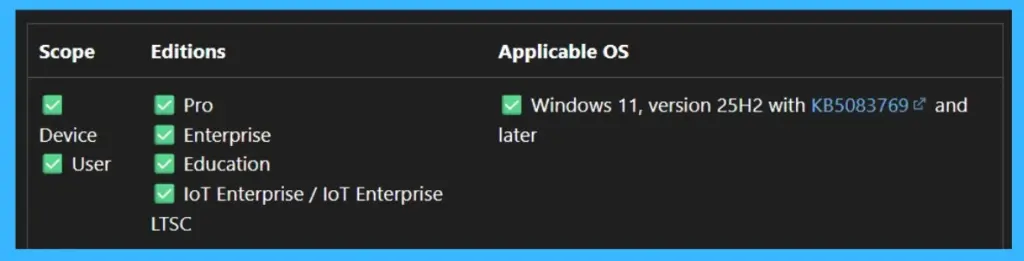
The new setting works only in specific situations, such as when the app is not actively used and was not installed by the user. This ensures that users who rely on Copilot are not affected. This feature is available on Windows 11 version 25H2 and later, and can be configured using Group Policy or Policy CSP, making it easy for IT admins to apply across devices.
- Microsoft Introducing Copilot+ PCs
- Classic Outlook for Windows Now Improved with Copilot
- How to Prepare Microsoft Copilot with Zero Trust
What’s New
Microsoft has introduced a new policy called RemoveMicrosoftCopilotApp that allows IT admins to automatically remove the Microsoft Copilot app from managed devices. This removal happens only under specific conditions, such as when the app is not used for 28 days and wasn’t installed by the user. The policy is now supported on Windows 11 version 25H2 and later and can be configured using both Group Policy and Policy CSP.

- This gives organizations more control to manage apps while keeping the user experience clean and consistent
Copilot Removal Setting from the Settings Catalog through Intune
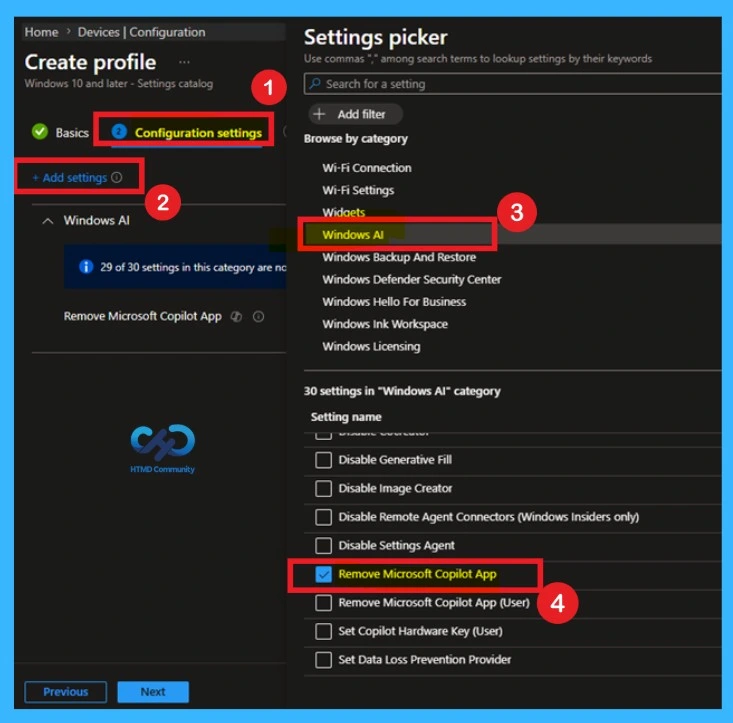
You can log in to the MS Intune admin center and configure the settings through settings picker window. The Settings picker in Intune, where admins search and select the required policy. By navigating to the Windows AI category, the Remove Microsoft Copilot App option can be easily found and added to the configuration profile. This step ensures the correct setting is included before enabling and applying it to managed devices.
Configure through Intune Policy
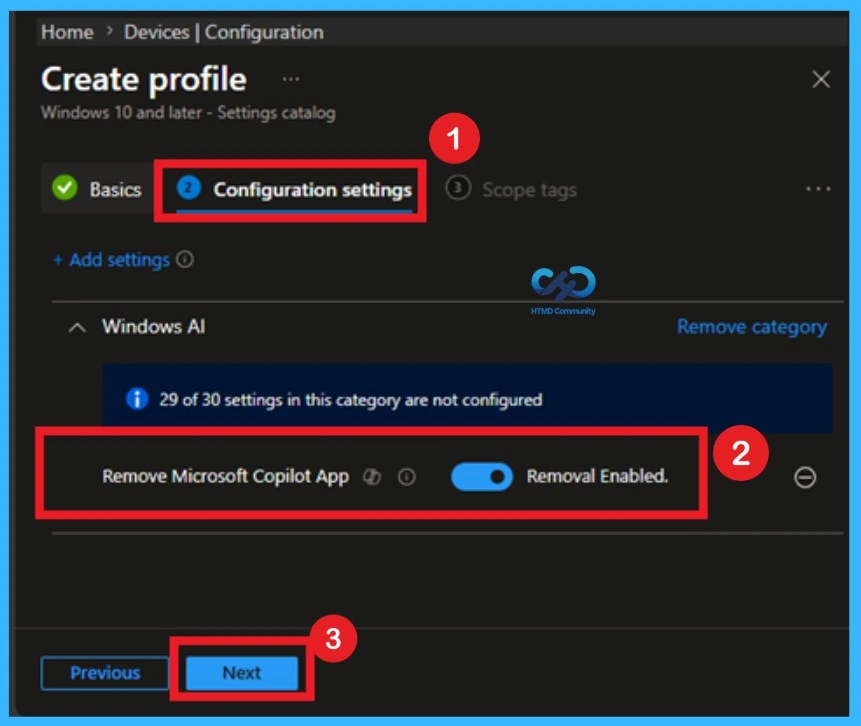
The Configuration settings step while creating a profile in Intune. Under the Windows AI category, the Remove Microsoft Copilot App setting is enabled. This is where IT admins can activate the policy to automatically remove the Microsoft Copilot app from eligible devices based on defined conditions. Once configured, admins can proceed to assign and deploy the policy across their organization.
Windows CSP Details
The RemoveMicrosoftCopilotApp CSP provides admins with a targeted way to uninstall the Microsoft Copilot app from Windows devices. It applies at both the User and Device policy paths and only takes effect under specific conditions: both Microsoft 365 Copilot and Microsoft Copilot are installed, the Copilot app was not installed by the user, and it has not been launched in the past 28 days.
- The allowed values are 0 (Removal Disabled) and 1 (Removal Enabled), making it an on or off switch for targeted Copilot removal.
- When set to 1, the app is uninstalled if both Microsoft 365 Copilot and Microsoft Copilot are installed, the app was not installed by the user, when set to 0, removal is disabled and the app remains installed.
| Property name | Property value |
|---|---|
| Format | int |
| Access Type | Add, Delete, Get, Replace |
Need Further Assistance or Have Technical Questions?
Join the LinkedIn Page and Telegram group to get the latest step-by-step guides and news updates. Join our Meetup Page to participate in User group meetings. Also, join the WhatsApp Community and the Whatsapp channel to get the latest news on Microsoft Technologies. We are there on Reddit as well.
Author
Anoop C Nair is a Workplace Technology solution architect with 25+ years of experience. Microsoft Certified Trainer. Microsoft MVP from 2015 onwards for consecutive 11+ years! He is a blogger, Speaker, and Founder of HTMD Community and HTMD Conference. His main focus is on Device Management technologies like Intune, Windows, and Cloud PC. He writes about technologies like Intune, SCCM, Windows, Cloud PC, Entra, and Microsoft Security.