
Key Takeaways
- ConfigMgr 2603 is now available through the Early Update Ring
- Only ConfigMgr 2409 or later environments are supported
- The enrollment process is temporary and version-specific
- The script is digitally signed for improved deployment security
In this post we are discussing the ConfigMgr 2603 Introduces New Early Update Enrollment Process. Microsoft has officially released Configuration Manager version 2603 to the Early Update Ring, giving organizations an opportunity to test upcoming improvements before the global production rollout. The release is targeted at enterprises running ConfigMgr version 2409 or later and continues Microsoft’s phased deployment strategy for Configuration Manager updates.
Table of Contents
Table of Contents
ConfigMgr 2603 Introduces New Early Update Enrollment Process
The Early Update Ring allows administrators to evaluate new capabilities, deployment improvements, and platform changes in controlled environments before broad availability. To access version 2603, administrators must manually opt in using the dedicated EnableEarlyUpdateRing2603 PowerShell script provided by Microsoft.
- Windows 11 22H2 Upgrade using SCCM Feature Update Option
- SCCM Servicing Plans for Windows 11 in-place Upgrade
- SCCM 2403 New Key Features And Improvements
What’s New in ConfigMgr 2603
ConfigMgr 2603 is now available in the Early Update Ring for environments running version 2409 or later. Microsoft has added a new PowerShell opt-in script called EnableEarlyUpdateRing2603.ps1 to help administrators enable the update. The script must be run from an administrator PowerShell window on the site server. After running the script and checking for updates, the ConfigMgr 2603 update will appear in the Configuration Manager console.
- Microsoft also mentioned that this opt-in is only for version 2603 and is not a permanent change.
- The following table shows the features and details of ConfigMgr 2603
| Feature | Details |
|---|---|
| Release | ConfigMgr 2603 is now available in the Early Update Ring |
| Requirement | Supported for environments running version 2409 or later |
| Opt-In | Run `EnableEarlyUpdateRing2603.ps1 <SiteServer_Name |
| Important Note | Enrollment is temporary and applies only to version 2603 |
Early Update Ring PowerShell Command
To install ConfigMgr 2603, administrators must open Windows PowerShell with administrative privileges and run the EnableEarlyUpdateRing2603.ps1 script against their central administration site or standalone primary site server. After successful enrollment, the update becomes available within the Configuration Manager console under available updates. Microsoft also confirmed that only environments running ConfigMgr version 2409 or later are eligible for the 2603 update. Look at the below list.

- Open a Windows PowerShell session as administrator.
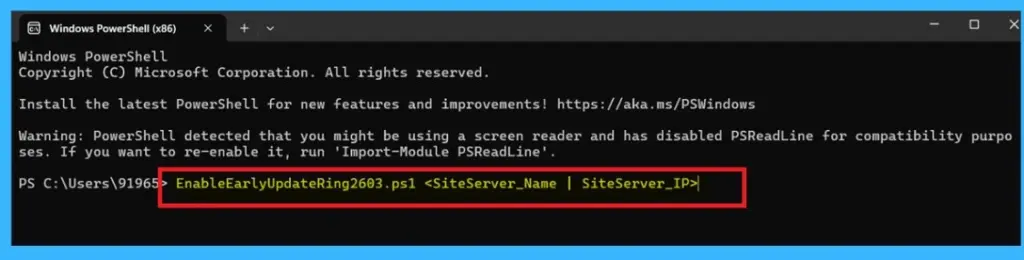
- Run the EnableEarlyUpdateRing2603.ps1 script, using the following syntax:
EnableEarlyUpdateRing2603.ps1 <SiteServer_Name> | SiteServer_IP>- Where
SiteServerrefers to the central administration site or standalone primary site server. - For example,
EnableEarlyUpdateRing2603.ps1 cmprimary01 - Check for updates.
- Look at the below screenshot for more details of ConfigMgr 2603 in PowerShell Command.
Need Further Assistance or Have Technical Questions?
Join the LinkedIn Page and Telegram group to get the latest step-by-step guides and news updates. Join our Meetup Page to participate in User group meetings. Also, join the WhatsApp Community and the WhatsApp channel to get the latest news on Microsoft Technologies. We are there on Reddit as well.
Author
Anoop C Nair is a Workplace Technology solution architect with 25+ years of experience. Microsoft Certified Trainer. Microsoft MVP from 2015 onwards for consecutive 11+ years! He is a blogger, Speaker, and Founder of HTMD Community and HTMD Conference. His main focus is on Device Management technologies like Intune, Windows, and Cloud PC. He writes about technologies like Intune, SCCM, Windows, Cloud PC, Entra, and Microsoft Security.