
Key Takeaways
- New Device Page Becomes the Default
- Old Device Page Removed
- Existing Features Remain Available
- Updated Admin Permissions Required
- Review Permissions and Documentation
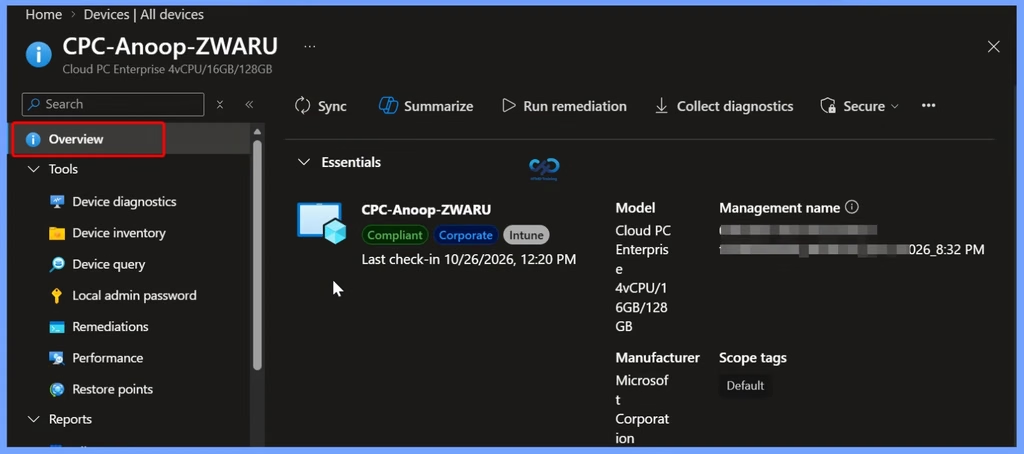
Starting with the Microsoft Intune September 2026 release, the new device management page will become the default experience for all administrators, replacing the old device management page. The new interface provides a consolidated view of device properties, activity, management tools, and reports. All existing device management features will remain available, with improved navigation and usability.
Table of Content
Table of Contents
Microsoft Intune New Device Management Page Replaces Old Interface by Default for All Administrators
Administrators must have the Managed devices/Update permission along with the specific permission required to perform individual device actions. For example, changing or removing a device’s primary user requires both Managed devices/Update and Managed devices/Set primary user permissions. Organizations should review administrator permissions, update internal documentation, and familiarize their IT teams with the new interface to ensure smooth device management.
| Message ID |
|---|
| MC1456780 |
- Microsoft Intune Device Compliance Report for Managed Devices
- Intune Device Offboarding Agent Introduces an Agentic Way for Admins to Eliminate Security Risks from Unused or Outdated Endpoints
- Explore Microsoft Intune Device Query for Multiple Devices using KQL
What’s Changing in the New Microsoft Intune Device Experience
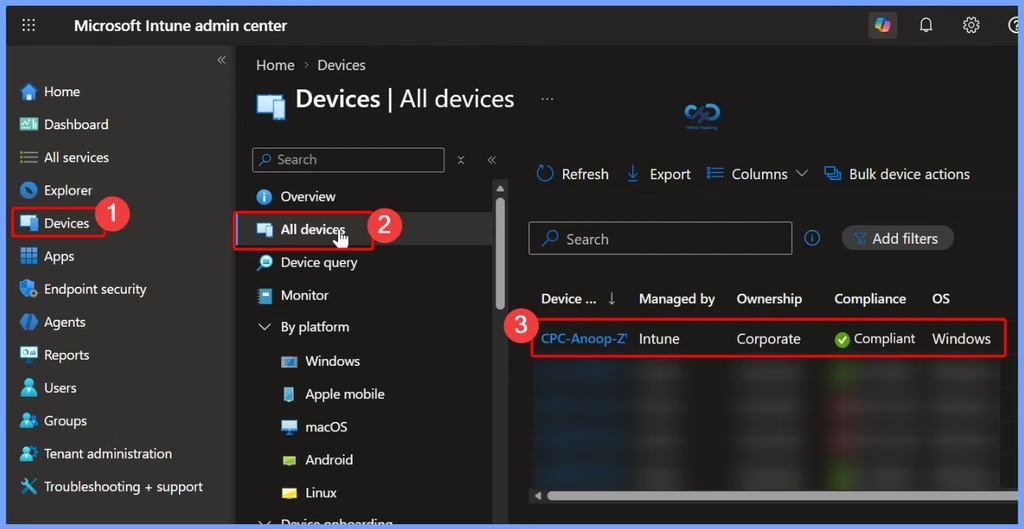
Administrators who navigate to Devices > All devices and select a device will automatically see the new device management page. The old device page will no longer be available after the transition. This update improves navigation, usability, and access to device information without removing existing device management features.
- New Default Interface: All administrators will use the new device management page by default.
- Existing Features Retained: All current device management capabilities remain available.
- Additional Permission Required: Administrators must have the Managed devices/Update permission along with the specific permission needed for each device action.
- Primary User Management: Changing or removing a device’s primary user requires both Managed devices/Update and Managed devices/Set primary user permissions.
- Device Renaming Restrictions: Administrators without Managed devices/Update may be unable to rename devices.
How to Prepare for the New Microsoft Intune Device Management Experience
Administrators can explore the new device management experience, understand the updated interface, and verify permissions before the transition. The table below helps you show more details.

| Steps |
|---|
| Sign in to the Microsoft Intune admin center. |
| Go to Devices > All devices. |
| Review device properties, activity, management tools, and reports. |
| Verify that administrators have the required permissions for device management actions. |
Need Further Assistance or Have Technical Questions?
Join the LinkedIn Page and Telegram group to get the latest step-by-step guides and news updates. Join our Meetup Page to participate in User group meetings. Also, join the WhatsApp Community and the Whatsapp channel to get the latest news on Microsoft Technologies. We are there on Reddit as well.
Author
Anoop C Nair is Workplace Technology solution architect with 25+ years of experience in global enterprise organizations such as JP Morgan, Capgemini, etc. He is Microsoft Certified Trainer. Microsoft MVP from 2015 onwards for consecutive 11 years! He also conducts Intune and modern workplace tech training for enterprise organizations. He is Blogger, Speaker, and Founder of HTMD Community and HTMD Conference. His focus is on Device Management technologies such as Intune, Windows, Cloud PC. He writes about technologies like Intune, SCCM, Windows, Cloud PC, Windows, Entra, Microsoft Security.