
Key Takeaways
- MS Entra Dynamic Permissions for Detecting Excessive AI Agent Access and Enabling Task-Based Permissions
- Gives Only Required Permissions: AI agents get only the permissions they need to complete their tasks.
- Finds Extra Permissions: Helps administrators identify AI agents that have more permissions than required.
- Provides Temporary Access: Agents get access only for the time needed to complete an approved task.
- Improves Security: AI agents do not automatically get all the permissions of the employees they assist.
- Monitors Access Across Applications: Helps administrators check agent identities, roles, and permissions across connected business applications.
Microsoft Entra Dynamic Permissions helps organisations give AI agents only the permissions they need to complete their tasks. Agents should not automatically get all the permissions of the employees they assist. Instead, they should receive only the required access for an approved task and only for the time needed.
Table of Content
Table of Contents
MS Entra Dynamic Permissions for Detecting Excessive AI Agent Access and Enabling Task-Based Permissions
Organisations can set security rules to control what AI agents can access. Permissions can be reduced or removed when a task is completed or changed. The new preview also helps administrators find AI agents with more permissions than required in connected business applications and take steps to fix them.
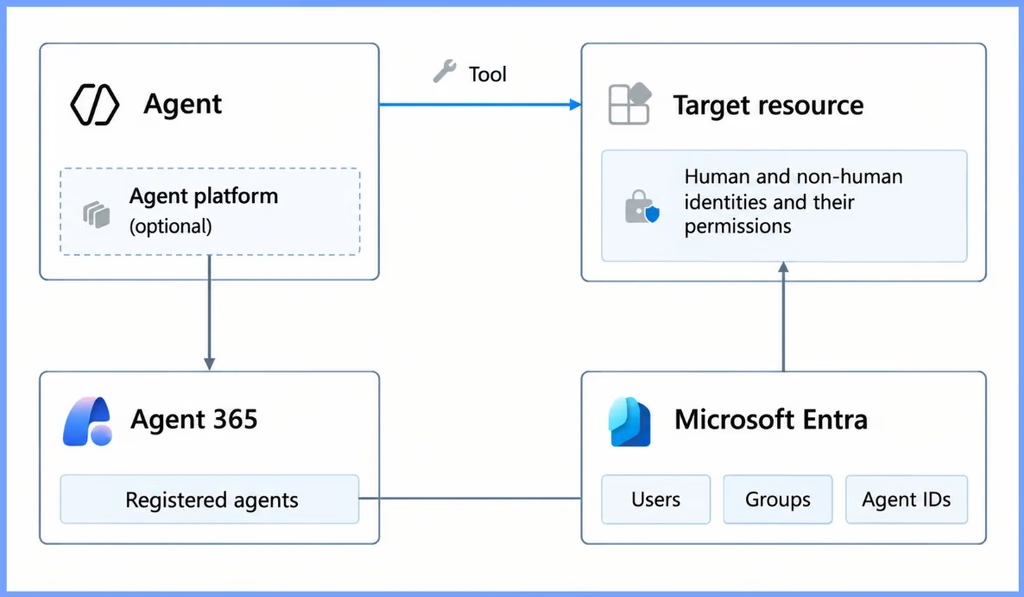
| Agent | Target Resource | Agent 365 | Microsoft Entra |
|---|---|---|---|
| Agent Platform (Optional) | Human and non human identities and their permissions | Registered agents | Users Groups Agent IDs |
- 16 New Windows Vulnerabilities Discovered By MDASH AI-Powered Agentic Security System
- 3 Core Areas To Improve Security Reduce Risk And Build Resilience Against AI-Driven Threats
- Introduction To App Lifecycle Management Agent In Entra For Unified App Control And Visibility
- Windows Accessibility And AI Creating Technology That Works Better For Everyone
- AI Agent Tool that Brings the Power of Microsoft Graph and MS Entra
- Best Guide to Invite B2B Guest Users to Entra ID using IntuneTrack Uptime
- Key Scenarios of MS Entra External Identity Deployment Architectures
- New External Authentication Methods in Microsoft Entra ID
Prerequisites for Dynamic Permissions
Dynamic permissions are currently in preview, so its features and capabilities may change. Microsoft has not yet announced the final licensing requirements. During the preview, dynamic permissions for agent identities requires the following license plan:
| Prerequisites for Dynamic Permissions |
|---|
| Microsoft 365 E7: Includes Agent 365 and Microsoft Entra Suite. |
Understanding Agent Platforms and Resource Access
An AI agent can run on one platform and access data from other applications. Dynamic permissions helps administrators understand where an agent runs, which applications it can access, and what permissions it has. This helps identify unnecessary or excessive access.

| Understanding | Details |
|---|---|
| Agent Platform | The platform where the AI agent is created and runs. |
| Applications and Resources | The applications and data that the agent can access using its assigned identity and permissions. |
Need Further Assistance or Have Technical Questions?
Join the LinkedIn Page and Telegram group to get the latest step-by-step guides and news updates. Join our Meetup Page to participate in User group meetings. Also, join the WhatsApp Community and the Whatsapp channel to get the latest news on Microsoft Technologies. We are there on Reddit as well.
Author
Anoop C Nair is Workplace Technology solution architect with 25+ years of experience in global enterprise organizations such as JP Morgan, Capgemini, etc. He is Microsoft Certified Trainer. Microsoft MVP from 2015 onwards for consecutive 11 years! He also conducts Intune and modern workplace tech training for enterprise organizations. He is Blogger, Speaker, and Founder of HTMD Community and HTMD Conference. His focus is on Device Management technologies such as Intune, Windows, Cloud PC. He writes about technologies like Intune, SCCM, Windows, Cloud PC, Windows, Entra, Microsoft Security.