
Key Takeaways
- Provides centralized visibility into Microsoft Entra license usage across the tenant
- Helps optimize licensing costs by identifying unused or underutilized features
- Displays monthly license entitlements based on purchased subscriptions
- Aggregates data from all Microsoft Entra products within the tenant
- Enables better capacity planning and license management decisions
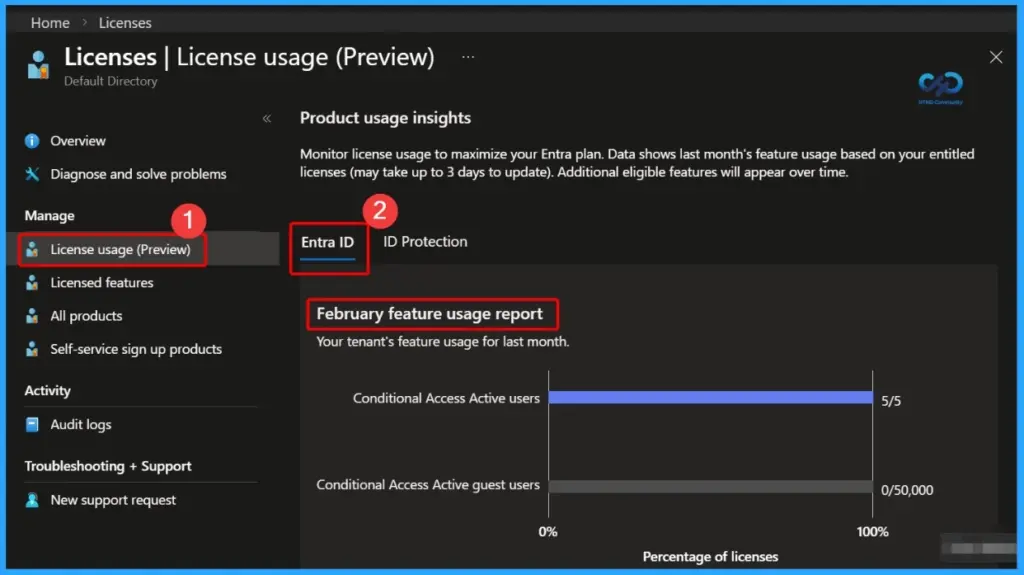
Microsoft has introduced Entra License Usage Insights to provide a centralized view of license consumption across your tenant. The License Usage page in the Microsoft Entra admin center helps administrators understand how features are being used, making it easier to identify underutilized licenses and optimize overall licensing costs.
Table of Content
Table of Contents
Microsoft Entra License Usage Insights Tenant-Level Entitlement & Feature Utilization Analysis
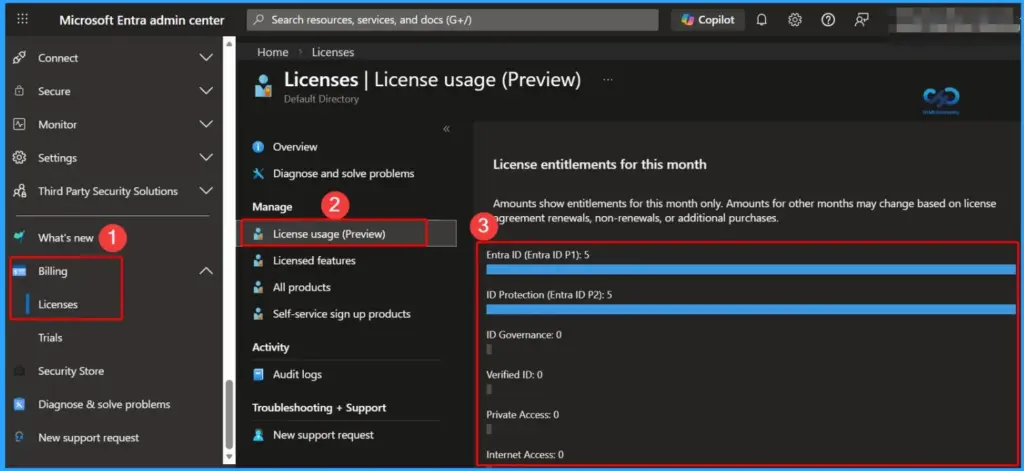
The license entitlements section gives a clear picture of how many licenses are available for the current month. These entitlements are calculated from all Microsoft Entra products purchased, enabling better tracking, planning, and governance of license allocation across the organisation.
- What is Entra ID One Person One License Details
- Optimize Entra License with New Entra License Utilization Feature
- What is Microsoft Entra ID?
- New Microsoft Entra Portal Walkthrough
Microsoft Entra License Entitlements – Overview and Included Products
Microsoft Entra License Usage Insights consolidates entitlement data across all purchased Entra offerings, giving administrators a clear and unified view of licensing. This helps organizations track availability, understand consumption patterns, and make informed decisions for better license optimization and governance.
| Product Name |
|---|
| Microsoft Entra ID P1 |
| Microsoft Entra ID P2 |
| Microsoft Entra Suite |
| Microsoft Entra ID Governance |
| Microsoft Entra Verified ID |
| Microsoft Entra Private Access |
| Microsoft Entra Internet Access |
Need Further Assistance or Have Technical Questions?
Join the LinkedIn Page and Telegram group to get the latest step-by-step guides and news updates. Join our Meetup Page to participate in User group meetings. Also, join the WhatsApp Community and the Whatsapp channel to get the latest news on Microsoft Technologies. We are there on Reddit as well.

Author
Anoop C Nair is a Workplace Technology solution architect with 25+ years of experience. Microsoft Certified Trainer. Microsoft MVP from 2015 onwards for consecutive 11+ years! He is a blogger, Speaker, and Founder of HTMD Community and HTMD Conference. His main focus is on Device Management technologies like Intune, Windows, and Cloud PC. He writes about technologies like Intune, SCCM, Windows, Cloud PC, Entra, and Microsoft Security.