
Key Takeaways
- Tenant Governance Relationship support now provides visibility into delegated admin privileges across managing tenants.
- The Privileged EAM workbook includes improved role classification sections, filters, and clearer KQL queries.
- Updated RBAC classification templates automatically recognize newer role definitions.
- EntraOps supports multiple RBAC systems including Microsoft Entra, Intune, Defender XDR, Graph App Roles, and Identity Governance.
In this post we are discussing, EntraOps v0.7.0 Released with Improved Microsoft Entra Tenant Governance and Role Visibility. Recently, Microsoft-focused security research project EntraOps announced the public release of EntraOps Privileged EAM v0.7.0, introducing several new capabilities designed to improve Microsoft Entra tenant governance and privileged access visibility. The update brings multiple enhancements that were previously available only in beta or preview versions into full public release.
Table of Contents
Table of Contents
EntraOps v0.7.0 Released with Improved Microsoft Entra Tenant Governance and Role Visibility
The latest EntraOps release focuses on helping organizations better understand and manage privileged identities, delegated administration, and role classifications across Microsoft environments. With expanded Tenant Governance Relationship support, administrators can now get better insights into delegated privileges across managing tenants and cross-tenant relationships.
- High Level Overview of Identity Protection in Microsoft Entra ID
- Modernize MFA Authentication Policies in Entra ID
- What is Microsoft Entra ID?
- Security Enhancement with Named Locations in Entra ID
What’s New in EntraOps v0.7.0
One of the biggest updates in this release is support for Tenant Governance Relationships. EntraOps can now analyze delegated admin role assignments coming from managing tenants, allowing organizations to identify privileges assigned through cross-tenant delegated administration. The feature also maps principals back to their original tenant using ObjectTenantId for improved tracking and visibility.
Administrators now get a dedicated role classification section with enhanced filtering options, clearer KQL queries, and improved sorting capabilities. Role classifications are now stored inside a dedicated Watchlist, while the PrivilegedEAM parser merges the information into a unified reporting view with expanded tagging support.

- EntraOps is a community research project for automated management of Microsoft Entra ID tenants at scale using a DevOps approach.
- It classifies, identifies, and protects privileged access based on Microsoft’s Enterprise Access Model.
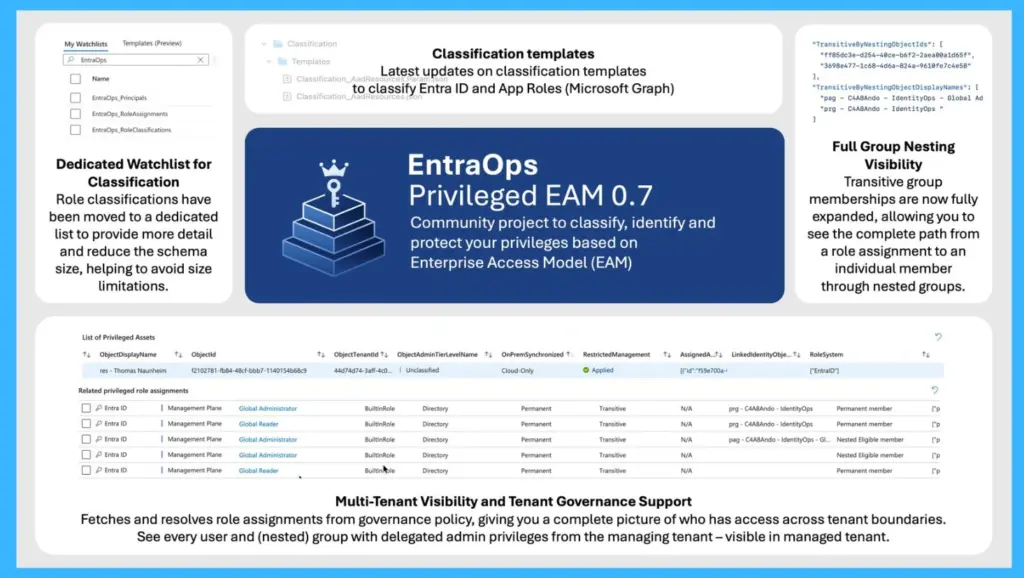
| Feature | Description |
|---|---|
| Dedicated Watchlist | Role classifications moved to a dedicated list. Provides richer detail while reducing schema size to avoid ingestion limits. |
| Classification Templates | Latest updates to templates for Entra ID and App Roles (via Microsoft Graph). |
| Multi-Tenant Visibility | Resolves role assignments from governance policies across tenants. |
| Tenant Governance Support | Shows management of users and nested groups within the governed tenant. |
Improved Classification
EntraOps v0.7.0 introduces updated classification templates for multiple RBAC systems, ensuring newer role definitions are automatically categorized as out-of-box templates. This helps administrators maintain accurate privilege analysis as Microsoft services continue evolving.
- The release also improves transitive group membership analysis by adding full nesting chain visibility across privileged access reports.
Automation and Security Management Features
EntraOps continues to support automation across Microsoft Entra roles, Microsoft Intune, Defender XDR Unified RBAC, Microsoft Graph App Roles, and Identity Governance. The PowerShell module can run locally, in CI/CD pipelines, or in environments supporting PowerShell Core.
The platform also includes advanced automation for securing privileged assets. Features such as Restricted Management Administrative Units (RMAU), Conditional Access group automation, and customizable Enterprise Access Model classifications help organizations strengthen Zero Trust protections for high-privileged identities and workloads.
Need Further Assistance or Have Technical Questions?
Join the LinkedIn Page and Telegram group to get the latest step-by-step guides and news updates. Join our Meetup Page to participate in User group meetings. Also, join the WhatsApp Community and the WhatsApp channel to get the latest news on Microsoft Technologies. We are there on Reddit as well.
Author
Anoop C Nair is a Workplace Technology solution architect with 25+ years of experience. Microsoft Certified Trainer. Microsoft MVP from 2015 onwards for consecutive 11+ years! He is a blogger, Speaker, and Founder of HTMD Community and HTMD Conference. His main focus is on Device Management technologies like Intune, Windows, and Cloud PC. He writes about technologies like Intune, SCCM, Windows, Cloud PC, Entra, and Microsoft Security.