
Key Takeaways:
- Free 50-Hour Windows 365 Trial for Agents in AI-Driven Computer-Using Agents
- Embed AI-driven agents directly into enterprise workflows
- 3 Phases of AI Agents and Frontier Firm
- Redefining how digital workforces operate
Let’s discuss Free 50-Hour Windows 365 for Agents Trial Now Available with Microsoft Copilot Studio. AI-driven Computer-Using Agents (CUAs) are a newly announced feature in Microsoft’s Windows 365 for Agents, currently in public preview (as of 2025–2026). This new feature allows AI agents to interact with applications through the user interface, just like a human worker in Enterprise Automation.
Table of Contents
Table of Contents
Free 50-Hour Windows 365 for Agents Trial Now Available with Microsoft Copilot Studio
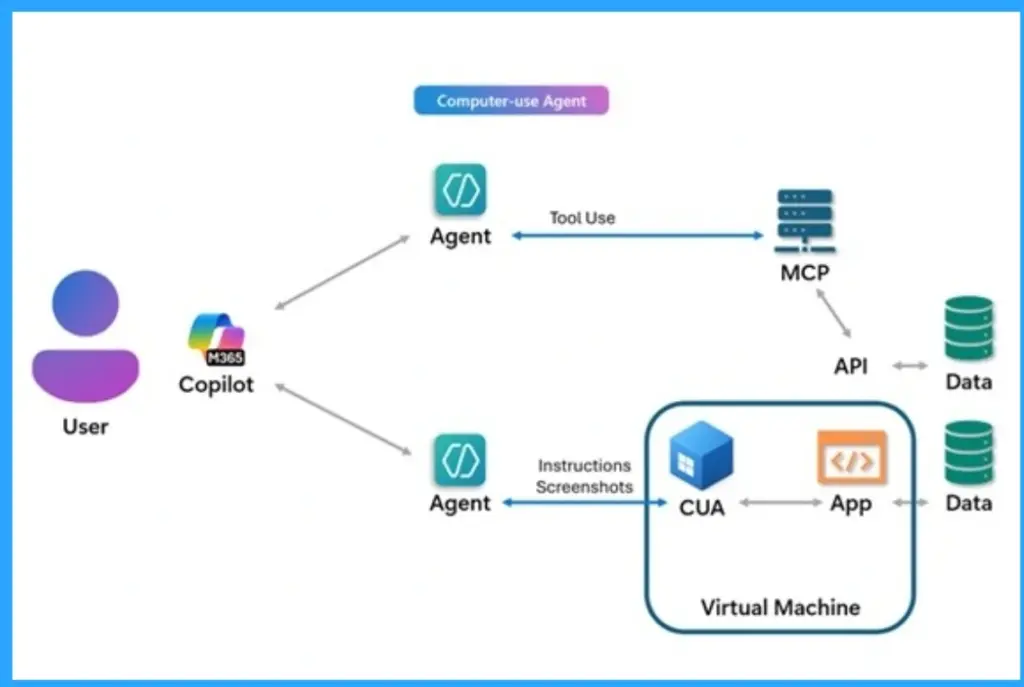
As we know that, Windows 365 for Agents introduces a secure, IT-managed Cloud PC environment specifically designed for running AI agents. CUAs (Computer-Using Agents) are distinct from traditional RPA bots or API-only agents.
They can click, type, and navigate applications directly via the UI. They are powered by large language models (LLMs), enabling adaptive, human-like workflows.
- Understanding Entra Agentic AI in Security From Manual Work to Fully Autonomous Agents
- How Windows 365 for Agents Performs Intelligent PowerPoint Editing in Cloud PC
- Enhancing Threat Detection and Identity Protection with AI Security Copilot Agents
Features of Computer-Using Agents
Different from traditional RPA bots or API-only agents. Powered by large language models (LLMs), they adapt in real time to complex workflows. Useful for bridging gaps in legacy or UI-only applications.

Difference Between Computer-Using Agents and Earlier Generations of Automation Tools
Unlike scripted RPA workflows or tool-based integrations, computer-using agents plan, adapt, and act in real time making them well-suited for complex, unstructured scenarios.
| Aspect | Traditional RPA (Robotic Process Automation) | MCP-Oriented Agents (Tool-Based AI) | Computer-Using Agents (CUAs) |
|---|---|---|---|
| Interface | Simulates user input on GUIs via scripted macros | Invokes APIs and structured tools (MCP) with no UI required | Observes and manipulates UI elements (windows, clicks, keystrokes) like a human |
| Autonomy | Low: follows fixed workflows with limited, rule-based logic | Moderate: uses LLM prompts and predefined tools for some adaptability | High: LLM-driven agents dynamically plan and adapt to new and changing scenarios |
| Use cases | Repetitive tasks with stable forms (e.g., data entry, simple UI tasks) | Multi-step processes with available integrations (e.g., connecting to databases or web services) | Complex or non-API tasks requiring judgment (e.g., updating legacy apps, cross-UI workflows) |
| Infrastructure | Often runs on on-premises VMs or user PCs; limited by fragility and manual setup | Runs as cloud services or integrated into existing platforms with no special desktop required | Runs on Windows 365 Cloud PCs at scale (secure, on-demand VMs) with enterprise compliance and identity management |
3 Phases of AI Agents and Frontier Firm
A frontier firm is an organization that combines human leadership with AI-powered agents to drive exceptional productivity, innovation, and business transformation. There are 3 phases in AI Agents and Frontier Firm.
- Phase 1: Knowledge workers use personal AI assistants like Copilot that help them work faster and smarter.
- Phase 2: Human agent teams, where AI agents perform defined tasks under human supervision.
- Phase 3: Evolution to human-led, agent-operated model, where employees define goals while agents run full business processes.
Need Further Assistance or Have Technical Questions?
Join the LinkedIn Page and Telegram group to get the latest step-by-step guides and news updates. Join our Meetup Page to participate in User group meetings. Also, join the WhatsApp Community and the WhatsApp channel to get the latest news on Microsoft Technologies. We are there on Reddit as well.
Author
Anoop C Nair is a Workplace Technology solution architect with 25+ years of experience. Microsoft Certified Trainer. Microsoft MVP from 2015 onwards for consecutive 11+ years! He is a blogger, Speaker, and Founder of HTMD Community and HTMD Conference. His main focus is on Device Management technologies like Intune, Windows, and Cloud PC. He writes about technologies like Intune, SCCM, Windows, Cloud PC, Entra, and Microsoft Security.