
Key Takeaways
- TCM APIs are now generally available, enabling large-scale tenant configuration management
- Supports monitoring of over 200 settings across Microsoft 365 workloads
- Introduces a configuration-as-code approach for better automation and control
- Helps detect and manage configuration drift in real time
- Integrates with Microsoft Graph for scalability and automation
In this post, we are discussing How Tenant Configuration Management TCM Helps IT Admins Manage Configuration with Greater Control. Microsoft has officially announced the general availability of Tenant Configuration Management (TCM) APIs, which are now a key factor in how organisations manage and secure their Microsoft 365 environments. This update enables administrators to export and monitor over 200 tenant configuration settings across multiple workloads, helping ensure environments remain secure with organisational standards.
Table of Contents
Table of Contents
Tenant Configuration Management APIs Now Available in Microsoft Entra
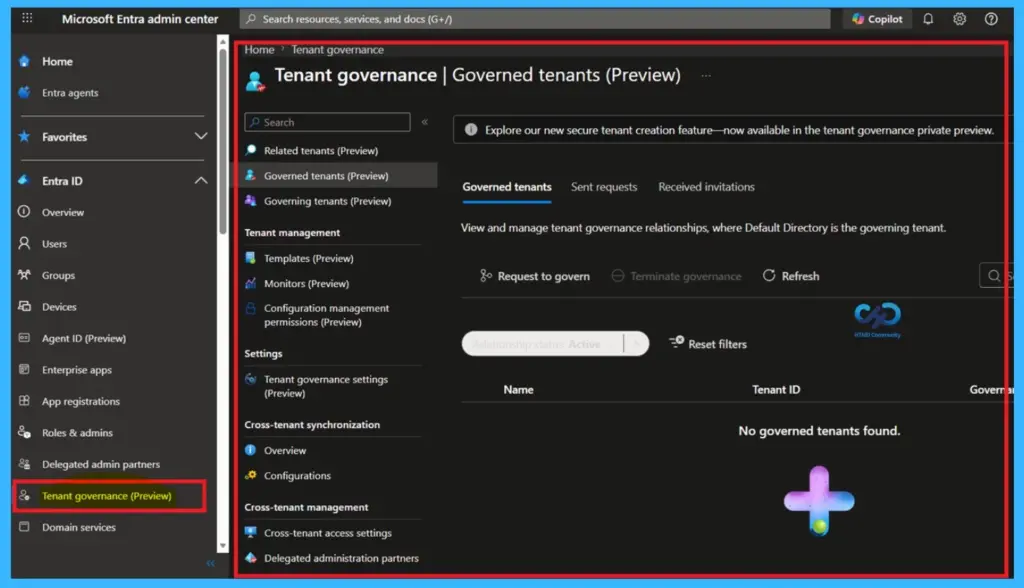
The TCM APIs are part of Microsoft Entra and work behind the scenes of Tenant Governance. While Tenant Governance gives a dashboard view to manage settings, the APIs allow organisations to control and manage configurations using automation and scripts.
- Expansion of Entra Global Secure Access Advanced Threat Protection
- Entra Source IP Anchoring with Global Secure Access to Improve the Security Management of SaaS Apps
- Microsoft Entra Enhances Security with New AI face Check Feature
What’s New
Microsoft has introduced the general availability of Tenant Configuration Management (TCM) APIs, making it easier for organisations to manage and monitor tenant settings. With this update, teams can now control over 200 configuration settings across multiple Microsoft 365 services using Microsoft Graph.
The new model also brings a configuration as code approach, allowing organisations to define a desired state and continuously track any changes or configuration drift, improving security, compliance, and overall management efficiency.

- TCM APIs are 4 key components that work together to maintain configuration consistency.
- These include snapshots, baselines, monitors, and configuration drifts, forming a continuous loop of assessment and enforcement.
- A snapshot captures the current state of configurations, while a baseline defines the desired state.
- Monitors then compare the live environment against this baseline, identifying any configuration drift.
| Capability | Info |
|---|---|
| Integrated into automation | Exposed through Microsoft Graph for workflow automation. |
| Connected to security or compliance | Links tenant settings with existing governance systems. |
| Applied across tenants or services | Consistent configuration management at scale. |
| Configuration‑as‑code model | Tenant settings defined programmatically and continuously evaluated. |
Enabling Scalable Configuration Management
Most impactful aspects of TCM APIs are their ability to scale across environments. Since they are integrated with Microsoft Graph, organisations can integrate configuration management into automation workflows and existing security systems. This scalability ensures that configurations can be applied consistently across multiple tenants and services. It also reduces manual effort, allowing IT teams to focus on strategic initiatives rather than repetitive configuration checks.
Need Further Assistance or Have Technical Questions?
Join the LinkedIn Page and Telegram group to get the latest step-by-step guides and news updates. Join our Meetup Page to participate in User group meetings. Also, join the WhatsApp Community and the Whatsapp channel to get the latest news on Microsoft Technologies. We are there on Reddit as well.
Author
Anoop C Nair is a Workplace Technology solution architect with 25+ years of experience. Microsoft Certified Trainer. Microsoft MVP from 2015 onwards for consecutive 11+ years! He is a blogger, Speaker, and Founder of HTMD Community and HTMD Conference. His main focus is on Device Management technologies like Intune, Windows, and Cloud PC. He writes about technologies like Intune, SCCM, Windows, Cloud PC, Entra, and Microsoft Security.