
Key Takeaways
- Microsoft has made License Usage Insights generally available in Microsoft Entra
- Provides clear visibility into license entitlements and feature usage
- Includes six months of usage trend data for better planning
- Differentiates between active and guest users for accurate reporting
In this post, discussing Microsoft Entra License Usage Insights Six-Month Trends Active vs Guest Reporting and Copilot Suggestions. Microsoft has recently announced the general availability of License Usage Insights in Microsoft Entra, giving organizations clearer visibility into how their licenses is being used. This update is designed to help IT administrators better understand license entitlements and track the adoption of premium features across their environments.
Table of Contents
Table of Contents
Microsoft Entra License Usage Insights Six-Month Trends Active vs Guest Reporting and Copilot Suggestions
However, managing licenses efficiently has often been a challenge due to limited visibility into actual usage and feature adoption. With this new release, Microsoft introduces a redesigned experience in the Entra admin center that simplifies license tracking, improves reporting accuracy, and supports better planning. The feature enables organizations to optimize their investments while ensuring compliance and informed decision-making.
- Expansion of Entra Global Secure Access Advanced Threat Protection
- Entra Source IP Anchoring with Global Secure Access to Improve the Security Management of SaaS Apps
- Microsoft Entra Enhances Security with New AI face Check Feature
Why This Update
License usage insights are simple tracking and play an Important role in cost optimization and security planning. With improved visibility, organizations can identify unused features, ensuring they get maximum value from existing licenses.
| license usage insights | Insight Delivered |
|---|---|
| Maximize Investment | Identify which premium capabilities are included in licenses and actively used. |
| Strengthen Security | Boost adoption of security features already owned but not fully deployed. |
| Confident Planning | Use six months of usage trend data to plan renewals and budgets with clarity. |
| Compliance Readiness | Spot potential gaps early as organizational needs evolve, reducing risk exposure. |
What’s New in the GA Release
The general availability release introduces several enhancements to improving usability and insights. Organizations can now access six months of usage trend data, making it easier to analyze and forecast future needs. The update also clearly differentiates between active users and guest users, allowing for more accurate reporting. Additionally, Copilot-powered prompt suggestions help admins quickly explore and interpret license data

License Usage and Entitlements View
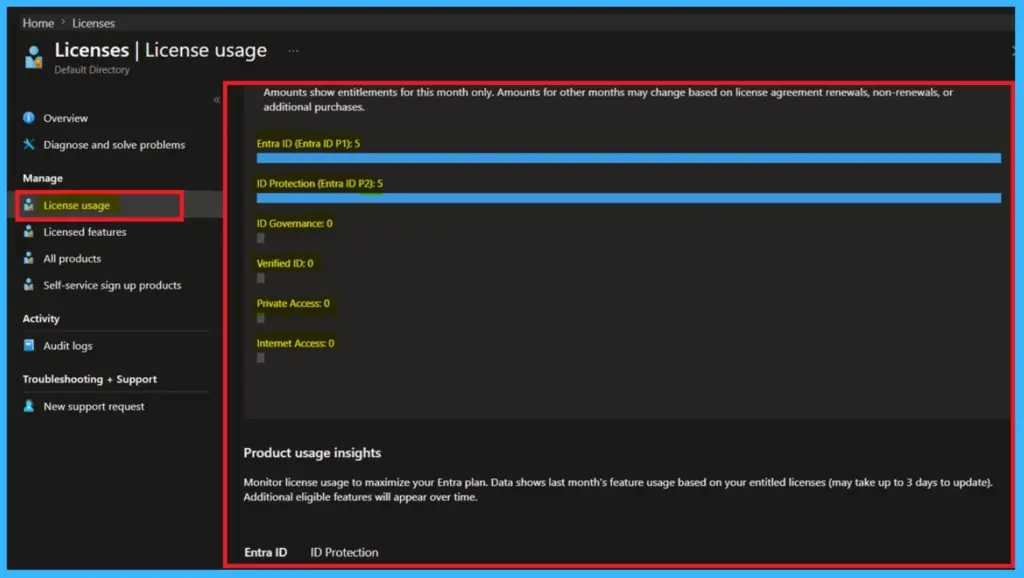
The License Usage section in the Microsoft Entra admin center, where administrators can see the number of licenses assigned to different Entra services. It displays current entitlements for this month, including services like Entra ID P1 and P2, along with other features that are not yet in use.
- This view helps admins quickly understand which licenses are actively assigned and which services are still unused, making it easier to manage license distribution.
- To access License Usage Insights in Microsoft Entra, go to billing > licenses view license Entitlements then check product usage insights
License Usage Insights
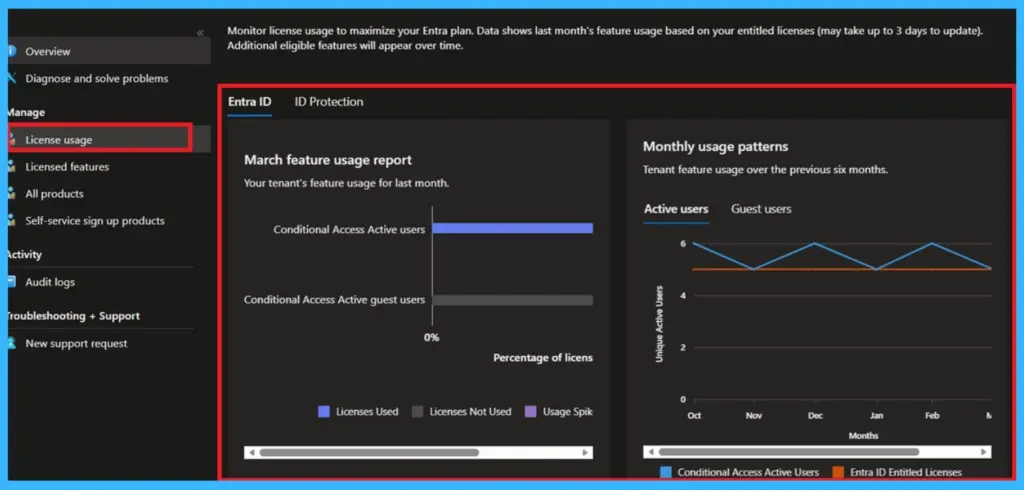
The Product Usage Insights dashboard, showing how features are actually being used within the organization. It includes a feature usage report for the last month, such as Conditional Access usage for active and guest users, along with a 6 month trend graph. The chart clearly separates active users and guest users, helping admins track adoption patterns over time.
- This makes it easier to identify unused features and take action to improve overall usage and planning.
Need Further Assistance or Have Technical Questions?
Join the LinkedIn Page and Telegram group to get the latest step-by-step guides and news updates. Join our Meetup Page to participate in User group meetings. Also, join the WhatsApp Community and the Whatsapp channel to get the latest news on Microsoft Technologies. We are there on Reddit as well.
Author
Anoop C Nair has been Microsoft MVP for 10 consecutive years from 2015 onwards. He is a Workplace Solution Architect with more than 22+ years of experience in Workplace technologies. He is a Blogger, Speaker, and Local User Group Community leader. His primary focus is on Device Management technologies like SCCM and Intune. He writes about technologies like Intune, SCCM, Windows, Cloud PC, Windows, Entra, Microsoft Security, Career, etc.