Skip to content
  • Home
  • Intune
  • Security
  • App Deploy Guides
  • Windows 11
  • Windows 365
  • ConfigMgr
  • Videos
HTMD Community Intune Windows Modern Workplace Device Management
Zero Touch AI
HTMD Community Intune Windows Modern Workplace Device Management
  • Home
  • Intune
  • Security
  • App Deploy Guides
  • Windows 11
  • Windows 365
  • ConfigMgr
  • Videos

Intune

Microsoft Intune is the SaaS solution provided by Microsoft. Microsoft Intune is a cloud-based desktop and mobile device management tool. This supports Mac OS, iOS, Android, and Windows 10. This cloud solution is used as a modern management tool.

You can check out HTMD Community Intune Training from Free Intune Training 2023 blog post.  Let’s learn about Intune Exam MD 102 Study Guide Starter Kit – Microsoft Intune Certification. Also, check out the Top 75 Latest Intune Interview Questions.
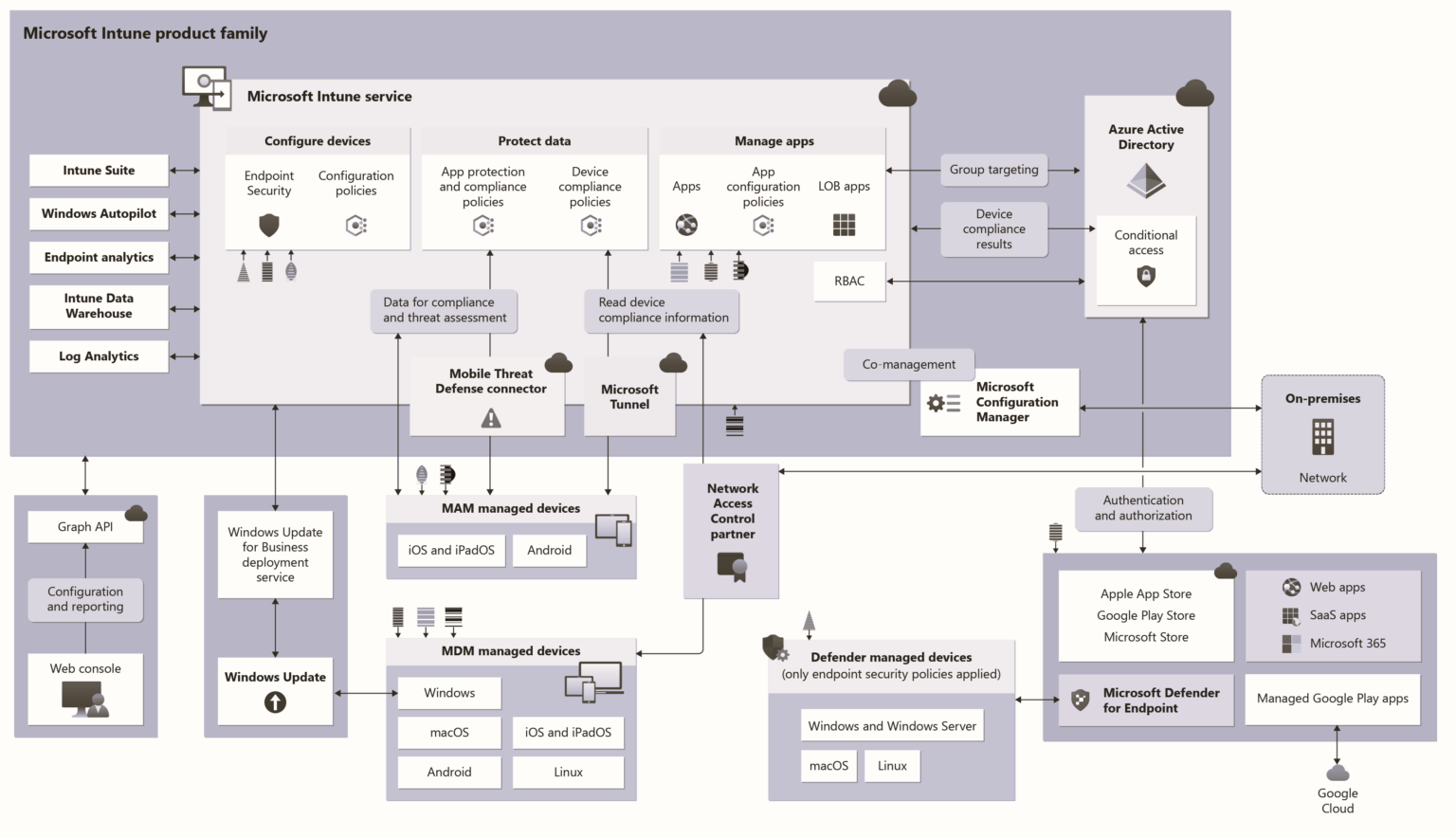
Microsoft Intune Architecture Diagram

This MDM solution can be integrated with SCCM, Azure AD, and Active Directory. This place gives you a great opportunity Learn Microsoft Intune and become an expert with Intune.

This solution can be used to deploy UWP applications, Security policies, Configuration policies, WiFi profiles, PKI certificates, and so on.

This solution is future-proof When you take a look at the Desktop (43.29%) Vs. Mobile (52.29%) Vs. Tablet (4.42%) Market Share Worldwide for the last year, you could see that mobile devices are leaders. So, Mobile Device Management is very critical, and this is a new world of opportunities for IT Pros like us. From my perspective, learning this solution is very important for SCCM admins.

Intune is an enterprise mobility management (EMM) solution from Microsoft. The EMM provider helps to manage mobile devices, network settings, and other mobile services and settings. This solution is nothing but a combination of Device, Application, Information Protection, Endpoint Protection (antivirus software), and Security/Configuration policy management solution (SaaS) facilitated by Microsoft in the Cloud.

Additionally, this solution has a feature called compliance policy, which can be integrated with the Azure AD “Conditional Access” policy to restrict access to company resources.


Windows-11-May-Patch-6

2026 May KB5089549 KB5087420 Windows 11 Patch | 0 Zero Day Vulnerabilities and 120 Flaws

Microsoft-Intune-Finally-Restores-Password-Manager-Support-for-Android-Enterprise-Devices

Microsoft Intune Finally Restores Password Manager Support for Android Enterprise Devices

Microsoft-Intune-Renames-iOS-iPadOS-to-Apple-Mobile-After-visionOS-and-tvOS-Support

Microsoft Intune Renames iOS/iPadOS to Apple Mobile After visionOS and tvOS Support

How to Enable Alphanumeric Device Password Required for Devices using Intune

How to Enable Alphanumeric Device Password Required for Devices using Intune

Disable-Automatic-Download-of-GenAI-Mode

Disable Automatic Download of GenAI Mode in Google Chrome with an Intune Settings Catalog Policy

Fix Upgrade Issues in Specific Microsoft Intune Tunnel Versions using mstunnel-patch-2602 Script 1

Fix Upgrade Issues in Specific Microsoft Intune Tunnel Versions using mstunnel-patch-2602 Script

Enable Print Spooler Redirection Guard Option using Intune

Enable Print Spooler Redirection Guard Option using Intune

Preview New Device View in MS Intune Simplifies Device Actions with Better Layout and Reporting Access 2

Preview New Device View in MS Intune Simplifies Device Actions with Better Layout and Reporting Access

How to Configure App Inventory for Windows Devices in Microsoft Intune

How to Configure App Inventory for Windows Devices in Microsoft Intune

How to Enable Private Network Firewall to Filter Network Traffic using Intune

How to Enable Private Network Firewall to Filter Network Traffic using Intune

Microsoft Intune Enhances Properties Catalog with Application Inventory Support 3

Microsoft Intune Enhances Properties Catalog with Application Inventory Support

Intune and SCCM Right Click Tools Deep Dive Sessions 4

Intune and SCCM Right Click Tools Deep Dive Sessions

Easy Way to Update User Storage Size for Windows 365 Shared Cloud PCs. Fig. 1

Easy Way to Update User Storage Size for Windows 365 Frontline Shared Cloud PCs

Microsoft-Intune-All-Apps-Now-in-Device-View-Simplifies-App-Troubleshooting-for-IT-Admins

Microsoft Intune All Apps Now in Device View Simplifies App Troubleshooting for IT Admins

Intune Policy Now Allows Automatic Removal of Unused Copilot App 5

Intune Policy Now Allows Automatic Removal of Unused Copilot App

Controlling Cocreator Access in Windows Paint using Microsoft Intune

Controlling Cocreator Access in Windows Paint using Microsoft Intune

Older posts
Page1 Page2 … Page135 Next →

loader
Subscribe To Our Newsletter

2026 How to Manage Devices ©
Next Page »
  • Privacy
  • Terms
  • About
  • Contact
  • Partners
  • Authors
  • Subscribe