
key Takeaways
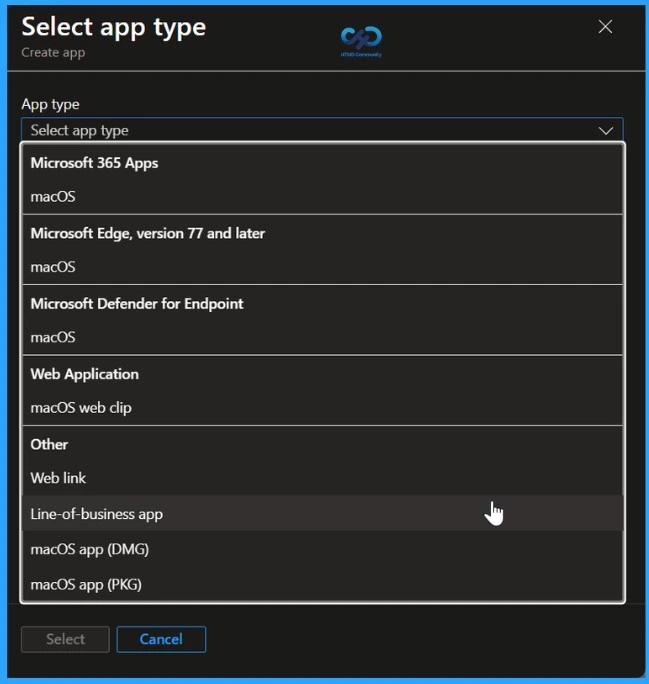
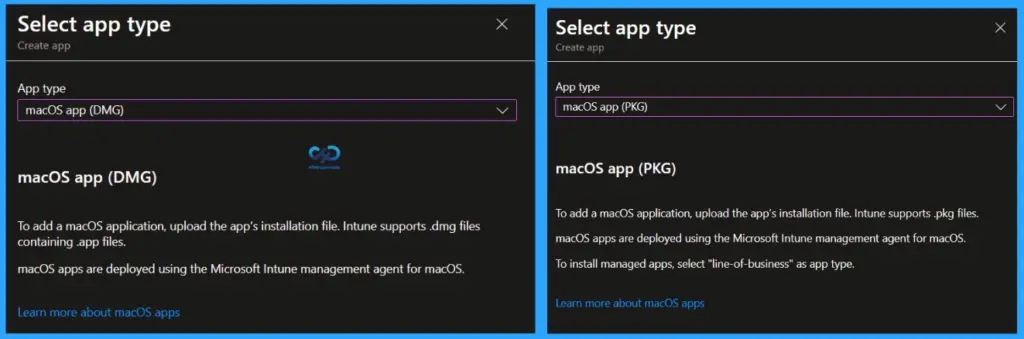
- PKG/DMG apps are installed using the Intune agent.
- The Intune agent currently does not support assignment filters.
- LOB PKG apps are deployed via the MDM channel.
- The MDM channel supports assignment filters, unlike the Intune agent.
- The limitation is due to the difference in deployment mechanisms
macOS PKG and DMG apps don’t support assignment filters because they are installed using the Intune management agent, which currently doesn’t support filters. Since this method works outside the MDM framework, it can’t apply filter-based targeting. As a result, admins won’t see the option to use filters when assigning these apps.
Table of Content
Table of Contents
Why macOS PKG and DMG Apps Don’t Support Assignment Filters
LOB PKG apps are deployed through the MDM channel, which fully supports assignment filters. Since MDM-based deployments can evaluate device and user attributes in real time, filters can be applied effectively to control app distribution. This difference in deployment mechanisms, Intune agent vs. MDM, is the key reason why filters are available for LOB apps but not for standard PKG or DMG app deployments.
| App type | Supported |
|---|---|
| Store app | N/A |
| Microsoft 365 apps | Yes |
| Microsoft Edge version 77 and newer | Yes |
| Microsoft Defender for Endpoint | Yes |
| Web link | No |
| Line-of-business apps | Yes |
- How to Use Intune Assignment Filters Comparison Property gt ge lt le with OS Version
- Intune Supports Assignment Filters for Android AOSP
- MEM Intune: Create Assignment Filters for Azure Virtual Desktop Single Session Windows 10 | AVD
- Check Associated Assignments for Intune Filters
Supported Profile Types for macOS in Intune
Most macOS configuration and security profiles are supported in Intune, allowing administrators to manage device settings, security, and connectivity effectively. Key supported device configuration profiles include Custom, Device Restrictions, Device Features, Endpoint Protection, Extensions, various certificate types (PKCS, SCEP, Trusted), Settings Catalog (both MDM and DDM), VPN, Wi-Fi, and Wired Network. These profiles enable broad control over macOS devices, from security policies to network configurations.
| Profile type | Supported |
|---|---|
| Device configuration profile | |
| Custom | Yes |
| Derived credential | N/A |
| Device restrictions | Yes |
| Device restrictions (Windows 10 Team) | N/A |
| Device features | Yes |
| N/A | |
| Endpoint Protection | Yes |
| Enrollment device platform restrictions | Yes |
| Extensions | Yes |
| PKCS certificate | Yes |
| PKCS imported certificate | Yes |
| Preference file | Yes |
| SCEP certificate | Yes |
| Settings catalog (MDM) | Yes |
| Settings catalog (DDM) | Yes |
| Trusted certificate | Yes |
| VPN | Yes |
| Wi-Fi | Yes |
| Wired network | Yes |
| Endpoint Security profile | |
| Account protection | N/A |
| Antivirus | Yes |
| Attack surface reduction | N/A |
| Disk encryption | Yes |
| Endpoint detection and response | N/A |
| Firewall | Yes |
| Security baselines | N/A |
Workarounds for macOS PKG/DMG Apps Without Assignment Filters
The PKG and DMG apps in Microsoft Intune don’t support assignment filters; you can use these practical alternatives to achieve similar targeting.

- Use Entra ID Dynamic Groups
- Create dynamic device or user groups based on attributes like OS version or device type, and assign apps to those groups to achieve similar targeting as filters.
- Separate App Versions for Different Groups
- Upload the same app multiple times with slight variations (e.g., naming or configuration) and assign each version to different groups.
- Use Scripts for Conditional Logic
- Deploy shell scripts through Intune to install apps based on conditions. This adds flexibility beyond standard assignments.
- Leverage Company Portal
- Make apps available instead of required, and guide specific users/groups to install only what applies to them.
Need Further Assistance or Have Technical Questions?
Join the LinkedIn Page and Telegram group to get the latest step-by-step guides and news updates. Join our Meetup Page to participate in User group meetings. Also, join the WhatsApp Community and the Whatsapp channel to get the latest news on Microsoft Technologies. We are there on Reddit as well
Useful Links
Platforms and policy types supported by assignment filters – Microsoft Intune | Microsoft Learn
Author
Anoop C Nair has been Microsoft MVP for 10 consecutive years from 2015 onwards. He is a Workplace Solution Architect with more than 22+ years of experience in Workplace technologies. He is a Blogger, Speaker, and Local User Group Community leader. His primary focus is on Device Management technologies like SCCM and Intune. He writes about technologies like Intune, SCCM, Windows, Cloud PC, Windows, Entra, Microsoft Security, Career, etc.