
Key Takeaways
- Microsoft Teams on Android will support third-party meetings using SIP.
- Users can join external meetings outside the Teams platform.
- The feature improves cross-platform communication.
- It helps organizations connect different meeting platforms easily.
- The update was recently added to the Microsoft 365 roadmap.
- SIP support gives more flexibility for enterprise collaboration.
Microsoft Teams on Android to Support Third-Party Meetings with SIP Integration! Microsoft is improving cross-platform communication by enabling Microsoft Teams users on Android devices to join third-party meetings using Session Initiation Protocol (SIP). Recently added to the Microsoft 365 roadmap, this upcoming feature helps organizations connect different communication platforms more easily.
Table of Content
Table of Contents
Microsoft Teams on Android to Support Third-Party Meetings with SIP Integration
Microsoft Teams normally works best with other Teams meetings. If someone sends you a meeting link from another platform, joining it from Teams was difficult and often needed extra devices or special software. Now, Microsoft is making this easier on Android devices by adding SIP support directly inside the Teams app.
- You use Microsoft Teams on your Android phone.
- Someone sends you a meeting link from another video platform.
- Earlier, Teams could not easily connect to that meeting.
- With SIP support, Teams can now connect directly to that external meeting.
- You can join voice and video calls without needing extra hardware or apps.
| Benefit | Details |
|---|---|
| Benefit | SIP support reduces difficulties for mobile users joining external meetings. |
| Cross-Platform Access | Teams Android users can join third-party meetings more easily. |
| Security Concern | SIP traffic goes outside the Microsoft 365 environment, requiring stronger security controls. |
| IT Requirements | Organizations should review network settings and mobile device management (MDM) policies. |
| Data Protection | SIP signaling traffic should use Transport Layer Security (TLS) encryption. |
| Purpose of TLS | Helps protect meeting data confidentiality and integrity during communication. |
- Microsoft Confirms Right-Click Paste Issue in Teams and Desktop Apps after Microsoft Edge Update
- Microsoft Announces Teams Optimization for Windows App on iOS and Android
- How Organizers and Presenters can Join a Microsoft Teams Town Hall as an Attendee
- How to Enhance your Teams Experience with Snap Resizable Panes and Zoom Controls Features
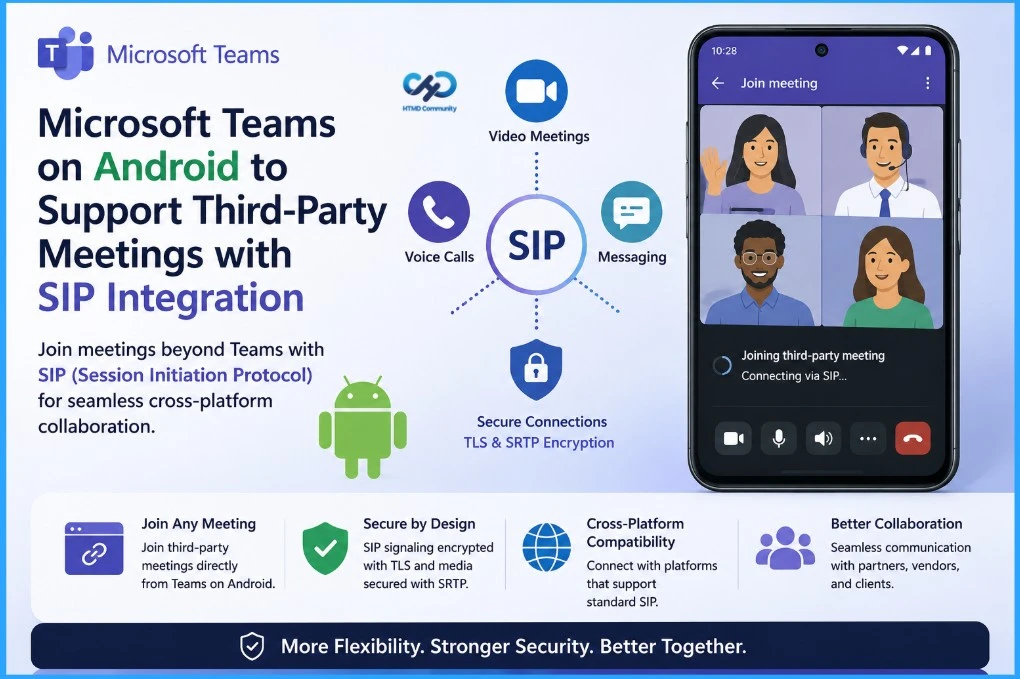
SIP Integration Brings Secure Cross-Platform Meetings to Android
Organizations will need to review firewall settings, conditional access policies, and mobile device management configurations to ensure secure external meeting connections are allowed without exposing the environment to risks. Microsoft also confirmed that the feature will roll out gradually through the Targeted release program before becoming widely available under the Standard release phase.
- SIP traffic will use TLS encryption for secure signaling.
- Audio and video streams will be protected using SRTP.
- The feature helps prevent eavesdropping and session hijacking.
- IT admins should review firewall and conditional access policies.
- Organizations must secure open SIP ports against cyberattacks.
- Microsoft will release the feature in phases.
- Targeted release users will receive the feature first.
- Standard release will make it available to all eligible users later.
- How Organizers and Presenters can Join a Microsoft Teams Town Hall as an Attendee
- How to use New End Event Button in MS Teams to Enhance Town Halls Webinars and Meetings
- How to Enhance your Teams Experience with Snap Resizable Panes and Zoom Controls Features
Need Further Assistance or Have Technical Questions?
Join the LinkedIn Page and Telegram group to get the latest step-by-step guides and news updates. Join our Meetup Page to participate in User group meetings. Also, join the WhatsApp Community and the Whatsapp channel to get the latest news on Microsoft Technologies. We are there on Reddit as well.

Author
Anoop C Nair is a Workplace Technology solution architect with 25+ years of experience. Microsoft Certified Trainer. Microsoft MVP from 2015 onwards for consecutive 11+ years! He is a blogger, Speaker, and Founder of HTMD Community and HTMD Conference. His main focus is on Device Management technologies like Intune, Windows, and Cloud PC. He writes about technologies like Intune, SCCM, Windows, Cloud PC, Entra, and Microsoft Security.