
Key Takeaways
- Selective Response Actions is currently available in Preview.
- Helps organisations customise security response actions during device onboarding.
- Provides better control over high-impact security operations on critical devices.
- Supports protection for Tier-0 systems and other high-value assets.
- Helps maintain operational stability while improving security protection.
- Enhances flexibility and control in Microsoft Defender for Endpoint security operations.
Selective Response Actions is a new Preview feature in Microsoft Defender for Endpoint that gives organizations better control over security response actions during device onboarding. It helps IT and security teams apply high-impact actions more carefully on Tier-0 systems and other important devices, improving protection while maintaining operational stability.
Table of Content
Table of Contents
New Selective Response Actions Improve Safer Device Onboarding in Microsoft Defender for Endpoint
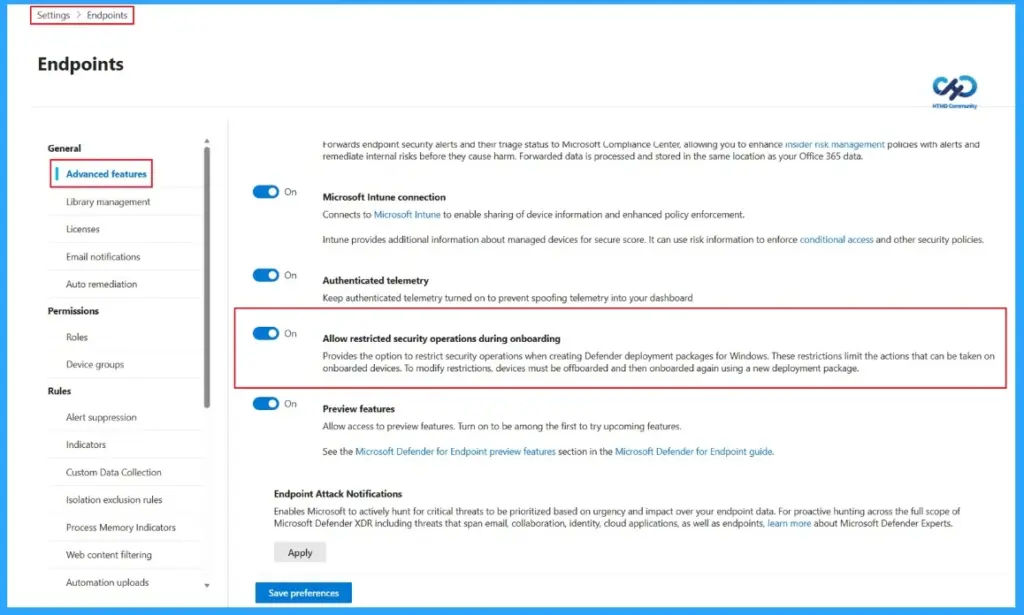
To use the Selective Response Actions feature, organisations must first enable it in the Microsoft Defender portal. Sign in to the portal, go to Settings > Endpoints > Advanced features, and turn on the Allow restricted security operations during onboarding option. Once enabled, administrators can start configuring restricted security operations for onboarded devices.
Feature |
|---|
| Selective Response Actions |
- Manage Offline Security Updates For Linux Using Microsoft Defender And Intune
- Microsoft Security Update Guide for Information on Security Vulnerabilities
- Maester Microsoft Security Test Automation Framework
- How to Block Office Applications from Creating Executable Content in Microsoft Defender using Intune
How Selective Response Actions Work in Microsoft Defender for Endpoint
To use Selective Response Actions, organisations must first enable the feature in their tenant environment. After enabling it, administrators can use the Defender Deployment Tool (DDT) to create an onboarding package with customised security operation settings.
- During package configuration, admins can choose between two onboarding modes:
- Full Functionality – Allows all response actions on onboarded devices.
- Restricted Functionality – Limits high-impact response actions for better operational control.
If Restricted Functionality is selected, organisations can decide which security actions are allowed or blocked on Tier-0 systems and other critical devices. This helps reduce operational risks while maintaining strong security protection and device stability.

| Capability | What It Does |
|---|---|
| Basic Response | Run antivirus scans, collect files, and gather investigation packages from devices. |
| Advanced Response | Isolate devices, restrict app execution, and start remediation actions for vulnerabilities. |
| Live Response | Allows security teams to start live remote response sessions on devices. |
| Device Protection | Supports automated investigation and response (AIR) actions on devices automatically or manually. |
Prerequisites and Supported Operating Systems
Selective Response Actions in restricted mode are supported on Windows client and Windows Server devices running Sense version 10.8798 or later. Organisations must also install the required KB updates to use this feature properly.
- Supported Operating Systems
- Windows Server 2025 (All Editions) — KB5063878
- Windows Server 2022 — KB5063880
- Windows Server 2019 — KB5063877
- Windows 10 22H2 — KB5062649
- Windows 11 23H2 — KB5062663
- Windows 11 24H2 — KB5062660
- Windows 11 25H2 — Supported on all versions
Need Further Assistance or Have Technical Questions?
Join the LinkedIn Page and Telegram group to get the latest step-by-step guides and news updates. Join our Meetup Page to participate in User group meetings. Also, join the WhatsApp Community and the Whatsapp channel to get the latest news on Microsoft Technologies. We are there on Reddit as well.
Resources
Author
Anoop C Nair is a Workplace Technology solution architect with 25+ years of experience. Microsoft Certified Trainer. Microsoft MVP from 2015 onwards for consecutive 11+ years! He is a blogger, Speaker, and Founder of HTMD Community and HTMD Conference. His main focus is on Device Management technologies like Intune, Windows, and Cloud PC. He writes about technologies like Intune, SCCM, Windows, Cloud PC, Entra, and Microsoft Security.