
Key Takeaways
- Platform SSO can now be configured during macOS ADE enrollment.
- Users sign in with Microsoft Entra credentials during Setup Assistant.
- Devices gain faster access to Microsoft 365 and protected resources.
- Company Portal version 5.2604.0 or newer is required.
In this post, we are discussing How to Configure SSO in macOS ADE Setup Assistant using MS Intune. Microsoft has introduced support for configuring Platform Single Sign-On during Automated Device Enrollment (ADE) for macOS devices. The update allows combining Platform SSO policies, Company Portal deployment, and ADE enrollment settings, admins can create a smoother and more secure sign-inexperience on managed macOS devices.
Table of Contents
How to Configure SSO in macOS ADE Setup Assistant using MS Intune
With this feature, users can sign in using their Microsoft Entra account during initial device setup and get immediate access to Microsoft 365 apps and company resources once they reach the desktop. Microsoft says this reduces repeated credential prompts and improves the onboarding experience for enterprise users.
- How to setup Microsoft Enterprise SSO plug-in for Apple macOS Devices using Intune
- How to Troubleshoot Microsoft Enterprise SSO Plug-in on macOS using Intune
- macOS Devices Migration Framework to Intune from Jamf Kandji JumpCloud Platforms
What’s New
Microsoft now allows PlatformSSO registration to run directly during macOS Setup Assistant in the ADE process. This means users can complete authentication earlier during setup instead of configuring SSO after reaching the desktop. Once enrollment finishes, users are already connected to Microsoft Entra resources and can start using apps like Teams immediately.
| New in Intune macOS ADE | Why it Matters |
|---|---|
| Platform SSO in Setup Assistant | Users sign in with Entra ID right at provisioning |
| Policy integration | Ensures smooth, consistent onboarding |
| Company Portal v5.2604.0+ required | Delivers Enterprise SSO plug‑in support |
| ADE profile updates: “await final config” and locked enrollment | Devices are fully ready before users start work |
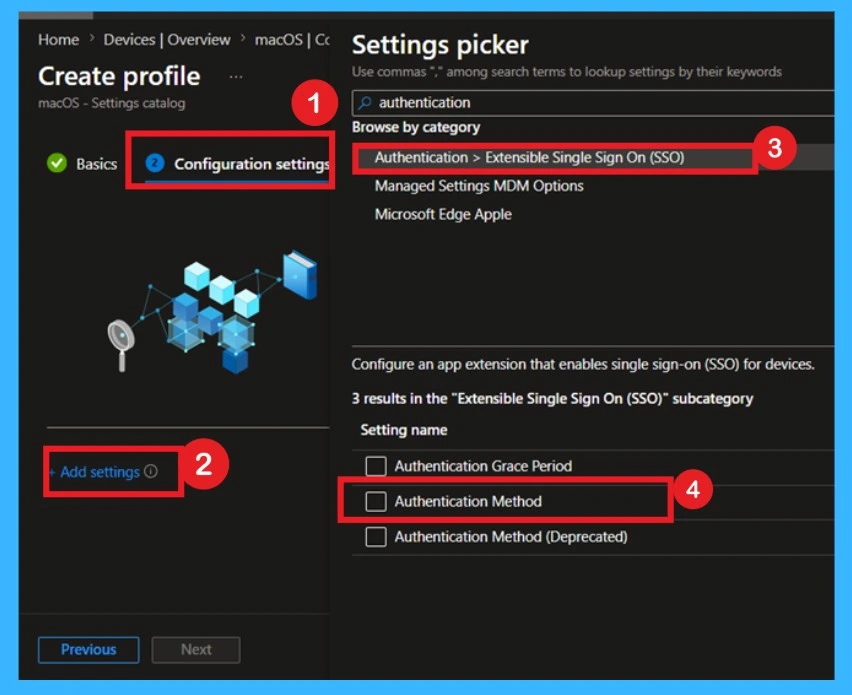
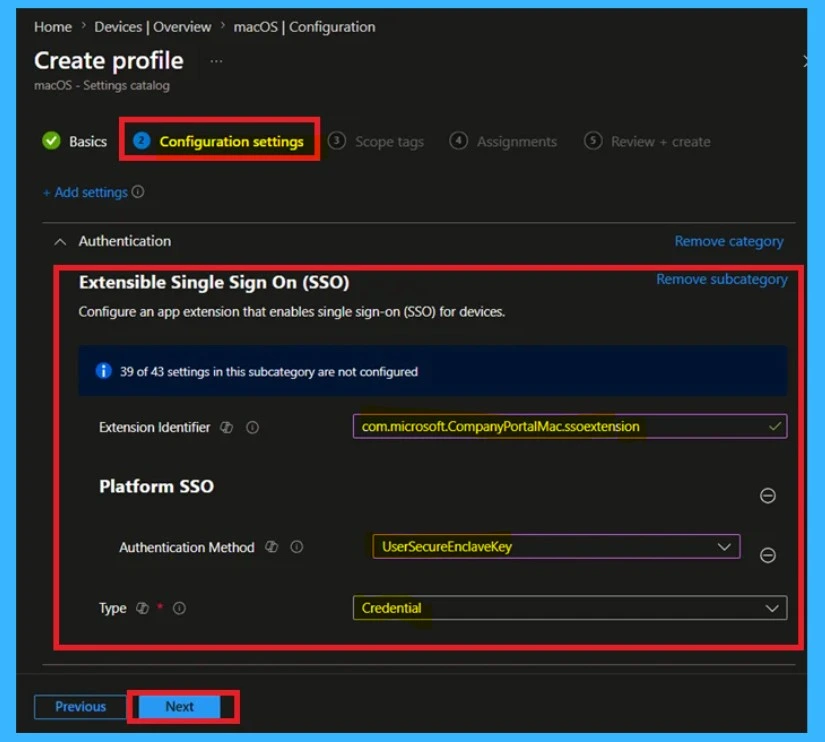
- Admins can configure Platform SSO settings, including authentication method and credential type, directly from the macOS Settings Catalog in Intune.
- Devices > macOS > Configuration > Settings catalog > Authentication > Extensible Single Sign-On (SSO) > Authentication Method.
Why this Update Important
The update improves both user experience and security for enterprise macOS deployments. Earlier device identity registration helps reduce delays caused by Conditional Access checks and minimizes repeated authentication prompts. It also creates a smoother onboarding process for employees receiving new macOS devices in managed environments.

- Selecting “Authentication Method” under Extensible Single Sign-On (SSO) enables Platform SSO configuration for macOS devices.
Need Further Assistance or Have Technical Questions?
Join the LinkedIn Page and Telegram group to get the latest step-by-step guides and news updates. Join our Meetup Page to participate in User group meetings. Also, join the WhatsApp Community and the WhatsApp channel to get the latest news on Microsoft Technologies. We are there on Reddit as well.
Author
Anoop C Nair is a Workplace Technology solution architect with 25+ years of experience. Microsoft Certified Trainer. Microsoft MVP from 2015 onwards for consecutive 11+ years! He is a blogger, Speaker, and Founder of HTMD Community and HTMD Conference. His main focus is on Device Management technologies like Intune, Windows, and Cloud PC. He writes about technologies like Intune, SCCM, Windows, Cloud PC, Entra, and Microsoft Security.