
Key Takeaways
- Microsoft acknowledged an issue on 27 July 2022 affecting the ability to configure or update Settings Catalog device policies in Intune.
- The issue impacts Intune admins only. There is no direct end-user impact associated with this incident.
- Microsoft is investigating under Incident ID IT408313, which can be monitored through the Intune Service Health Status in the MEM Admin Center.
- Settings Catalog policies can still be created for Windows client OS, iOS/iPadOS, and macOS, though updates and configurations may fail during the incident.
How to Fix Intune Settings Catalog Policy Configuration Issue IT408313. The Intune Settings Catalogue is the main place to create Cloud Policies. This functionality is similar to Group Policies from the On-Prem world. Microsoft recently confirmed an issue with configuring and updating Settings Catalog device policies. You can create Settings Catalog policies for Windows Client OS, iOS/iPadOS, and macOS devices.
Table of Content
Table of Contents
How to Fix Intune Settings Catalog Policy Configuration Issues IT408313
Microsoft also created an incident IT408313 to investigate this issue. The impact is only for Intune or MEM admins. So there is no direct impact on the end-users with this Incident. You can quickly look at the Intune Service Health Status Message in the MEM Admin center portal. In the SaaS world, knowing where to look for service outages is important. Why is Intune Services Down? Sometimes you might notice if any services are temporarily down, and your tenant might be impacted.
As per Microsoft’s incident description, this Intune Settings Catalog issue impacts only some tenants. This is not a global issue impacting all the Intune tenants.”Admins may be unable to configure or update ‘Settings Catalog‘ device policies in Microsoft Intune. More info: Additionally, if admins do succeed in updating or creating “Settings Catalog” policies, those updates may also not be reflected for devices.”
- How to Create Intune Settings Catalog Policy
- Troubleshoot Microsoft Edge Security Policy Deployment Issues With Intune
- Intune Security Baseline Microsoft Defender Policy Troubleshooting Tips
Check the Intune Incident from the MEM Admin Center Portal
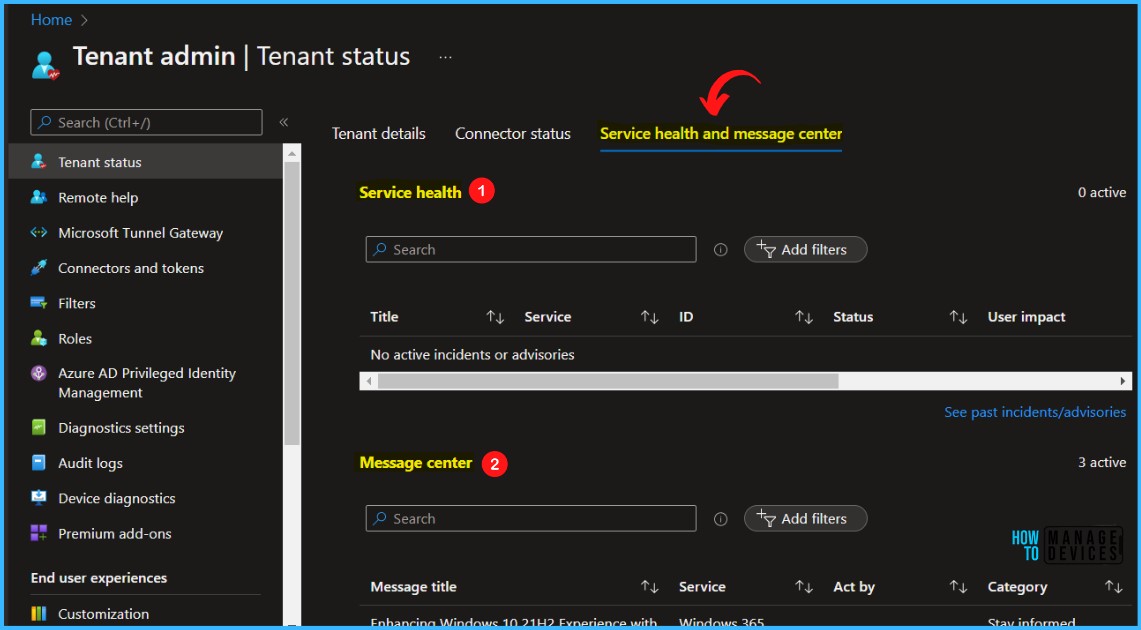
Let’s see how to check the Intune incident details from the MEM Admin Center portal. This is one of the places you must keep looking at as part of Intune daily monitoring tasks.

- Sign in to the Microsoft Intune admin center. https://intune.microsoft.com/
- Go to Tenant Administration and select Tenant Status.
- Click on the Service health and message center tab, as shown in the screenshot.
You can see an Intune incident IT408313. Some admins may be unable to configure or update ‘Settings Catalog’ device policies in Microsoft Intune. Click on the Intune incident IT408313 to get the status of the Settings Catalog service Issue. All these Intune services are independent threads but connected. This is why the Settings Catalog issue is not impacting other functionalities of Intune.
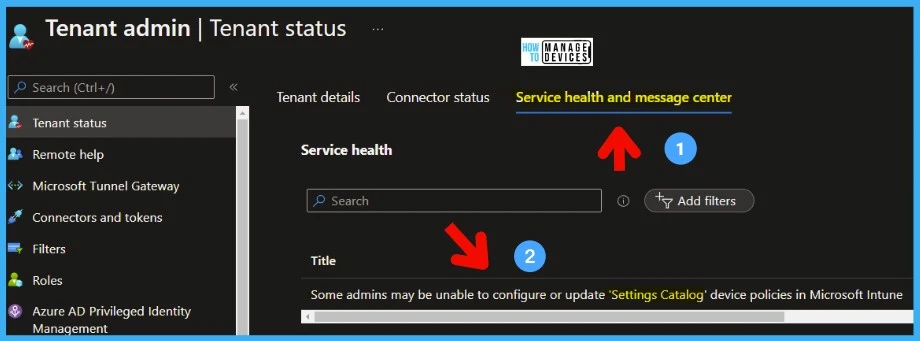
Unable to Configure or Update Settings Catalog Device Policies in Intune. Issue is FIXED
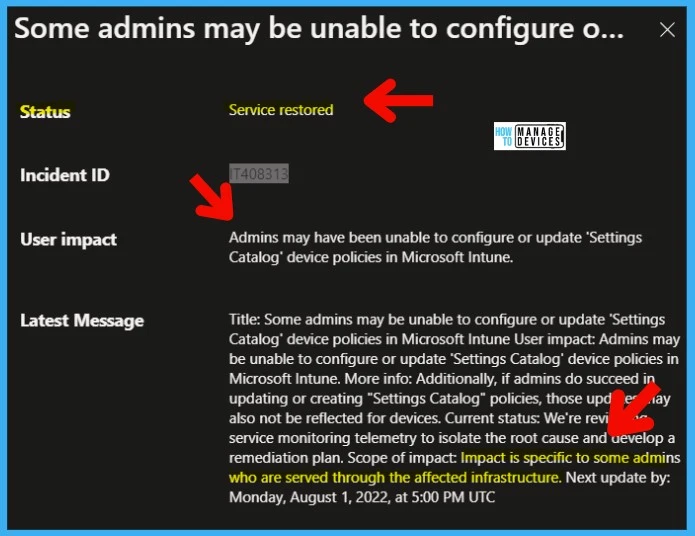
As per the updates on Intune incident IT40831, Microsoft has already fixed the issue on 8/1/2022. The issue was that Admins may have been unable to configure or update the ‘Settings Catalog’ device policies in Microsoft Intune.
Title: Some admins may be unable to configure or update ‘Settings Catalog’ device policies in Microsoft Intune. User impact: Admins may be unable to configure or update ‘Settings Catalog’ device policies in Microsoft Intune. More info: Additionally, if admins do succeed in updating or creating “Settings Catalog” policies, those updates may also not be reflected for devices.
Microsoft has not updated the details on the status description. The current status of the Incident still shows that MS is trying to isolate the issue and remediate it. However, the status shows as Service Restored.
| Current Status |
|---|
| We’re reviewing service monitoring telemetry to isolate the root cause and develop a remediation plan. Scope of impact: Impact is specific to some admins who are served through the affected infrastructure. Next update by: Monday, August 1, 2022, at 5:00 PM UTC |
Resource – >http://aka.ms/MEMSHD (use MEM Admin Center Login)
Need Further Assistance or Have Technical Questions?
Join the LinkedIn Page and Telegram group to get the latest step-by-step guides and news updates. Join our Meetup Page to participate in User group meetings. Also, join the WhatsApp Community to get the latest news on Microsoft Technologies. We are there on Reddit as well.
Author
Anoop C Nair has been Microsoft MVP for 10 consecutive years from 2015 onwards. He is a Workplace Solution Architect with more than 22+ years of experience in Workplace technologies. He is a Blogger, Speaker, and Local User Group Community leader. His primary focus is on Device Management technologies like SCCM and Intune. He writes about technologies like Intune, SCCM, Windows, Cloud PC, Windows, Entra, Microsoft Security, Career, etc.