
Key Takeaways
- Microsoft is pushing passkeys as the default sign-in method across platforms.
- Organisations can now remove passwords and SMS methods entirely.
- Recovery now uses government ID verification and live face checks.
- Passkey-preferred authentication is available in preview.
- Security questions for password reset will be deprecated starting March 2027.
In this post, we are discussing Microsoft Reports 95% Passkey Sign-In Success and 14× Faster Authentication. Microsoft has announced major improvements to its passkey and account recovery experience, focusing on closing security gaps that attackers continue to exploit even after organisations adopt passwordless sign-ins.
Table of Contents
Table of Contents
Microsoft Reports 95% Passkey Sign-In Success and 14× Faster Authentication
MS explained that while passkeys already protect users from phishing attacks, many organisations still leave older sign-in methods such as passwords, SMS codes, and weak recovery systems active just in case. According to Microsoft, these methods have become a target for attackers using AI-driven phishing, deepfakes, and SIM swapS.
- Native Authentication for Microsoft Entra External ID | Complete Control Over Login Experience
- How to Setup Passwordless Login for Microsoft Accounts
- Entra External ID Now Supports SMS as an MFA Option
- Windows Elevates Passkey Security with Plug-in Credential Manager Integration
What’s New in Microsoft Passkey Security Updates
Microsoft has introduced several new features to improve passwordless security and account recovery in Microsoft Entra ID. The update adds synced passkeys for external users, passkey support on unmanaged Windows devices, and passkey profiles for better admin control. Microsoft also launched passkey preferred authentication in preview, which automatically shows the strongest sign-in option first.
Also, organisations can now remove passwords and SMS methods completely to reduce phishing risks. The company also made Microsoft Entra ID account recovery generally available, allowing users to recover accounts securely using government-issued ID verification and live face checks instead of traditional security questions.

| Gap | Risk |
|---|---|
| Gap 1 · Phishable sign‑in methods | Passwords, SMS codes, and push notifications keep the sign‑in moment vulnerable to phishing. |
| Gap 2 · Dormant credentials | Even with passkeys deployed, unused passwords or SMS methods remain attached and attackers exploit them. |
| Gap 3 · Weak recovery channels | Helpdesk calls and knowledge-based questions are easily compromised, especially with AI generated deepfakes. |
Faster and Simpler Passkey Sign-In
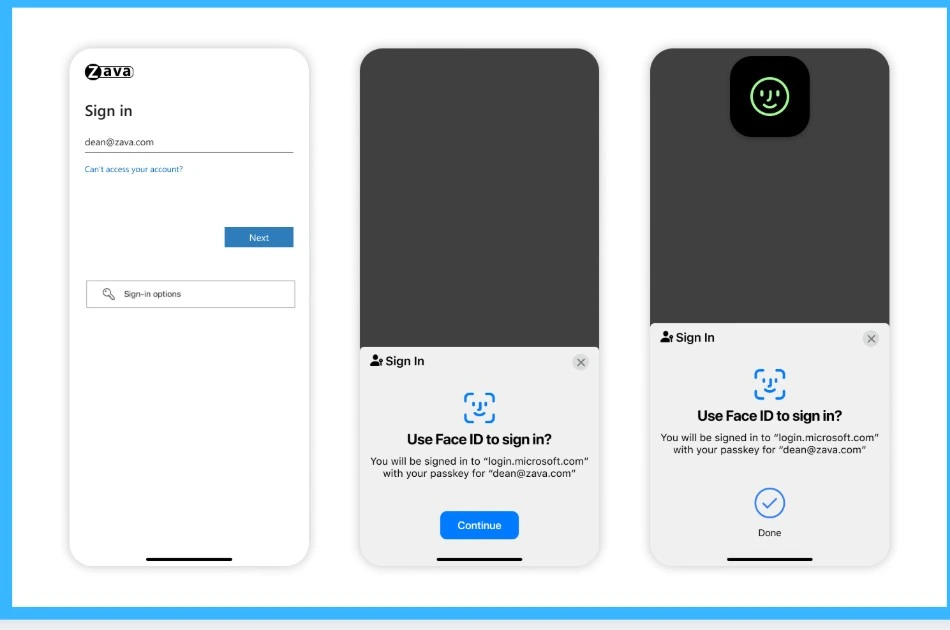
Microsoft says passkeys are making sign-ins much easier and safer for both regular users and businesses. Instead of typing passwords and entering OTP codes from another app or phone, users can simply unlock with their fingerprint or face scan and sign in instantly. These passkeys work across phones, laptops, browsers, and operating systems because they sync through services like iCloud Keychain, Google Password Manager, and Microsoft Password Manager.
Microsoft found that passkey logins are much faster, more successful, and harder for attackers to steal compared to traditional passwords and MFA codes, and these improvements are now available for both employees and customer-facing applications through Microsoft Entra ID and Microsoft Entra External ID.
- Passkeys stop phishing, but gaps remain: Attackers exploit weak fallbacks and recovery channels.
| Step | Action | Action |
|---|---|---|
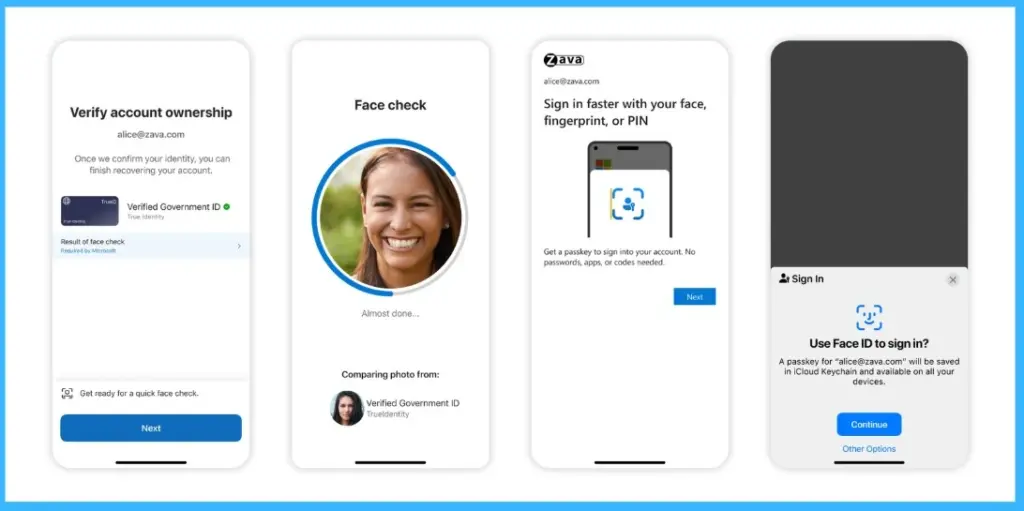
| Verify ID | Scan a government‑issued document (driver’s license, passport, etc.) | Establish high‑assurance identity proof |
| Live Face Check | Real‑time selfie matched to ID photo via Microsoft Entra Verified ID (Azure AI) | Ensure the user is present and authentic |
| Register Passkey | User immediately registers a synced passkey | Secure future sign‑ins with phishing‑resistant credentials |
Verified Account Recovery Reduces Impersonation Risks
Users can recover their account directly from a browser by verifying their identity with a government ID and a quick selfie, then immediately creating a new passkey without needing helpdesk support. The system uses secure identity checks powered by Microsoft Entra Verified ID and protects user privacy by sharing only verification results, not personal identity data.
- Verify identity using a driver’s license, passport, or other supported ID
- Complete a live selfie check to confirm the person matches the ID photo
- Create a new synced passkey for future secure sign-ins
- No passwords, phone calls, or easy-to-phish recovery methods needed anymore
Easy Setup with Flexible Identity Verification Options
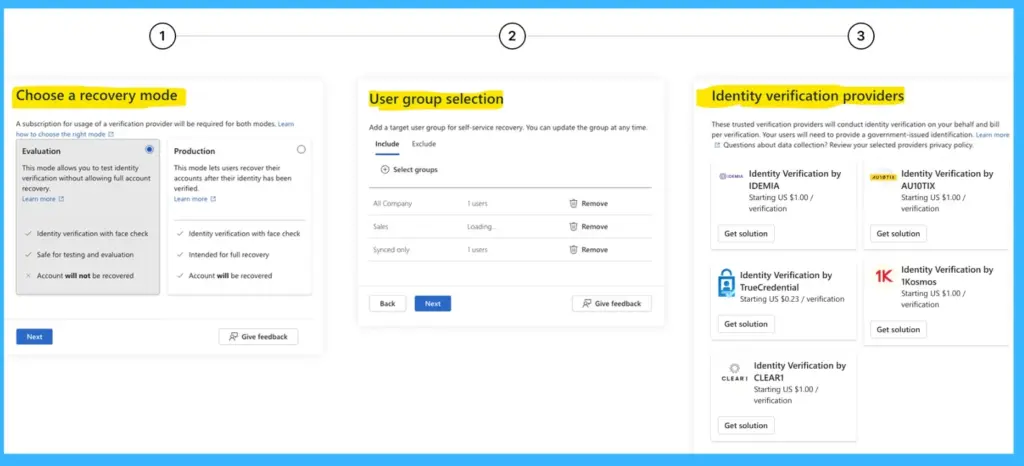
Microsoft says the new account recovery system is simple for IT admins to set up and flexible enough to meet different regional rules. Admins can quickly configure recovery by choosing an identity verification provider, selecting which users can use it, and optionally connecting it with HR or company records for extra verification.
They can also test the entire recovery process before enabling it for employees. The system supports different verification providers for different countries or regions, helping organisations comply with local regulations. Through the Microsoft Security Store, companies can use trusted identity verification providers without needing complex custom integrations or separate contracts.
Need Further Assistance or Have Technical Questions?
Join the LinkedIn Page and Telegram group to get the latest step-by-step guides and news updates. Join our Meetup Page to participate in User group meetings. Also, join the WhatsApp Community and the WhatsApp channel to get the latest news on Microsoft Technologies. We are there on Reddit as well.
Author
Anoop C Nair is a Workplace Technology solution architect with 25+ years of experience. Microsoft Certified Trainer. Microsoft MVP from 2015 onwards for consecutive 11+ years! He is a blogger, Speaker, and Founder of HTMD Community and HTMD Conference. His main focus is on Device Management technologies like Intune, Windows, and Cloud PC. He writes about technologies like Intune, SCCM, Windows, Cloud PC, Entra, and Microsoft Security.