

Let’s build a ConfigMgr CMPivot Query for out-of-support Office 365 ProPlus semi-annual and monthly channels. ConfigMgr can help you find the out-of-support versions of Office 365 Pro Plus (a.k.a. Microsoft 365 App) installed devices in your environment.
CMPivot provides a fast and efficient way to assess the status of devices in your environment and execute real-time queries on all connected devices within the chosen collection.
The CMPivot query gives you the real-time value of these versions in your environment. The following blog posts use the SQL query to provide details on Office 365 ProPlus out-of-support devices.
- SCCM Out Of Support Versions Of Office 365 Semi-Annual Channel
- ConfigMgr CMPivot Query to Fetch WSUS Server Details of the Clients | SCCM | Configuration Manager
- Out-of-Support Versions of Office 365 Semi-Annual Channel.
- Out-of-Support Versions of Microsoft 365 Apps Monthly Enterprise Channel.
- Quickly Check Registry Values using SCCM CMPivot Query
- SCCM CMPivot Standalone App Installation Guide | ConfigMgr
| Index |
|---|
| Launching CMPivot Query Window |
| Semi-Annual Office 365 ProPlus Out-of-Support CMPivot Query |
| Other Option |
| Monthly Office 365 ProPlus Out-of-Support CMPivot Query |
| Other Option |
NOTE! – CMPivot can return on the results of ONLINE devices when running the query. So, this might not make much sense if you want to get a report on all the devices of a global organization.

Launching CMPivot Query Window
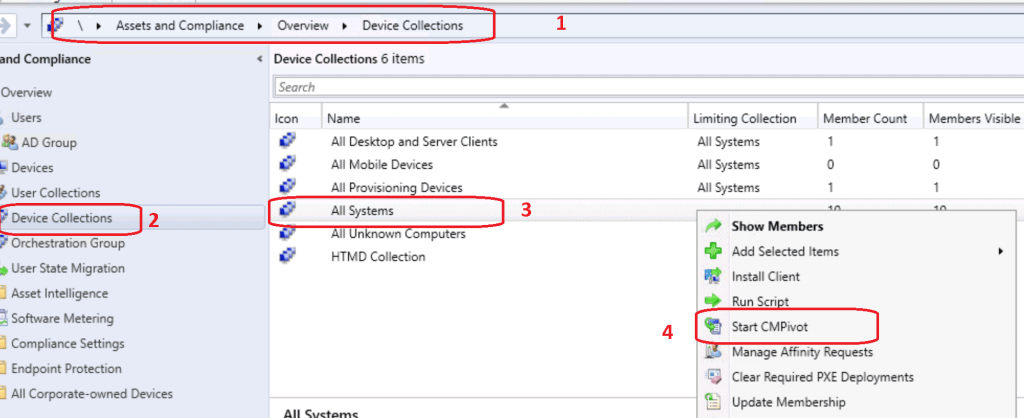
- Navigate to the device collection against which you want to run the CMPivot query.
- Select All Systems device collection.
NOTE! – In a production environment with more than many devices, I don’t recommend to use All System collection. Instead, use the collection with a smaller number of devices to try out the query.
- Right-click on the All Systems collection.
- Select Start CMPivot.
- CMPivot Query tool was launched.
- Get familiarized with new query language and CMPivot tool.
- Copy any of the following queries (monthly and semi-annual) as required.
- Check out the Run Query button from the SCCM CMPivot tool.
Semi-Annual Office 365 ProPlus Out-of-Support CMPivot Query
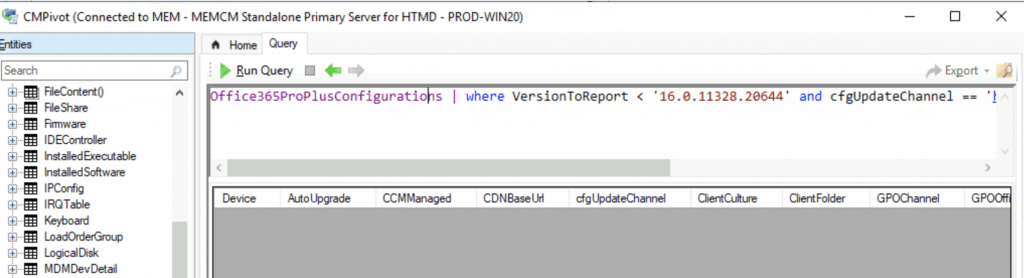
Copy the following CMPivot query to get the list of ONLINE devices for the Out-of-Support Office 365 ProPlus semi-annual channel. More details about the version and CDN Update channel are explained in the previous post.
NOTE! – I don’t think the last part of the build number is significant while checking out the support scenarios. So, in the above example, version number 1902 = build number 11328. You can just use 11328 in the following scenarios.
Office365ProPlusConfigurations | where VersionToReport < '16.0.11328.20644' and cfgUpdateChannel == 'http://officecdn.microsoft.com/pr/7ffbc6bf-bc32-4f92-8982-f9dd17fd3114'
Other Option
OfficeProductInfo | where Channel == 'Semi-Annual Enterprise Channel' and ProductName > '16.0.11929.20648'
Monthly Office 365 ProPlus Out-of-Support CMPivot Query
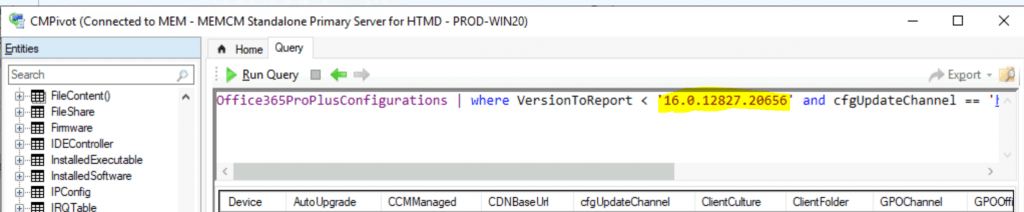
Copy the following CMPivot query to get the list of ONLINE devices for the out-of-support Office 365 ProPlus Monthly channel. More details about the version and CDN Update channel are explained in the previous post.
Office365ProPlusConfigurations | where VersionToReport < '16.0.12827.20656' and cfgUpdateChannel == 'http://officecdn.microsoft.com/pr/55336b82-a18d-4dd6-b5f6-9e5095c314a6'
Other Option
OfficeProductInfo | where Channel == 'Monthly Enterprise Channel' and ProductName > '16.0.12827.20656'
Resources
- ConfigMgr CMPivot Architecture – https://www.anoopcnair.com/sccm-cmpivot-guide/
We are on WhatsApp. To get the latest step-by-step guides and news updates, Join our Channel. Click here –HTMD WhatsApp.
Author
Anoop C Nair is Workplace Technology solution architect with 25+ years of experience in global enterprise organizations such as JP Morgan, Capgemini, etc. He is Microsoft Certified Trainer. Microsoft MVP from 2015 onwards for consecutive 11 years! He also conducts Intune and modern workplace tech training for enterprise organizations. He is Blogger, Speaker, and Founder of HTMD Community and HTMD Conference. His focus is on Device Management technologies such as Intune, Windows, Cloud PC. He writes about technologies like Intune, SCCM, Windows, Cloud PC, Windows, Entra, Microsoft Security.