
Key Takeaways
- Enhanced Windows Update Reports with Windows Diagnostic Data in Intune
- Enable Windows Diagnostic Data – Required in Intune for Windows Feature Update and Expedited Quality Update reports.
- Microsoft Requirement – This change was introduced through MC533802 and became effective from June 26, 2023.
- Impact on Reports – Without diagnostic data enabled, update reports may not include complete device status, errors, and alerts.
- Organization Action – Organizations using these update reports should ensure the required Windows diagnostic data setting is enabled in Intune.
- Stay Informed – Use Intune Message Center to monitor important service updates, upcoming changes, and requirements.
This post helps you to enable Windows diagnostic data for Windows feature update and expedited quality update reports from Intune. By following the instructions outlined in this post, you can ensure that your organization is compliant with the new requirement for enhancing Update reports. Microsoft Intune added Plan for change based on MC533802, effective from June 26, 2023, or shortly thereafter, enabling the use of Windows diagnostic data in Intune will become mandatory for Windows Feature Update and Expedited Quality Update reports.
Table of Content
Table of Contents
Enhanced Windows Update Reports with Windows Diagnostic Data in Intune
The question is, what would the impact be on your organisation? If your organization utilizes the Feature Update and Expedited Quality Update reports, then the Windows diagnostic data setting in Intune must be enabled to continue including device update status data, including errors and alerts.
With the Intune Message Center, you can conveniently access informational communications directly from the Intune service team. Communications include messages about changes that have recently happened to the Intune service, or are on the way for your tenant.

- Cloud PC Monitoring Health Performance Using Endpoint Analytics Intune
- Configure Windows Update For Business Reports | Intune WUfB Patching Reports
As mentioned in MC533802, starting on June 26, 2023, or soon after, Windows Feature update and Expedited Quality update reports will require you to enable the use of Windows diagnostic data in Intune. By enabling Windows diagnostic data, you can access improved insights and analysis, enabling better decision-making and more effective update management.
| Message | Service | Act by | Category | Published | Message ID |
|---|---|---|---|---|---|
| Plan for Change: Enable Windows diagnostic data for Windows Feature update and Expedited Quality update reports | Microsoft Intune | 6/26/2023 | Plan for change | 5/26/2023 | MC561182 |
How to Enable Windows Diagnostic Data in Intune
By following these steps, you will successfully enable the necessary features and ensure smooth integration with Intune for comprehensive reporting and analysis of update-related data.
- Sign in to the Microsoft Intune admin center https://intune.microsoft.com/.
- Navigate to Tenant Administration > Connectors and tokens.
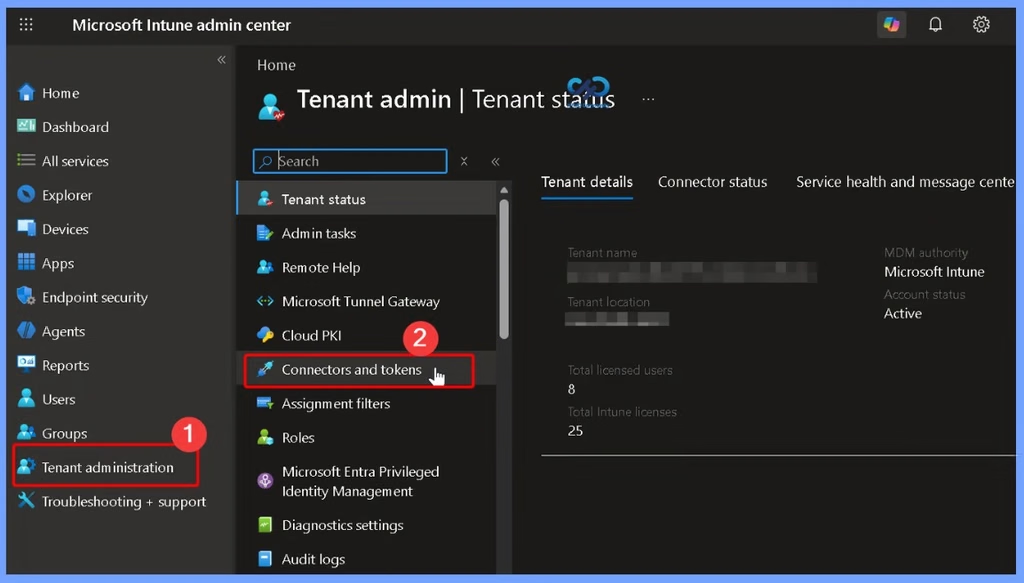
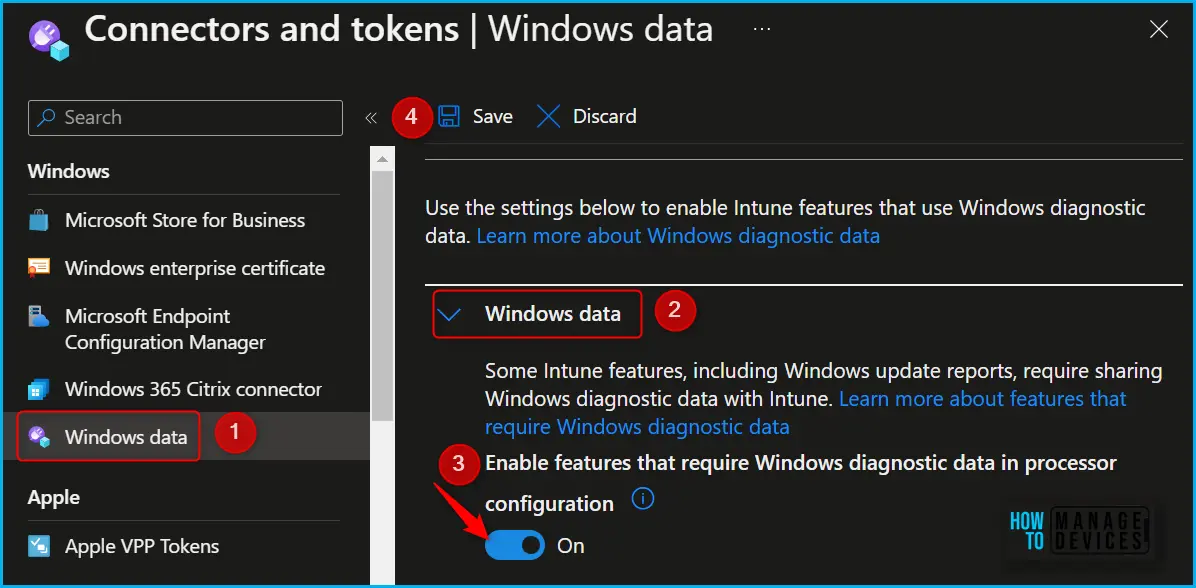
In Connectors and tokens, click on the Windows data node, here, you can configure your tenant to support Windows diagnostic data in processor configuration. Enabling the Windows Diagnostic setting will activate Intune features powered by Windows diagnostic data. It will also enable the Windows diagnostic data processor configuration if your tenant is not already opted-in.
- Toggle the switch to On, Enable features that require Windows diagnostic data in processor configuration. and click on Save.
- How to Deploy Allow Device Name to be Sent in Windows Diagnostic Data in Intune Via Setting Catalog
- Best Method to Allow Telemetry or Diagnostic Data with Intune
- Enhanced Windows Update Reports with Windows Diagnostic Data in Intune
On the Windows data page of the Microsoft Intune admin center, you can configure both the Windows diagnostic data in processor configuration and the license attestation. This centralized location allows for convenient management of these configurations, ensuring that both aspects are properly set up and aligned with your organization’s requirements.
Need Further Assistance or Have Technical Questions?
Join the LinkedIn Page and Telegram group to get the latest step-by-step guides and news updates. Join our Meetup Page to participate in User group meetings. Also, join the WhatsApp Community and the Whatsapp channel to get the latest news on Microsoft Technologies. We are there on Reddit as well.
Author
About Author – Jitesh, Microsoft MVP, has over six years of working experience in the IT Industry. He writes and shares his experiences related to Microsoft device management technologies and IT Infrastructure management. His primary focus is Windows 10/11 Deployment solution with Configuration Manager, Microsoft Deployment Toolkit (MDT), and Microsoft Intune.