
- Device enrollment success does not equal rollout readiness.
- App delivery delays are the primary cause of stalled Intune migrations.
- Autopilot prioritizes stability over complex dependency handling.
- Repackaging and dual-library management increase operational load.
Let’s discuss why App Delivery is Slowing Down in Microsoft Intune During or After Migration. The story is the same for many organizations: migrating management of devices to Intune is mostly successful, but the actual rollout of Intune stalls because apps are still catching up. Autopilot will get a device to a desktop, yet without the required apps the device isn’t actually ready to hand to a user.
Table of Contents
Table of Contents
Why App Delivery is Slowing Down in Microsoft Intune During or After Migration
Teams are then forced to either slow down deployments or finish onboarding through workarounds, and that leads to lost time and more helpdesk tickets. That scenario shows the common disconnect enrollment and management are achievable, but readiness, where the business feels the most impact, lags behind. Enrollment isn’t the finish line. Readiness is
- Most migration plans are tracking progress using specific signals:
- Are devices enrolling?
- Are my configuration profiles present?
- Is everything starting out compliant?
- What does reporting show?
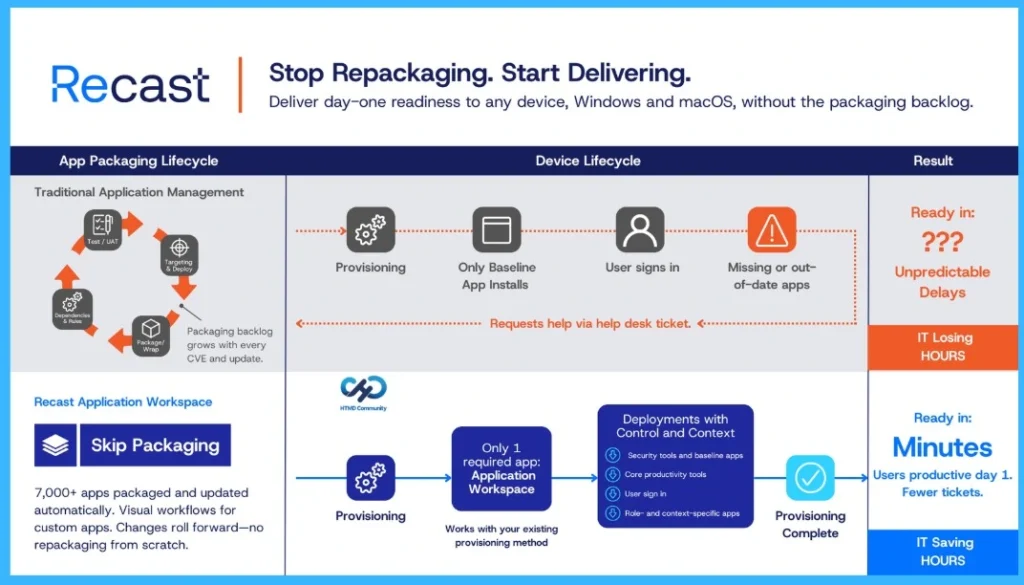
These all matter, but they don’t answer what users and leaders care about: “Can a user do their job (and can they do it on day one)?” In practice, the device is only “rollout ready” when the required apps are present, including security tools, core productivity apps, and role-specific apps. If those apps are missing or arrive late, the rollout slows for a very rational reason: IT can’t scale a deployment if every new device provided creates follow-up work
- Top 4 Pillars of SCCM to Intune Migration Workloads Identity Applications Policies
- Easy Method to Install Speech Pack using Microsoft Intune
- Top 75 Latest Intune Interview Questions and Answers
Why App Migrations Make the Readiness Problem More Obvious
Migrating applications over from ConfigMgr can be a daunting task. You first have to find a way to get apps into Intune, often repackaging them into Intune Win32 (.intunewin) packages, which is more work, more tooling, and now more format-specific troubleshooting. You’re also stuck keeping a separate app library current in both places.

Once the apps are in Intune, the battle of getting them onto devices begins, usually leveraging a combination of Autopilot and deployments. Depending on how you bring apps into Intune, that’s where the real complications begin.
Intune isn’t Built for Day-One Readiness, and It Shows
Autopilot and Autopilot Device Preparation (aka Autopilot V2) aren’t as robust or moldable as the task sequences of ConfigMgr. This is reinforced by multiple built-in behavior blockers and ongoing issues that can result in apps arriving only after the desktop for many orgs, especially when they reduce required apps to keep provisioning stable.
- For example, Microsoft directly gates how many apps you can deploy in their device preparation offering. They state this is to increase stability and improve success rate (in their guidance they believe most deployments should target 10 or fewer apps). Microsoft also has a documented issue going back to 2024 that still exists today:
- when a managed installer policy is enabled and you’re trying to install Win32 apps during device preparation, deployments can fail because device preparation can’t ensure the managed installer policy arrives before app delivery.
- To be fair, time is helping break down some of those barriers, as recent updates indicate a relaxing of those limitations. Still, Microsoft’s guidance reiterates that only essential apps should be deployed during provisioning, and only those able to be installed in a system context.
So, if your end user devices require numerous apps, have complex dependencies, or need strict ordering to avoid issues, Autopilot can instantly become a painful bottleneck. Not because Autopilot is “bad,” but because it’s optimized for stability and a predictable “one size fits all” provisioning flow with customizability later.
Treat App Delivery as its Own Workstream – A mindset shift that actually speeds up migrations
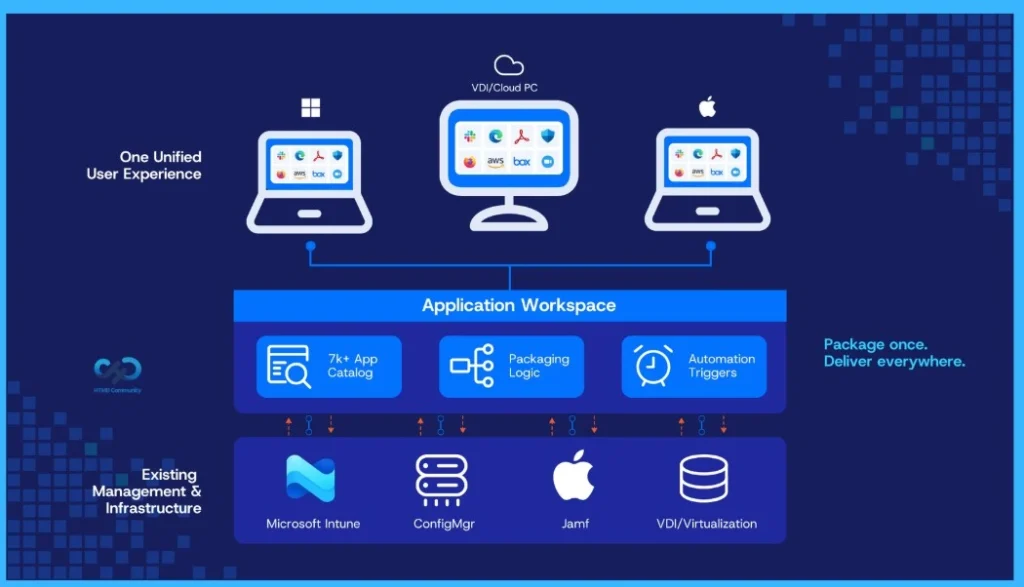
Instead of treating application delivery as a feature of device management, treat it as its own operational workstream. This keeps packaging logic, sequencing, promotion, rollout, and visibility all stable, even as your device tooling changes (ConfigMgr → Intune, or even alternatives like Citrix → AVD, etc.). This doesn’t mean you have to replace your management platform, like Intune. It means separating responsibilities.
| Example |
|---|
| Intune remains the device and security control plane (enrollment, compliance, configuration). |
| Application delivery moves outside of the device management space entirely, becoming a deliberate model focused on readiness: predictable installs, dependency/order control, staged rollout, and clear troubleshooting signals. |
Make that Mindset a Reality with Application Workspace
One example of what it looks like to treat app delivery as a dedicated workstream is Application Workspace, a platform focused on managing applications (catalog, packaging logic, and rollout governance) so delivery can stay consistent even as management tooling changes (ConfigMgr → Intune, Citrix → AVD).
- Here’s how it can provide this experience:
- Start by simplifying the app catalog (and reducing third-party churn). Application Workspace includes a Setup Store library of 7,000+ Windows and macOS apps, so common applications don’t require constant manual repackaging every time vendors release updates. It also surfaces CVE/dependency context during the update workflow instead of after the fact.
- Then handle your custom apps without turning everything into wrapper sprawl. When the Setup Store doesn’t cover what you need, Application Workspace supports visual packaging workflows with pre/post actions and conditions, so complex installs can be defined as repeatable logic instead of becoming a one-off scripting project.
- Govern change like a process, not an event. Packages can be promoted through DTAP-style stages (dev → test → acceptance → production) and rollout rings, which helps keep updates controlled, auditable, and easier to validate before broad release.
- Make installs and updates predictable with triggers. Instead of waiting for the next sync cycle or maintenance window, trigger-based routines (login/logoff/refresh and similar events) provide a consistent mechanism to complete installs and roll updates in a controlled way.
- Use telemetry to eliminate guesswork. Event-level reporting (deployments, launches, install health, compliance/telemetry) helps teams answer “what happened on that device?” without relying on scavenger-hunt troubleshooting.
- Finally: use the newly built foundation to improve device readiness. Once applications are managed and governed in one place, all that’s needed from Autopilot is to deploy a single required bootstrapper and then orchestrate baseline apps during enrollment, with user-context/role apps delivered automatically at login. The goal isn’t to force everything into OOBE. Use provisioning for a stable baseline, then let role-specific readiness complete automatically at first login.
Closing Thought
Tool changes are normal. The organizations that keep rollouts moving aren’t always the ones who “package faster.” They’re the ones who adapt to the challenge:
- Ensure the OOBE is stable and intentional, and the rest of the app estate arrives predictably enough that “rollout ready” means something.
They’re also the ones measuring readiness to prove the experience matches expectations. You can use the following indicators to help measure your current experience:
- Time-to-ready (enrollment → required apps present)
- Install success rate for baseline apps
- Ticket reduction (“please install X” after rollout)
Are you measuring your migration by enrollment… or by readiness?
Need Further Assistance or Have Technical Questions?
Join the LinkedIn Page and Telegram group to get the latest step-by-step guides and news updates. Join our Meetup Page to participate in User group meetings. Also, Join the WhatsApp Community to get the latest news on Microsoft Technologies. We are there on Reddit as well.
Author
Anoop C Nair has been Microsoft MVP for 10 consecutive years from 2015 onwards. He is a Workplace Solution Architect with more than 22+ years of experience in Workplace technologies. He is a Blogger, Speaker, and Local User Group Community leader. His primary focus is on Device Management technologies like SCCM and Intune. He writes about technologies like Intune, SCCM, Windows, Cloud PC, Windows, Entra, Microsoft Security, Career, etc.