
Key Takeaways
- Windows 11 now includes a built-in internet speed test feature
- Available with update KB5083769 for versions 24H2 and 25H2
- Accessible via the taskbar network icon or quick settings
- Powered by Ookla’s Speedtest technology
In this post, we are discussing Windows 11 Now Lets You Check Internet Speed Without Leaving Your Desktop. Microsoft recently released a new Windows 11 update that introduces a built-in internet speed test feature for users running versions 24H2 and 25H2. This update, delivered through KB5083769, focuses on improving usability. With this new feature, users no longer need to third-party apps or manually search online to check their internet performance.
Table of Contents
Table of Contents
Windows 11 Now Lets You Check Internet Speed Without Leaving Your Desktop
The speed test can now be accessed directly from system controls, making it easier to quickly diagnose connectivity issues. Although Microsoft had been testing this feature since 2025 and began limited rollout earlier in 2026, it is now becoming available.
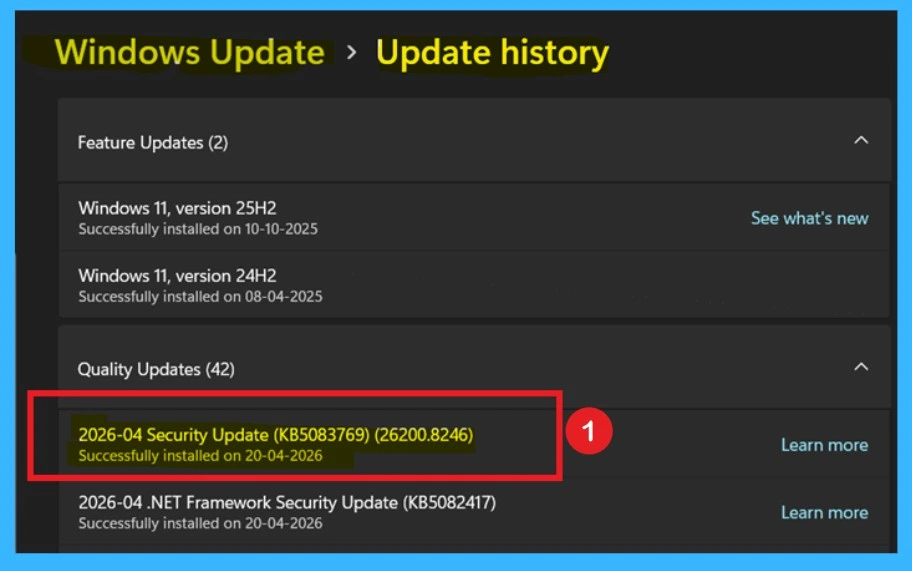
The company has partnered with Ookla, the creator of Speedtest, to integrate this functionality seamlessly into Windows 11. You can check the update through Windows Settings> Windows Update> Update History
- Fix No Internet Issue in Mobile Hotspot Connection in Windows 11
- How to Enable Disable Wake on LAN in Windows 11
- How to Find Wi-Fi Network Password in Windows 11
What’s New in This Update
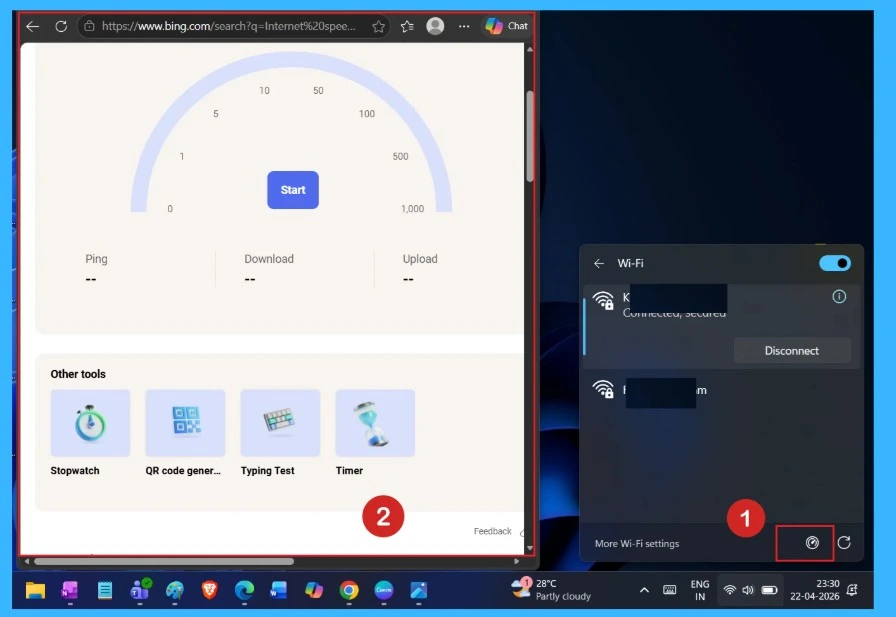
The update is the integration of a built-in internet speed test within Windows 11. Users can now quickly measure their connection without opening a browser or installing additional tools. The feature is accessible through the taskbar network icon or quick settings panel, offering a more direct way to check connectivity status when issues arise.

- In old updates it open through manually in a browser and now open via System taskbar or settings
- Used same Speed Test UI
| Feature | Details |
|---|---|
| Update Name | KB5083769 |
| Supported Versions | Windows 11 24H2 and 25H2 |
| Access Location | Taskbar network icon / Quick Settings |
| Technology Used | Ookla Speedtest (Web SDK) |
| Metrics Measured | Download speed, Upload speed, Latency, Jitter |
| Availability | Rolling out gradually to eligible devices |
Need Further Assistance or Have Technical Questions?
Join the LinkedIn Page and Telegram group to get the latest step-by-step guides and news updates. Join our Meetup Page to participate in User group meetings. Also, join the WhatsApp Community and the Whatsapp channel to get the latest news on Microsoft Technologies. We are there on Reddit as well.
Author
Anoop C Nair has been Microsoft MVP for 10 consecutive years from 2015 onwards. He is a Workplace Solution Architect with more than 22+ years of experience in Workplace technologies. He is a Blogger, Speaker, and Local User Group Community leader. His primary focus is on Device Management technologies like SCCM and Intune. He writes about technologies like Intune, SCCM, Windows, Cloud PC, Windows, Entra, Microsoft Security, Career, etc.