
Key Takeaways
- Windows 365 needs to work well on all platforms, especially Linux, not just Windows and Mac.
- Users should be able to restart and resume their Cloud PC easily without calling IT Professionals.
- Frontline Cloud PCs should remember where users left off, instead of starting fresh every time.
- Setting up Cloud PCs should be simpler and more reliable for admins.
Let’s discuss Windows 365 Cloud PC Top 5 Features Admins are Looking for in 2026. Now a days more over organizations start using Windows365 Cloud PC, So, that the admins are facing some common problems, and they mentioned in the Microsoft feedback page. Here we can understand that the admins are requested to the MS for basic needs that make managing Cloud PCs easier and reduce support tickets.
Table of Contents
Table of Contents
Windows 365 Cloud PC Top 5 Features Admins are Looking for in 2026
Here, in the article we are focussing on the 5 features that are looking Forword for 2026, with these features we can ensure a smooth work on Windows 365 Cloud PC. Admins want better support for different platforms, such as more choice in Cloud PC sizes, and simple controls that users can handle on their own, like restarting or resuming their Cloud PC. There are also issues with provisioning, licensing, and overall usability that slow down deployments and this will lead to extra more works.
| Admin Concern for Features |
|---|
| 1. Windows App for Linux |
| 2. AVD Support on Windows 365 Link |
| 3. More Flexible Cloud PC Sizes and Easy Upgrades |
| 4. Cloud PC Restart |
| 5. Hibernate Support for Windows 365 Frontline |
- How to Hide Shutdown Restart Sleep and Hibernate from Start Menu using Intune Policy
- Latest RDP Connectivity Requirements for Windows 365 and AVD
- New Dedicated Mode Experience in Windows 365 Frontline
- New Shared Mode Experience in Windows 365 Frontline Unlocking New Possibilities for Task Productivity
- Windows 365 Cloud PC Frontline Provisioning Policy Creation Process | 3 Cloud PC with One License
1. Windows App for Linux
In this Windows App for Linux admins are requesting to MS that, create a Linux version of the Windows App for accessing AVD and Windows 365 Cloud PCs. Admins want a Windows App that works on Linux so users can open their Windows 365 Cloud PC easily. Using a web browser is slow and does not work well for many people. Since Microsoft already has apps for Windows and Mac, admins feel Linux should also be supported.
- A Linux app would make work easier, faster, and more reliable for users who use Linux systems.
- In this feedback many admins are agrees to this request.
2. AVD Support on Windows 365 Link
Another request for AVD Support on Windows 365 Link. In the admins feedback they requesting to add Azure Virtual Desktop (AVD) support within Windows 365 Cloud PC. AVD support on Windows 365 Link would simplify hardware choices, reduce management complexity, and allow IT teams to use a single, well-managed device for both services.

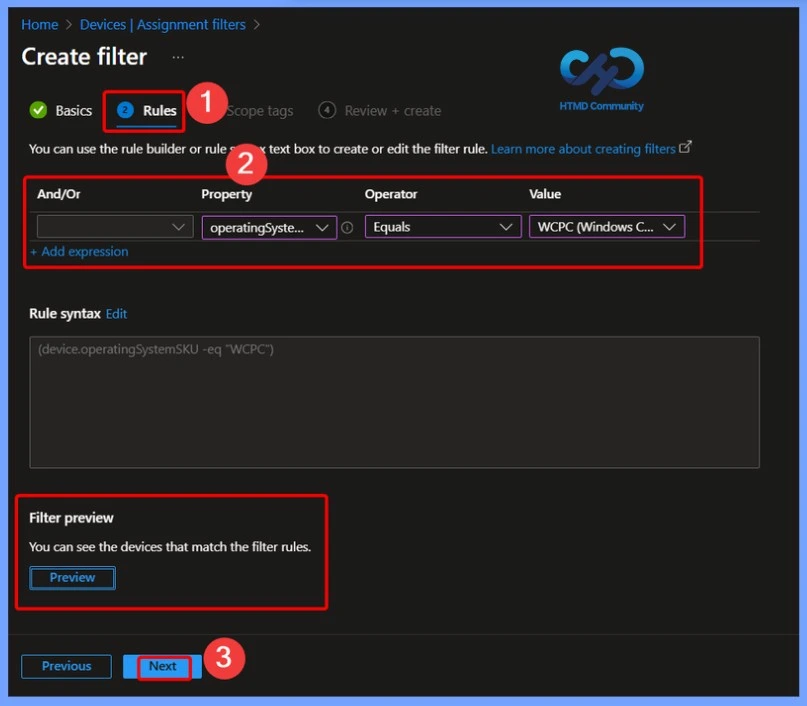
The below screenshot is from our post, How to Create a Device Filter for Windows 365 Link Device using Intune. Intune filters to control and secure Windows 365 Link devices. so may this post help for you.
3. More Flexible Cloud PC Sizes and Easy Upgrades
Admins want more flexible Cloud PC sizes, especially a 4 vCPU with 32 GB RAM option. Right now, if users need more memory, admins must upgrade them to 8 vCPU / 32 GB, which costs much more and adds CPU power they don’t actually need. Many workloads need extra RAM, not extra CPU.
Admins are also asking for an easy upgrade option so users on the base 4 vCPU / 16 GB plan can be stepped up without changing everything. This would help control costs while still giving users the performance they need.
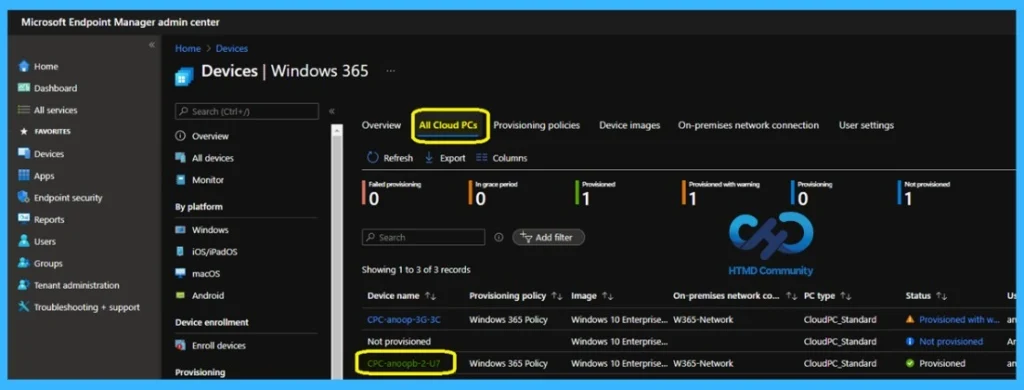
- Here below you can see a screenshot from our post related the Cloud PC size, if you are interested do check our post- Learn How to Resize Cloud PC Windows 365
4. Cloud PC Restart
Here the admins are requested for the Allow non-administrator users to restart their Cloud PC in Windows. Allowing non-administrator users to restart their Cloud PC directly from the Windows interface would greatly improve usability and reduce IT support calls.
Here we have sharing a short video for those who are interested to watch the Windows 365 Cloud PC Remote Restart Explanation- User vs Admin.
5. Hibernate Support for Windows 365 Frontline
Many admins are requested to add ability to hibernate Windows 365 Frontline Cloud PCs in dedicated mode. o users can resume exactly where they left off. Currently, users must start a new session each time, which means reopening applications and losing context. Hibernate would save time, improve productivity, and create a more natural desktop experience for workers.
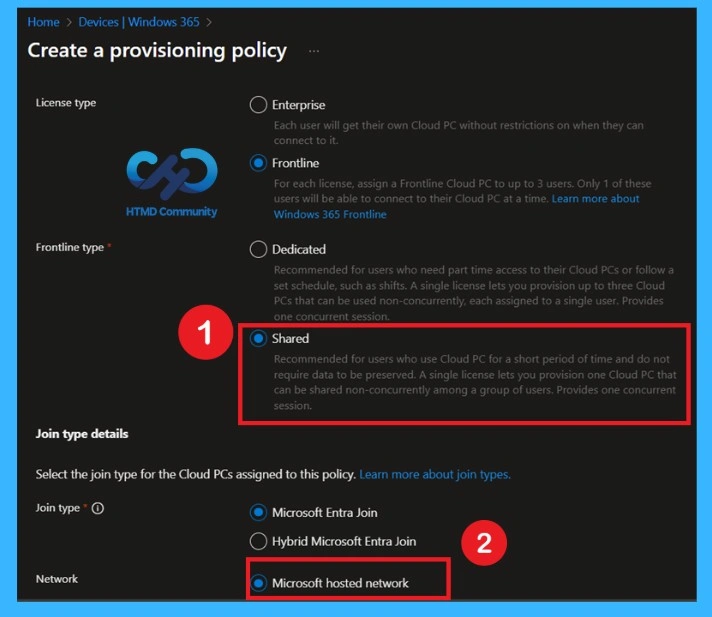
Read More – From Complex VDI to Easy Cloud Desktops with Windows 365 Frontline Shared
Need Further Assistance or Have Technical Questions?
Join the LinkedIn Page and Telegram group to get the step-by-step guides and news updates. Join our Meetup Page to participate in User group meetings. Also, Join the WhatsApp Community and WhatsApp Channel to get the latest news on Microsoft Technologies. We are there on Reddit as well.
Author
Anoop C Nair has been Microsoft MVP for 10 consecutive years from 2015 onwards. He is a Workplace Solution Architect with more than 22+ years of experience in Workplace technologies. He is a Blogger, Speaker, and Local User Group Community leader. His primary focus is on Device Management technologies like SCCM and Intune. He writes about technologies like Intune, Cloud PC, Windows, Entra, Microsoft Security, Career, etc.
I appreciate your insights on the key features of Windows 365 Cloud PC. The emphasis on security and scalability resonates with my experience in managing cloud environments. As we navigate these advancements, it’s fascinating to think about how such technology can lead us toward innovative concepts like Space Waves Game—imagine a future where our digital workspaces are as flexible as virtual realities!