
Key Takeaways
- Understanding Intune Device Sync and Device-to-Cloud Data Flow: Latency Freshness and Completeness Metrics
- End-to-End Device Data Flow: Device data travels through ingestion, processing, the data platform, and finally reaches the Intune admin center and Copilot.
- Latency – Less Than 10 Minutes: Policy and compliance reporting reaches the console within the defined P90 target.
- Freshness – Less Than 5 Minutes: Windows app inventory changes reach the cloud quickly.
- Completeness – Less Than 4 Hours: A full inventory refresh ensures that device information is captured without missing records.
- Timestamped Data: Every record carries a timestamp, helping administrators understand how recent the device information is.
When you click the sync button in the Intune admin center, the Windows device communicates with Intune to check for updates and send device information. This information travels through different stages, such as ingestion, processing, and the data platform, before reaching the Intune admin center and Copilot. This process helps administrators view updated device information.
Table of Content
Table of Contents
Understanding Device Sync and Device-to-Cloud Data Flow: Latency Freshness and Completeness Metrics
The three metrics explain how quickly this information is updated. Latency (less than 10 minutes) measures how quickly policy and compliance reports reach the console. Freshness (less than 5 minutes) means Windows app inventory changes reach the cloud within 5 minutes. Completeness (less than 4 hours) means a full inventory refresh is completed within 4 hours to capture all device information. These are data pipeline targets, not guaranteed manual sync times.
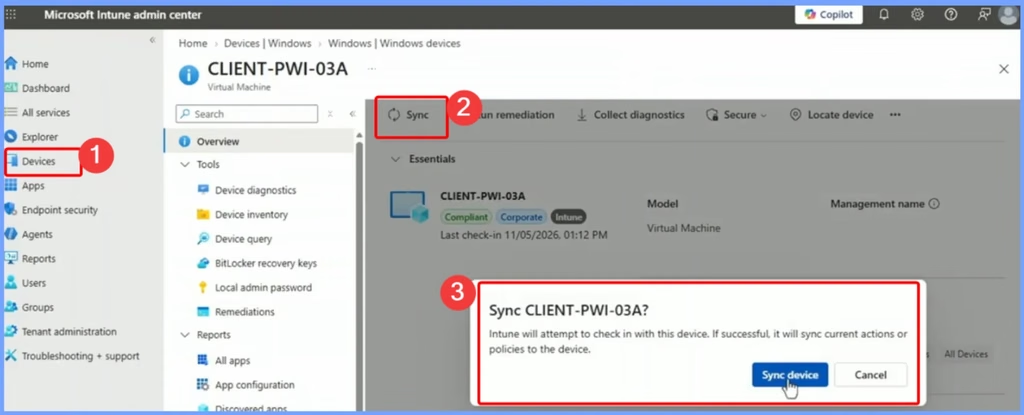
- Devices> Windows > Windows Devices
- Click the Sync button
| Sync Device |
|---|
| Intune will attempt to check in with this devices. If successful it will sync current actions or policies to the devices. |
- Configure Automatic SharePoint Library Sync using Microsoft Intune
- How to Block Syncing of External List Via Lists Sync using Intune
- How to Completely Lockdown OneDrive File Sync with Intune Policy
Real-Time Device Sync Initiation and Progress Tracking
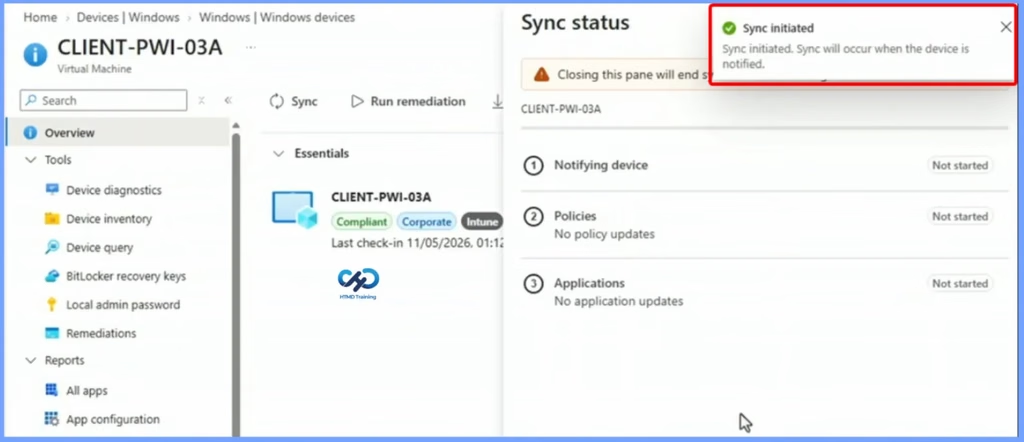
The Sync status interface helps administrators track the progress of a manual device sync. For example, when an administrator starts syncing a device named CLIENT-PWI-03A, a confirmation message appears saying, “Sync initiated. Sync will occur when the device is notified.” This means Intune has received the sync request and will perform the sync when the device receives the notification. A warning message also appears stating that closing the sync pane will stop live progress tracking.
The sync process is divided into three stages: Notifying device, Policies, and Applications. Each stage displays its current status, such as Not started, along with details about policy and application updates. This allows administrators to see the progress of the sync request and understand whether the device has been notified and whether policy and application updates have started.
Sync Status
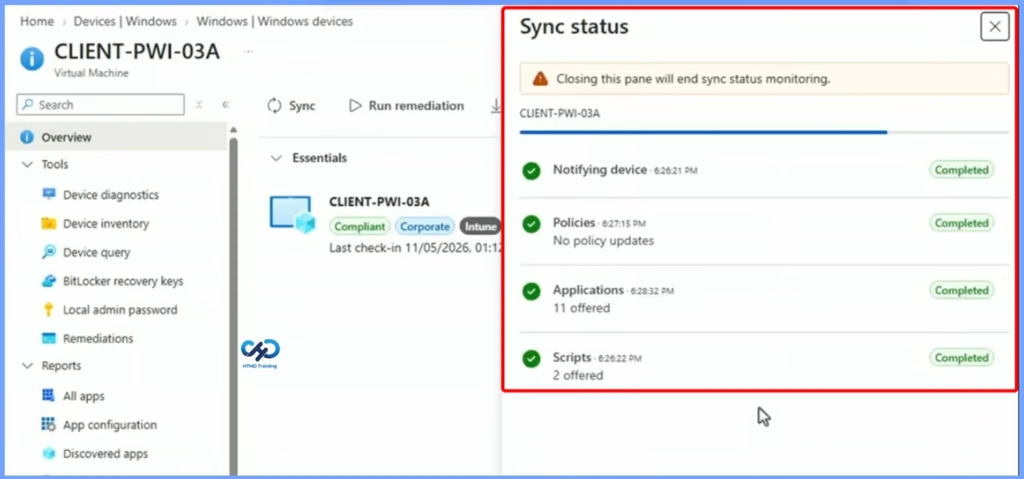
The Sync Status pane for device CLIENT-PWI-03A shows that all synchronization stages have been completed successfully, indicated by green checkmarks. The device was notified at 6:26:21 PM, policies were checked at 6:27:15 PM with no policy updates available, and applications were processed at 6:28:32 PM, with 11 applications offered. Additionally, 2 scripts were offered at 6:26:22 PM. This view helps administrators track the completed sync activities and check the status of policies, applications, and scripts.
Need Further Assistance or Have Technical Questions?
Join the LinkedIn Page and Telegram group to get the latest step-by-step guides and news updates. Join our Meetup Page to participate in User group meetings. Also, join the WhatsApp Community and the Whatsapp channel to get the latest news on Microsoft Technologies. We are there on Reddit as well.
Author
Anoop C Nair is Workplace Technology solution architect with 25+ years of experience in global enterprise organizations such as JP Morgan, Capgemini, etc. He is Microsoft Certified Trainer. Microsoft MVP from 2015 onwards for consecutive 11 years! He also conducts Intune and modern workplace tech training for enterprise organizations. He is Blogger, Speaker, and Founder of HTMD Community and HTMD Conference. His focus is on Device Management technologies such as Intune, Windows, Cloud PC. He writes about technologies like Intune, SCCM, Windows, Cloud PC, Windows, Entra, Microsoft Security.