

Key Takeaways
- iOS devices using embedded WebKit for sign-in are sending incorrect OS version and missing device data
- This causes Conditional Access failures in Microsoft Intune even for compliant devices
- The issue is widely observed across iOS 26.x versions and multiple environments
- Microsoft Outlook works normally because it uses broker-based authentication via Microsoft Authenticator
- The Enterprise SSO plug-in configured through Intune has been confirmed to fully resolve the issue
In this post, we are discussing iOS WebKit Bug Causes Conditional Access Failures in Intune Enrolled Devices. Recently, many IT administrators and Intune admins have faced an issue with iOS devices where users are unable to sign in to Apple Mail despite their devices being fully enrolled and compliant in Microsoft Intune. This unexpected behavior has caused confusion, as everything appears normal from a device management perspective, yet access is still being blocked by Conditional Access policies.
Table of Contents
Table of Contents
iOS WebKit Bug Causes Conditional Access Failures in Intune Enrolled Devices
The problem has been observed mainly on iOS versions 26.3.1 through 26.4, where authentication through embedded WebKit is not sending accurate device information. In several cases, the OS version is incorrectly reported as 18.7.0, and important device attributes are missing. Because Conditional Access depends on this data to validate compliance, login attempts are being denied even for properly managed devices.
Apps like Microsoft Outlook continue to work without any issues on the same devices. This clearly indicates that the issue is not with enrollment or compliance, but with how authentication data is being handled during WebKit-based sign-in flows.
- How to setup Microsoft Enterprise SSO plug-in for Apple macOS Devices using Intune
- How to Troubleshoot Microsoft Enterprise SSO Plug-in on macOS using Intune
- Configure Device Restriction Settings for macOS Devices using Intune
Why this Issue Happens
Several IT professionals have confirmed seeing the same behavior across newly enrolled iOS devices. The issue has been consistently observed since mid-March, particularly on devices updated to iOS 26.x versions. In all cases, Apple Mail fails to authenticate, while other apps continue to work normally.

Some users have also raised the issue publicly to increase visibility between Apple and Microsoft. However, there has been no clear official statement confirming the root cause or providing a permanent fix from either side. Root Cause Linked to WebKit Authentication
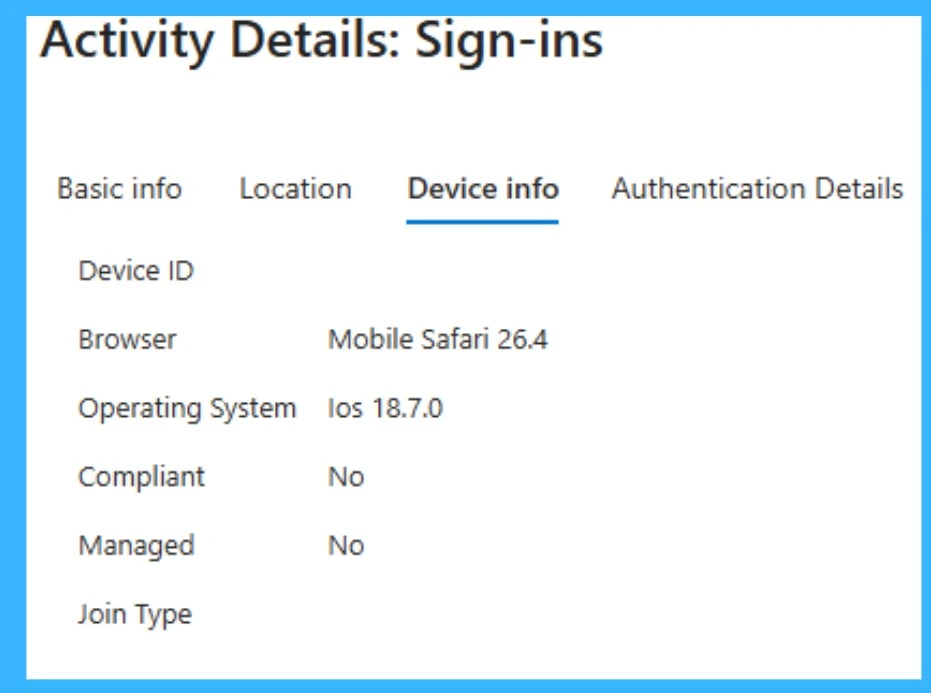
Sign-in Logs Showing Incorrect Device Information
Microsoft Entra sign-in logs clearly show the issue with device reporting. Even though the device is running a newer iOS version, the operating system is incorrectly displayed as iOS 18.7.0, and the device is marked as not compliant and unmanaged. This incorrect data is being sent during authentication through the WebKit-based login flow, which causes Conditional Access policies to fail. It confirms that the issue is not with the actual device compliance, but with how the device information is being reported during the sign-in process.
Workaround through Enterprise SSO Plug-in in Microsoft Intune
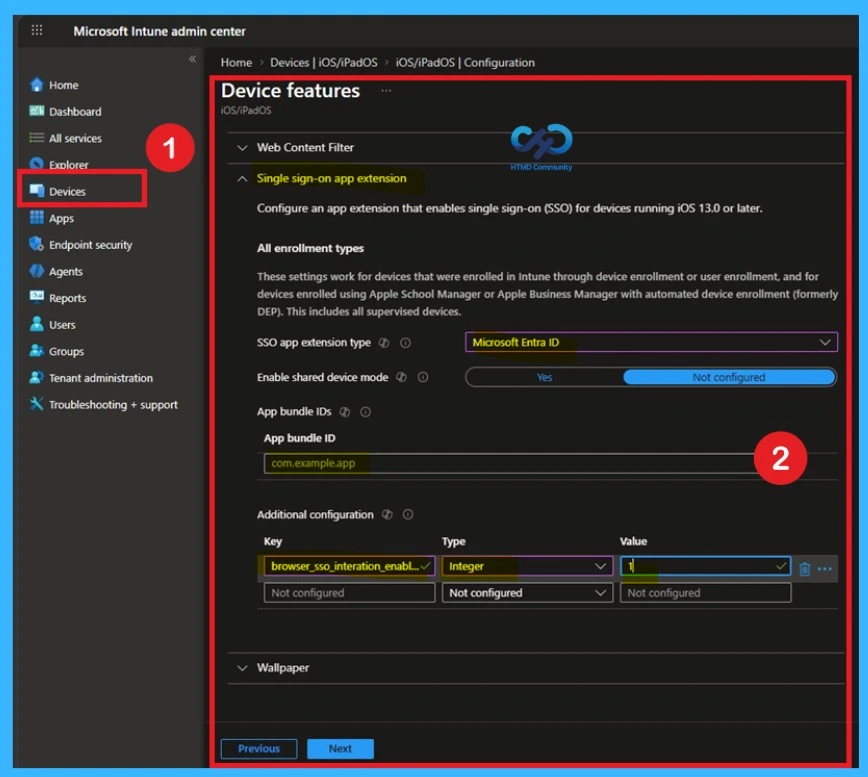
The most effective and confirmed solution is to configure the Enterprise SSO plug-in for iOS devices using Microsoft Intune. Multiple administrators who faced this issue have tested different approaches, and this method has consistently resolved the problem across environments. It ensures that authentication no longer depends on the WebKit flow, which is currently sending incorrect device data.
The configuration of the Single sign-on app extension in Microsoft Intune for iOS devices. Here, administrators select Microsoft Entra ID as the SSO app extension type and define the required settings such as app bundle IDs and additional configuration.
- This setup ensures that authentication requests are handled through a trusted SSO mechanism instead of the embedded WebKit flow.
- As a result, accurate device information like OS version and compliance status is passed during login, which helps resolve the Conditional Access failures experienced on iOS devices.
Redirect users to Outlook for iOS
As a temporary workaround, organizations can guide users to use Microsoft Outlook instead of Apple Mail. redirecting users to Outlook for iOS is important because Outlook doesn’t rely on Apple’s embedded WebKit for sign‑in. Instead, it uses the Microsoft Authenticator broker, which correctly reports the device’s compliance state and OS version to Intune. That’s why Conditional Access passes normally when users authenticate through Outlook, but fails when they try Apple Mai
| Action | Why It Helps | Risk |
|---|---|---|
| Redirect users to Outlook for iOS | Outlook uses the Microsoft Authenticator broker, which correctly reports device info and OS version, so Conditional Access passes. | Requires users to switch mail client; may impact user adoption if they prefer Apple Mail. |
| Check Intune Service Health & Microsoft 365 Message Center | Microsoft often posts advisories when major iOS version changes break compliance logic. Staying updated ensures you know if a fix is rolling out. | No direct fix, just monitoring; relies on Microsoft publishing timely updates. |
| Open a support ticket with Microsoft | Escalates awareness of the issue, may provide targeted hotfixes or early workarounds. | Time‑consuming |
Fix through Conditional Access Policies
Another possible fix is to temporarily adjust Conditional Access policies to allow affected sign-ins. Administrators can consider creating exceptions for specific apps like Apple Mail or modifying device-based conditions to reduce strict checks. However, this should be done with caution, as it may lower the overall security posture of the organization.
Any relaxation of security rules should only be temporary and watched carefully. Once a proper fix, like the SSO plug‑in, is in place, those changes should be removed so strong security is maintained.
Need Further Assistance or Have Technical Questions?
Join the LinkedIn Page and Telegram group to get the latest step-by-step guides and news updates. Join our Meetup Page to participate in User group meetings. Also, join the WhatsApp Community and the Whatsapp channel to get the latest news on Microsoft Technologies. We are there on Reddit as well
Author
Anoop C Nair is a Workplace Technology solution architect with 25+ years of experience. Microsoft Certified Trainer. Microsoft MVP from 2015 onwards for consecutive 11+ years! He is a blogger, Speaker, and Founder of HTMD Community and HTMD Conference. His main focus is on Device Management technologies like Intune, Windows, and Cloud PC. He writes about technologies like Intune, SCCM, Windows, Cloud PC, Entra, and Microsoft Security.