
Today, I will explore the easiest method for finding a list of SCCM client settings assigned for a device in the ConfigMgr console.
The list of client settings feature is useful for troubleshooting scenarios. You can check the client settings. You don’t have to use the PowerShell script or SQL query to find the list of client settings for a device in SCCM.
The client settings list can be accessed from the SCCM admin console itself. The client setting is where you configure SCCM client policies from the server side.
You can modify default client settings to configure settings for all users and devices in your ConfigMgr hierarchy or create a custom settings policy to deploy specific policies to a small set of devices or users.

Table of Contents
Where are SCCM Client Settings Configurations?
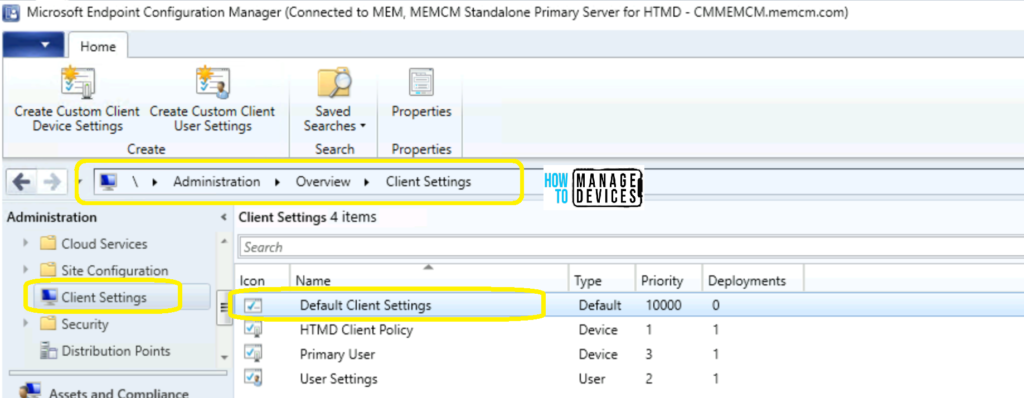
You can configure client settings from the Client Settings node of the Administration workspace in the console.
- Defender Settings Getting Removed for Comanaged SCCM 2309 and 2403 Clients
- List of Supported OS Versions for SCCM Clients
- SCCM 2307 Technical Preview New Features
NOTE: If you want to change client settings, I recommend changing the default client settings instead of creating a custom client policy.
Find the List of SCCM Client Settings Assigned for a Device
Let’s find the SCCM client settings assigned for a device from the ConfigMgr console. You can’t get the list of collections of a user from the SCCM console.
However, you can get a list of a user’s client settings. I have explained this scenario in the section below this post.
- Open Configuration Manager console.
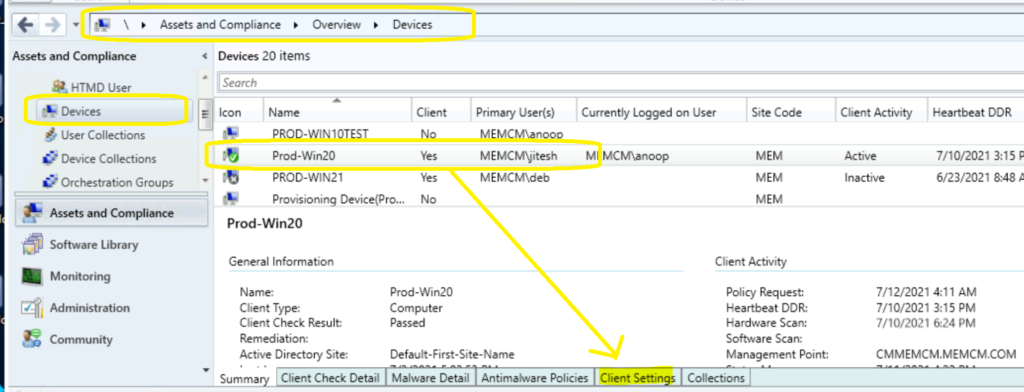
- Navigate \Assets and Compliance\Overview\DevicesYou can also Search for a device from any collection.
- Select a Device (Prod-Win20 is the device).
- Check the bottom of the console – there are 5 different tabs available: Summary.
- Client Check Details
- Malware Detail
- Antimalware Policies
- Client Settings
- Collections
- Click on Client Settings to find out the client settings assigned of a device.
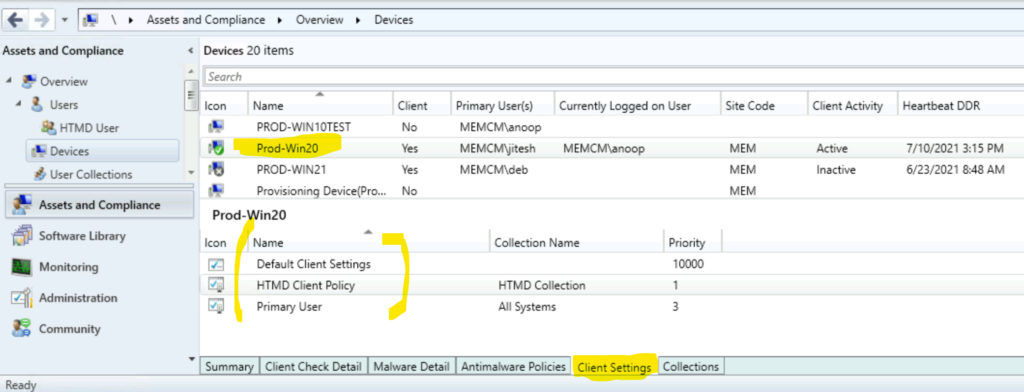
Once you are there in the Client Settings tab, you can see all the assigned client settings. The client settings set for a device called Prod-Win20 are listed below.
Default Client Settings. HTMD Client Policy. Primary User.
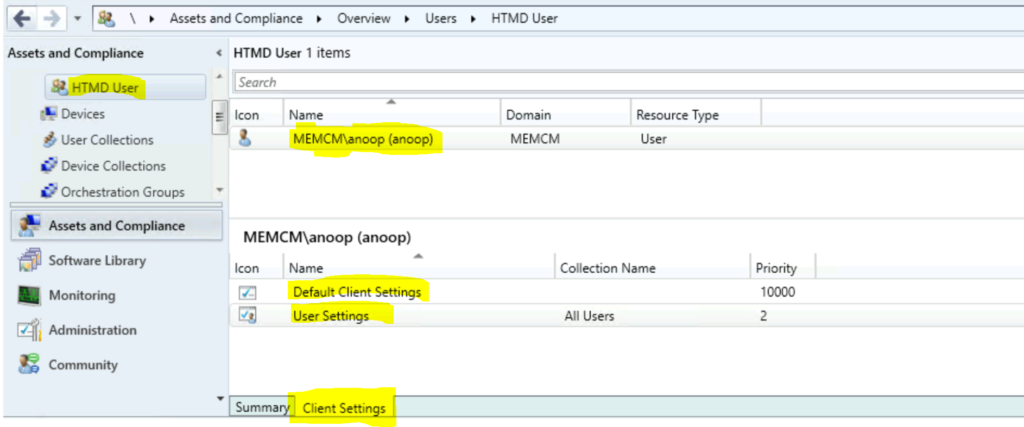
Find List of SCCM Client Settings Assigned for a User
Now, you can check the client settings assigned for a user from the admin console. This is useful for troubleshooting issues on policy settings for users in SCCM.
Resources
We are on WhatsApp. To get the latest step-by-step guides and news updates, Join our Channel. Click here –HTMD WhatsApp.
Author
Anoop C Nair is Workplace Technology solution architect with 25+ years of experience in global enterprise organizations such as JP Morgan, Capgemini, etc. He is Microsoft Certified Trainer. Microsoft MVP from 2015 onwards for consecutive 11 years! He also conducts Intune and modern workplace tech training for enterprise organizations. He is Blogger, Speaker, and Founder of HTMD Community and HTMD Conference. His focus is on Device Management technologies such as Intune, Windows, Cloud PC. He writes about technologies like Intune, SCCM, Windows, Cloud PC, Windows, Entra, Microsoft Security.
Anoop C Nair has been Microsoft MVP for 10 consecutive years from 2015 onwards. He is a Workplace Solution Architect with more than 22+ years of experience in Workplace technologies. He is a Blogger, Speaker, and Local User Group Community leader. His primary focus is on Device Management technologies like SCCM and Intune. He writes about technologies like Intune, SCCM, Windows, Cloud PC, Windows, Entra, Microsoft Security, Career, etc.