
Key Takeaways
- AI agents can now help build native Windows apps using WinUI and Windows App SDK.
- Works with AI coding tools like GitHub Copilot and Claude Code.
- Supports the complete app development process from build to testing.
- Designed to reduce common coding errors and AI loop issues.
- Developers can create WinUI 3 apps faster with simple setup commands.
Microsoft has introduced new AI agent skills that help developers quickly build native Windows apps using WinUI and the Windows App SDK. These skills work with tools like GitHub Copilot and Claude Code to handle the complete app development process, including creating, building, running, testing, and improving apps. The system is optimised to avoid common coding issues and reduce unnecessary AI loops, making app development faster and more efficient. Developers can easily set up the WinUI plugin in GitHub Copilot CLI and start building WinUI 3 apps in just a few minutes.
Table of Content
Table of Contents
New AI Agents can now Build Native Windows Apps using WinUI and Windows App SDK
Developers can now quickly set up AI-powered WinUI app development using GitHub Copilot CLI. By installing the WinUI plugin and running the WinUI setup command, all required tools and prerequisites are automatically configured. Once the setup is complete, you can simply ask GitHub Copilot to generate and help build your WinUI 3 application, making native Windows app development faster and easier.
Add the WinUI plugin to GitHub Copilot CLI
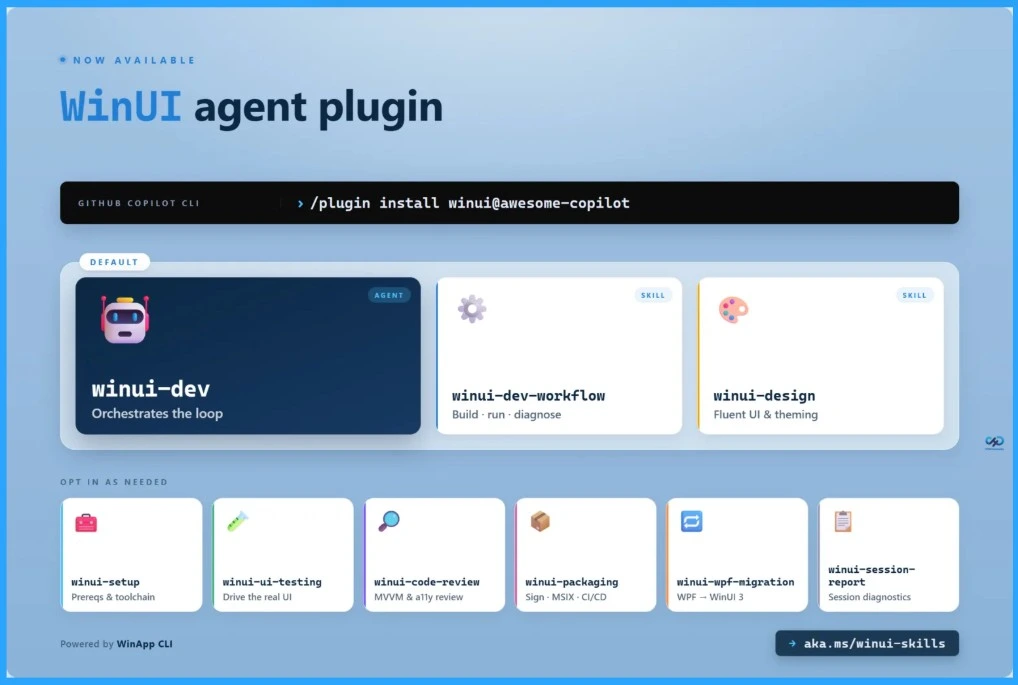
/plugin install winui@awesome-copilot

Run the winui-setup skill to install all prerequisites
/winui:winui-setup
- Microsoft Announces Teams Optimization for Windows App on iOS and Android
- 4 Primary Ways to Connect Windows 365 on Windows and Microsoft Teams Optimizations on Windows App
- How to Create Screen Capture App Protection Policy for Windows 365 App using Intune
- How to Change Policy Assignments for Multiple Users using Microsoft Teams Admin Center
- Fix Remove Account Issue on Microsoft Teams for iPhone Enrolled Devices in Intune
AI Skills to Simplify Native WinUI App Development
Microsoft introduced new WinUI development skills for AI agents like GitHub Copilot to make native Windows app development easier and faster. Normally, building WinUI apps requires knowledge of XAML, MVVM, packaging, accessibility, UI testing, and many other components. AI tools often struggle with these complex steps, mix old technologies with modern WinUI, or fail during app testing and execution.
- To solve this, Microsoft created a dedicated WinUI agent plugin with built-in skills and tools that guide AI agents through the complete app development process.
- The AI can create the project, build and run the app, test functionality, fix coding errors automatically, apply accessibility and design best practices, and even help with packaging and deployment.
- Developers can also use additional skills for UI testing, code reviews, app packaging, and migrating older WPF apps to WinUI.
- The plugin includes one main WinUI development agent and eight specialised skills that work together to simplify Windows app development while using fewer AI tokens and improving efficiency.
Different WinUI Development Tasks
The WinUI agent includes multiple built-in skills, and each skill is designed for a specific task. By default, the agent automatically loads the main development and design skills needed to create a WinUI 3 app from start to finish. The table below helps you to show more details.
| Skill | What it does |
|---|---|
winui-dev-workflow | Build and run workflow – project creation from templates, the BuildAndRun.ps1 helper, winapp run, error diagnosis, prerequisites. Use when building, running, or fixing build errors. |
winui-design | UI design and XAML correctness – layout planning, control selection, Fluent Design, theming (Light/Dark/HighContrast), typography, spacing, brushes, accessibility, data-binding review. Use when designing new pages, converting from WPF/Electron/web, reviewing XAML, or fixing theme issues. |
winui-code-review | Code-quality review before committing – MVVM compliance, x:Bind correctness, accessibility, theming, security, performance. Catches the issues the compiler and UI tests won’t. |
winui-ui-testing | Automated UI testing – generates a batch test script, runs all tests in one pass, reads results. Covers element assertions, interactions, value checks (TextBox, ComboBox, ToggleSwitch), file pickers, flyouts, dialogs, persistence, and accessibility audits. |
winui-packaging | MSIX packaging, code signing, and distribution – release builds, certificate generation (winapp cert generate), trust, signing (winapp sign), self-contained deployment, GitHub Actions CI/CD, and Microsoft Store submission. |
winui-wpf-migration | WPF → WinUI 3 migration – namespace replacement, control mapping (DataGrid → ListView, WrapPanel → ItemsRepeater, TabControl → TabView), Dispatcher → DispatcherQueue, System.Drawing → BitmapImage, MVVM conversion to CommunityToolkit.Mvvm, and DynamicResource → ThemeResource. |
winui-session-report | Diagnostic report on the current or a recent Copilot session. Use when asking for session feedback, debugging agent behavior, or reviewing what happened during a build session. |
winui-setup | Setup your development environment – only call once if needed to ensure all the tools are installed and available. |
Need Further Assistance or Have Technical Questions?
Join the LinkedIn Page and Telegram group to get the latest step-by-step guides and news updates. Join our Meetup Page to participate in User group meetings. Also, join the WhatsApp Community and the Whatsapp channel to get the latest news on Microsoft Technologies. We are there on Reddit as well
Resources
Introducing WinUI agent plugin for GitHub Copilot and Claude Code – #ifdef Windows
Author
Anoop C Nair has been Microsoft MVP for 10 consecutive years from 2015 onwards. He is a Workplace Solution Architect with more than 22+ years of experience in Workplace technologies. He is a Blogger, Speaker, and Local User Group Community leader. His primary focus is on Device Management technologies like SCCM and Intune. He writes about technologies like Intune, SCCM, Windows, Cloud PC, Windows, Entra, Microsoft Security, Career, etc.