

Key Takeaways
- Intune Discovered apps provides a software inventory of apps detected on Intune-enrolled devices.
- It helps you view application names and version details directly from the Intune portal.
- Discovered apps reports are different from app installation reports.
- Intune does not collect unmanaged app data on personal devices.
- On corporate devices, both managed and unmanaged apps are inventoried.
In this post, you will learn how to get Application Version Details from the Intune Portal. Intune discovered apps is a list of detected apps on the Intune-enrolled devices in your tenant. It acts as a software inventory for your tenant. Is Intune Software Inventory missing? This could be one of the reasons!
Before adding apps to Intune and making them available, there are several app requirements. You may find it helpful to assess and understand a few app fundamentals to know the details of the application name and application version.
Discovered apps are separate reports from the app installation reports. For personal devices, Intune never collects information on applications that are unmanaged. On corporate devices, any app, whether it is a managed app or not, is collected for this report.
There are various app types are available for Intune. By exporting lists of applications names and Versions, you can determine app requirements needed by the users at your company, such as the platforms and capabilities that your workforce needs.

Table of Contents
Video – Intune Software Inventory
In this video, let’s discuss Intune Inventory for Mac, iOS, Android, and Windows platforms. Also, check out the custom Inventory Options for Windows Devices.
- Intune Application Deployment using MSI EXE IntuneWin Formats
- Intune Win32 App Deployment Toast Notification | User Experience
Get Application Version Details from Intune Portal
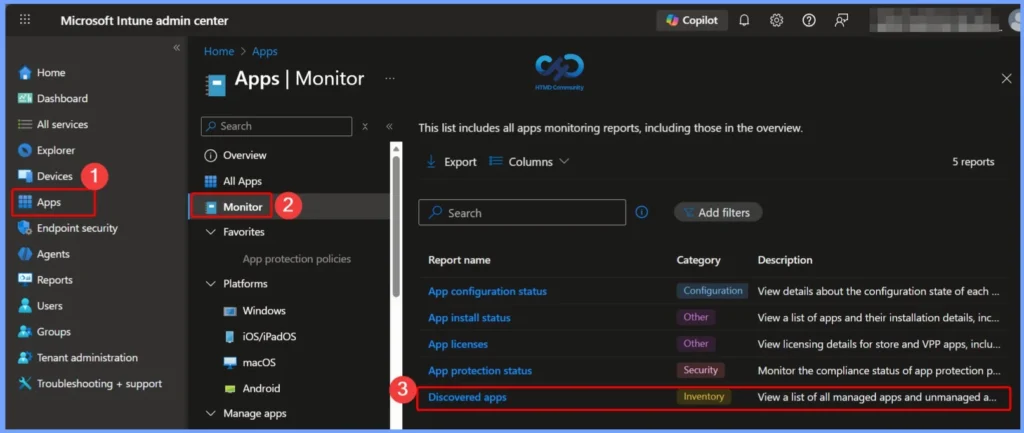
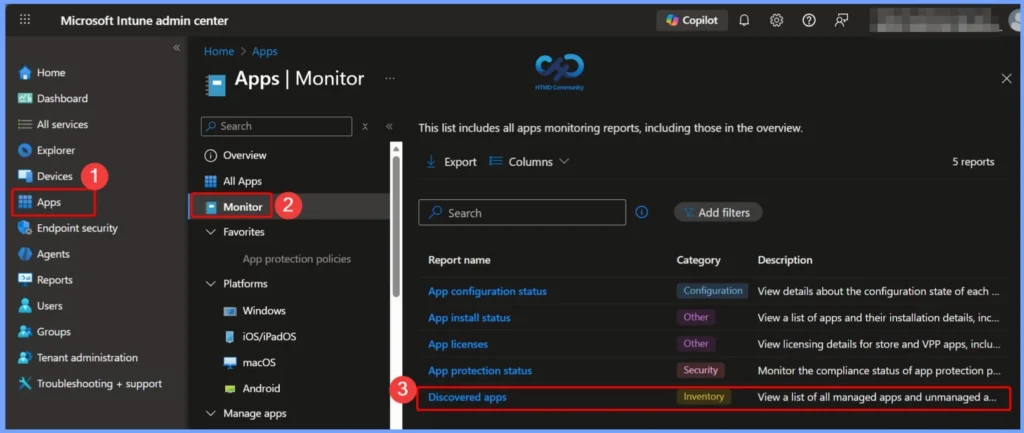
Let’s follow the steps below to get the application version details from Intune Portal, You can be able to quickly locate the discovered apps. Sign in to Microsoft Intune Admin Center https://intune.microsoft.com. Select Apps > Monitor > Discovered apps.
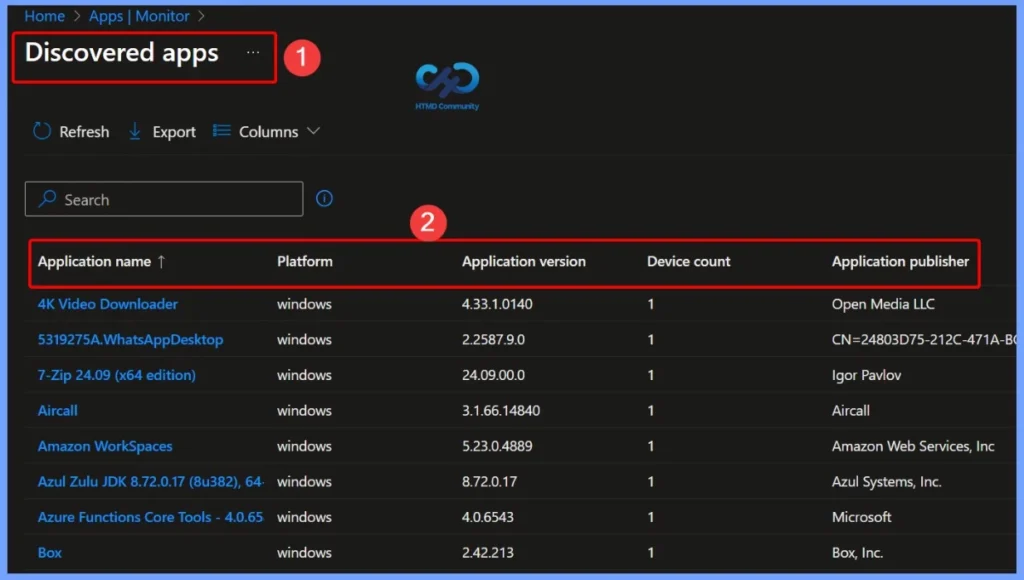
The results include a list of applications, by name, and a field above the list where you can ‘Search by application name’. The report list columns are ‘Application name’, ‘Application version’, ‘Application size’, and ‘Device count’.
Note – For discovered Win32 apps, there currently is no aggregate count. This type of data can only be viewed on a per-device basis.
You can export the list of discovered apps to a .csv file by selecting Export from the Discovered apps pane. Click on the Export. The popup will appear with the following available options when exporting all discovered apps, Choose the option and Click Yes, This will export data to a comma-separated values (.csv) file.
- Export the discovered apps aggregate data set – The CSV file only includes the columns you see within the discovered apps.
- ApplicationName
- ApplicationVersion
- Platform
- Device count
- Application publisher
- Export the discovered apps raw data set – The CSV file includes all available inventory data in your report.
- ApplicationKey
- ApplicationName
- ApplicationVersion
- DeviceName
- Platform
- UserName
- DeviceId
- OSDescription
- OSVersion
- ImeiNumber
- EmailAddress
- BundleSize
- ShortVersion
- UserId
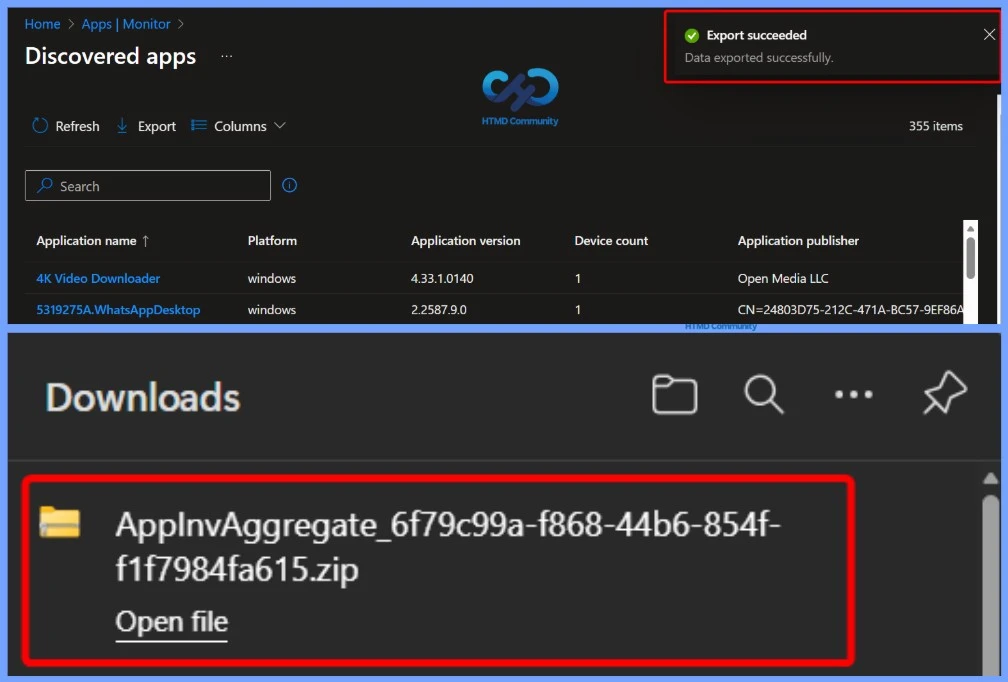
A notification will appear automatically in the top right-hand corner with the message Export is in progress. You can also see the status by selecting the notification icon. All exported data will be automatically downloaded to your browsers in a .zip file format, and a notification message will appear Export completed.
Get Application Version Details Per Device Report
Intune also provides the list of discovered apps for the individual device in your tenant. The following steps help you to collect the details specific to the device.
- Sign in to the Microsoft Intune admin center https://intune.microsoft.com/
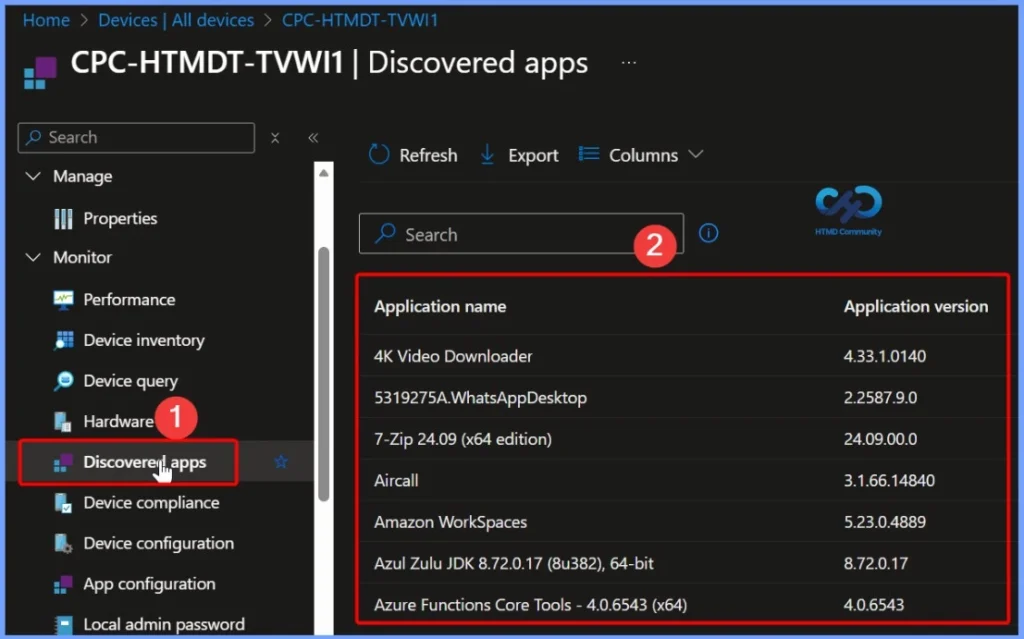
- Choose Devices > All devices and select the device from the list. For Example, I selected the device CPC-HTMDT-TVWI1.
Note: You can also select the Devices by choosing the By platform.
To view detected apps for this device, select Discovered Apps in the Monitor section. Here you can see the Application Name and Application Version for the selected device.
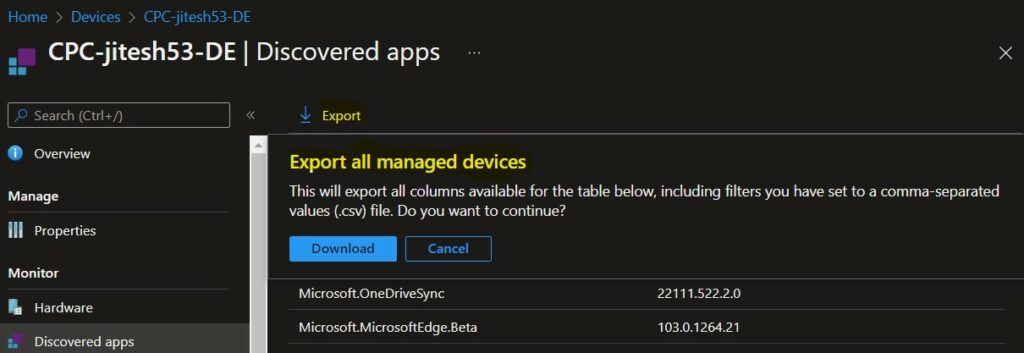
You can export the list of discovered apps to a .csv file by selecting Export from the Discovered apps pane. Click on Download to export the list of installed apps for the device.
A notification will appear automatically in the top right-hand corner with the message Export is in progress. All exported data will be automatically downloaded to your browsers in a .csv file format, and a notification message will appear Export completed.
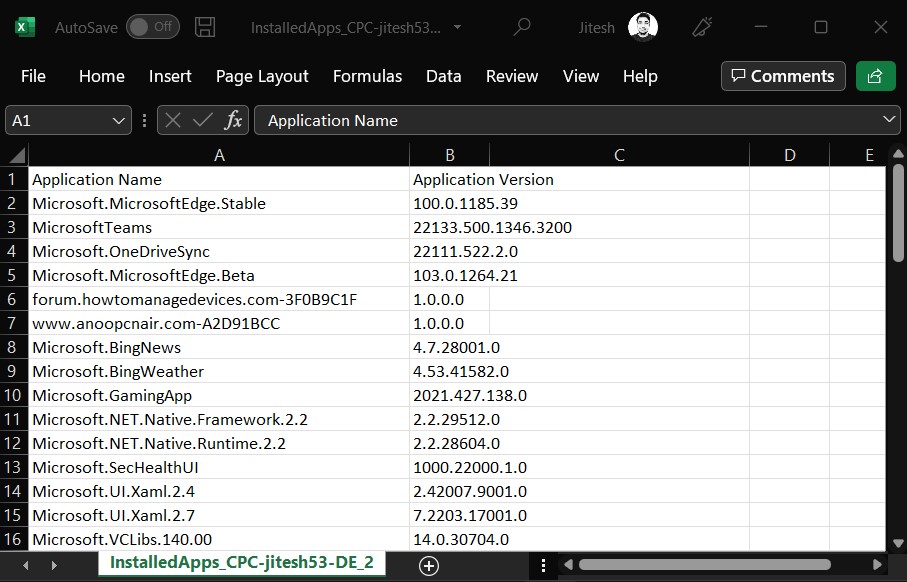
You can now open the exported discovered applications list. The below screenshot shows the list of all the application names and versions that are exported for the device.
Need Further Assistance or Have Technical Questions?
Join the LinkedIn Page and Telegram group to get the latest step-by-step guides and news updates. Join our Meetup Page to participate in User group meetings. Also, join the WhatsApp Community to get the latest news on Microsoft Technologies. We are there on Reddit as well.
Author
About Author – Jitesh, Microsoft MVP, has over six years of working experience in the IT Industry. He writes and shares his experiences related to Microsoft device management technologies and IT Infrastructure management. His primary focus is Windows 10/11 Deployment solution with Configuration Manager, Microsoft Deployment Toolkit (MDT), and Microsoft Intune.
Is there any way to get this data in a powerbi report?
Is it possible to export the raw data of the report for only a specific application from the Application Monitoring.