
Key Takeaways
- Centralised Device Configuration Report directly from the Intune portal.
- Reports can be generated using OS and Profile Type filters for targeted analysis.
- Report columns can be customised to focus on relevant deployment and compliance details.
- The Summary report offers a quick view of the top configuration profile status.
This post explains how to export Intune device configuration profiles from the Intune admin portal. If you are looking for a simple and manual approach, you can export all available configuration profiles from your Intune tenant to a CSV file for review, documentation, or reporting purposes.
Device profiles allow you to add and configure settings, and then push these settings to devices in your organization. You have some options when creating policies, Administrative templates, Baselines, Settings catalog, or Templates.
The Intune Settings Catalog is the best place for all the policy settings in Intune. Microsoft recommends using setting catalog profiles to create and manage security policies. You can find a list of Intune Default and advanced reporting details.
Starting with the Microsoft Intune service release 2008, the new feature, Import custom ADMX and ADML administrative templates were added. You can import custom and third-party/partner ADMX and ADML templates into the Intune admin portal. Import Custom ADMX Administrative Templates In Intune Portal.

You have better options with Intune for exporting and importing Intune policies and configurations from Graph API. You can also try Backup Your Intune Settings Using Script.
Table of Contents
Export Intune Device Configuration Profiles
Here’s how you can export Intune Device Configuration profiles from the Intune Admin portal. You have two options to navigate to the Configuration profiles node: either you can navigate directly to the Devices > Configuration profiles or Devices > By platforms (Windows, iOS/iPadOS, Android, or macOS).
- Sign in to the Microsoft Endpoint Manager admin center https://endpoint.microsoft.com/.
- Navigate to Devices > Configuration profiles.
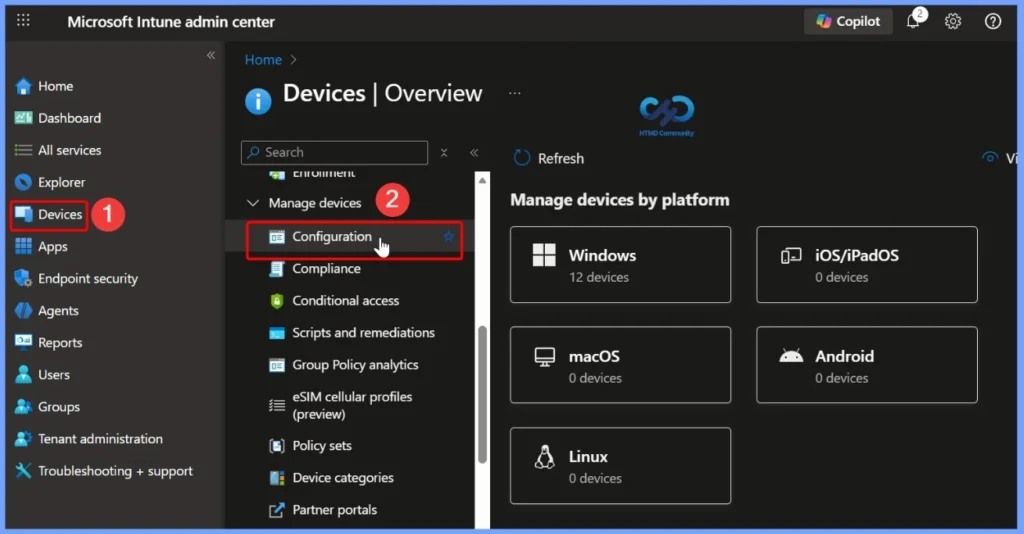
- Intune Device Configuration Report
- How to Get Application Version Details From Intune
- 10 Super Useful End User Portals from Microsoft 365 Intune Azure AD
View and Manage Available Intune Configuration Profiles
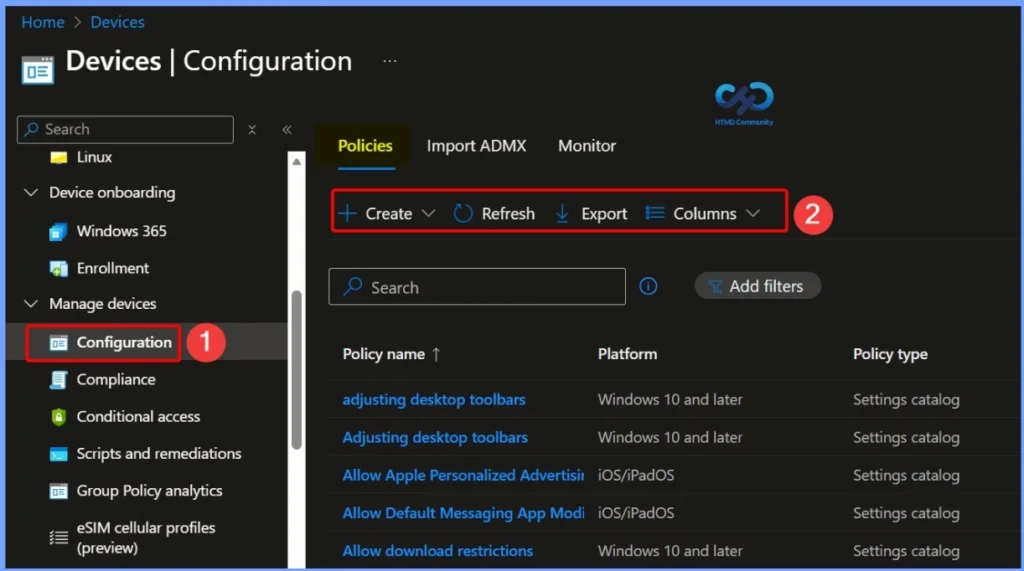
In the Intune admin portal, you can view a list of all available configuration profiles. The profiles displayed depend on the platform you selected during creation, and only the relevant settings appear for that platform. When creating a profile, you can choose the appropriate profile type based on your requirements. You can also search for configuration profiles by name and sort the list by clicking the column headers to quickly locate specific profiles.
- Android device administrator
- Android Enterprise
- iOS/iPadOS
- macOS
- Windows 10 and later
- Windows 8.1 and later
Customize Columns for Intune Configuration Profiles
You can use the Columns property to add or remove columns. Click on the Columns. Next, you will find the following columns that you can include/exclude. The Configuration profiles include.
- Profile name
- Platform
- Profile type
- Last modified
- Scope tags
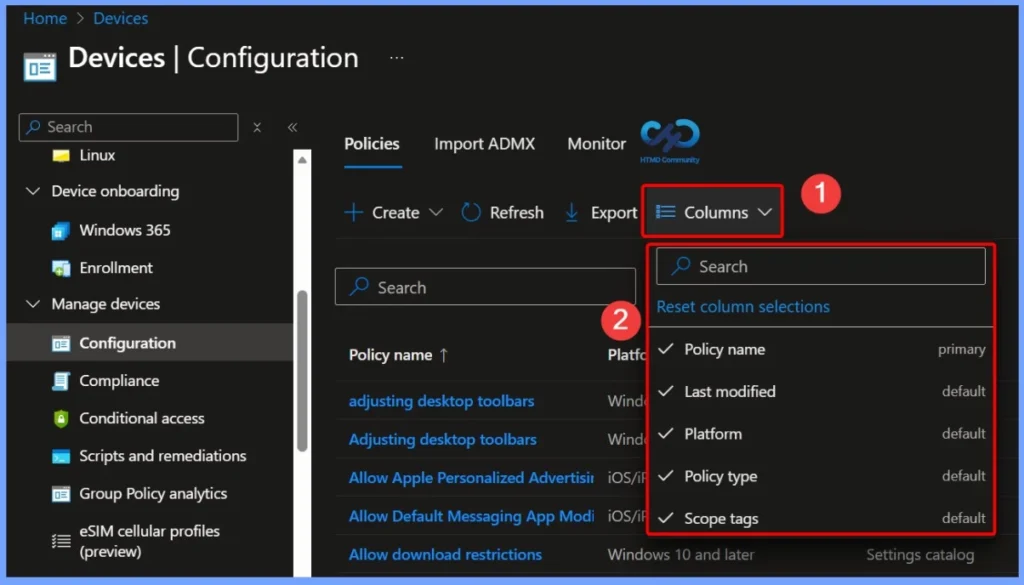
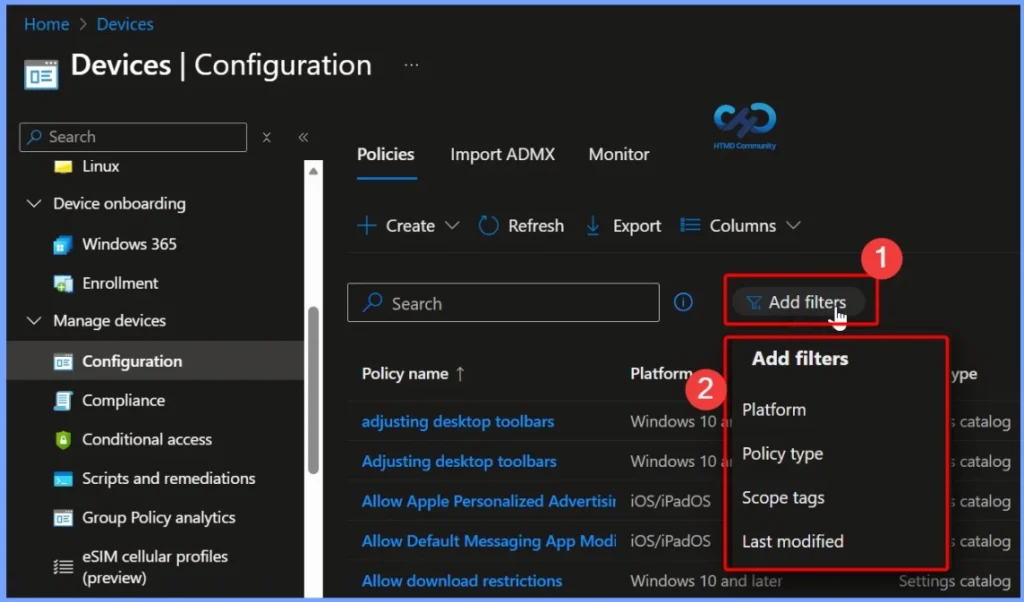
Filter and Column Options for Exported Configuration Profiles
The Filter and Columns options help you refine the list of configuration profiles before exporting. Using these options, you can check or uncheck specific columns to include only the details you need and exclude unnecessary information. This makes the export list more focused, easier to review, and better suited for reporting or documentation purposes.
- Platform
- Scope tags
- Last modified
Export Configuration Profiles from the Intune Admin Portal
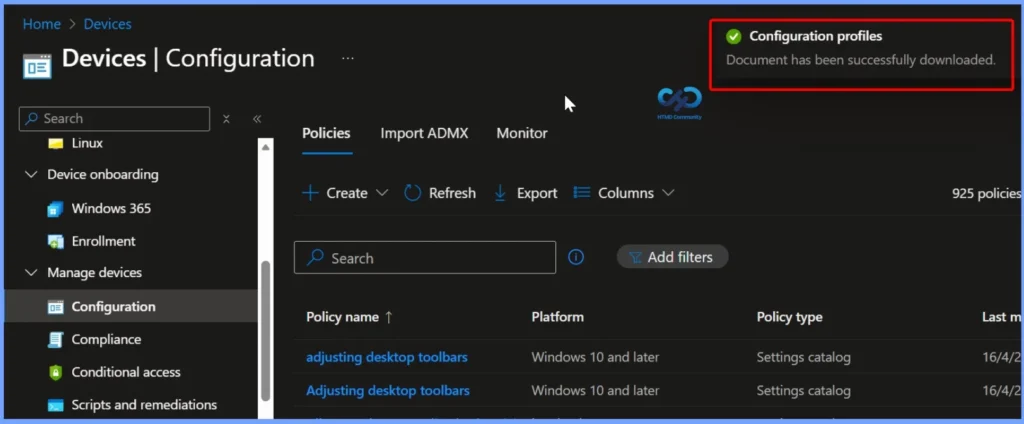
Select Export to download the list of configuration profiles, including any filters and column selections you have applied. Once the export starts, a notification appears in the top-right corner of the Intune admin portal confirming that the document has been successfully downloaded.
Downloaded Export File Format and Details
All exported data is automatically downloaded as a CSV file to your browser. When you open the file, it provides detailed information for all configuration profiles exported from the Intune tenant, making it easy to review settings, document configurations, or use the data for reporting and analysis.
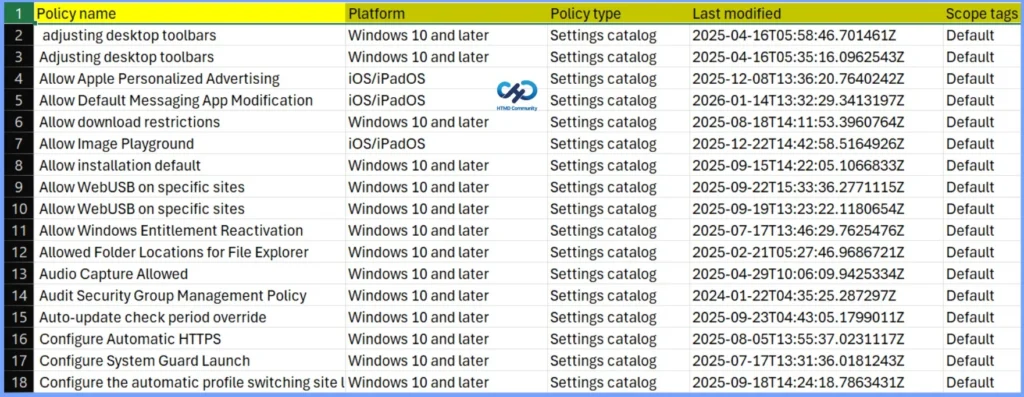
Once you open the exported configuration profiles list, the table displays all exported profiles, including their profile names and profile types. This view helps you quickly identify the type of each configuration profile and verify that the correct profiles were included in the export.
| Policy Name | Platform | Policy Type | Last Modified | Scope Tags |
|---|---|---|---|---|
| Adjusting desktop toolbars | Windows 10 and later | Settings catalog | 2025-04-16T05:58:46.701461Z | Default |
| Allow Apple Personalized Advertising | iOS/iPadOs | Settings catalog | 2025-12-08T13:36:20.7640242Z | Default |
| Allow Default Messaging App Modification | iOS/iPadOs | Settings catalog | 2026-01-14T13:32:29.3413197Z | Default |
| Allow download restrictions | Windows 10 and later | Settings catalog | 2025-08-18T14:11:53.3960764Z | Default |
| Allow Image Playground | iOS/iPadOs | Settings catalog | 2025-12-22T14:42:58.5164926Z | Default |
| Allow installation default | Windows 10 and later | Settings catalog | 2025-09-15T14:22:05.1066833Z | Default |
| Allow WebUSB on specific sites | Windows 10 and later | Settings catalog | 2025-09-22T15:33:36.2771115Z | Default |
| Allow Windows Entitlement Reactivation | Windows 10 and later | Settings catalog | 2025-09-19T13:23:22.1180654Z | Default |
| Allowed Folder Locations for File Explorer | Windows 10 and later | Settings catalog | 2025-07-17T13:46:29.7625476Z | Default |
| Audio Capture Allowed | Windows 10 and later | Settings catalog | 2025-02-21T05:27:46.9686721Z | Default |
Need Further Assistance or Have Technical Questions?
Join the LinkedIn Page and Telegram group to get the latest step-by-step guides and news updates. Join our Meetup Page to participate in User group meetings. Also, join the WhatsApp Community to get the latest news on Microsoft Technologies. We are there on Reddit as well.
Author
About Author – Jitesh, Microsoft MVP, has over six years of working experience in the IT Industry. He writes and shares his experiences related to Microsoft device management technologies and IT Infrastructure management. His primary focus is Windows 10/11 Deployment solution with Configuration Manager, Microsoft Deployment Toolkit (MDT), and Microsoft Intune.