

Exciting news! How to Use the New Favorites Menu Option in MS Intune. You all know about Microsoft Intune and its benefits. Microsoft Intune is a cloud-based service focusing on mobile device management (MDM) and mobile application management (MAM).
It helps organizations manage the devices and applications. Today, I am sharing the great news about the Favourite menu option, now available for Ms Intune. I think it is a much-needed option that will be an essential tool.
The new menu in Microsoft Intune now supports a “Favorites” feature, making it easier to access frequently used settings. We always prefer quick access everywhere while we are working. The new Favorites Menu option in Intune lets users quickly access frequently used settings and features.
This user-friendly tool is significant for IT admins when configuring and deploying policies in Intune. The favourite menu lists the pages and reports you need, which can help reduce your efforts and time. This post will help you use the New Favorites Menu option in MS Intune.

| Index |
|---|
| How to Use the New Favorites Menu option in MS Intune |
- Intune MDM Enrollment Error Code 80180005
- New Platform SSO for macOS Devices in Microsoft Intune
- New Granular Permissions for Endpoint Security Workloads in Intune
- 2406 Microsoft Intune New Features June Update

What is Microsoft Intune?
Microsoft Intune is a cloud-based solution for endpoint management that is aimed at helping organizations efficiently manage and secure their devices and applications.
How to Use the New Favorites Menu Option in MS Intune
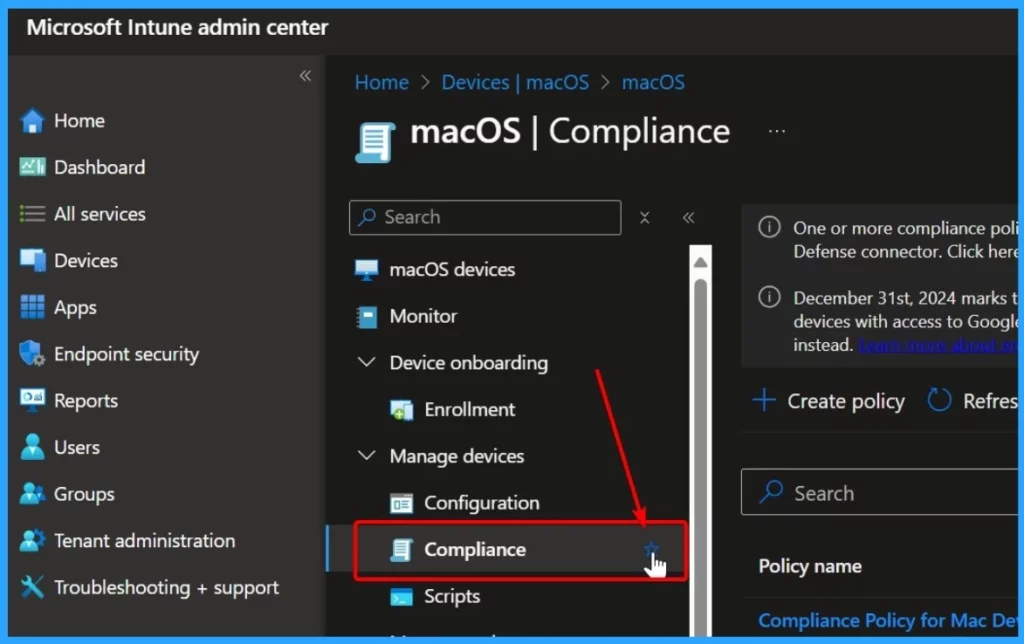
Above, I mentioned the overall use of the New Favorites Menu option in MS Intune. Let’s look into how it is used in Intune. To do that, you must first log in to the Microsoft Intune Portal. Then, you can favourite any section marked under a star note.
| How to Use Favorites Menu Option |
|---|
| Here, you can see that I want to add Compliance to my Favourite list. |
| You have to click on the Star option near Compliance. |
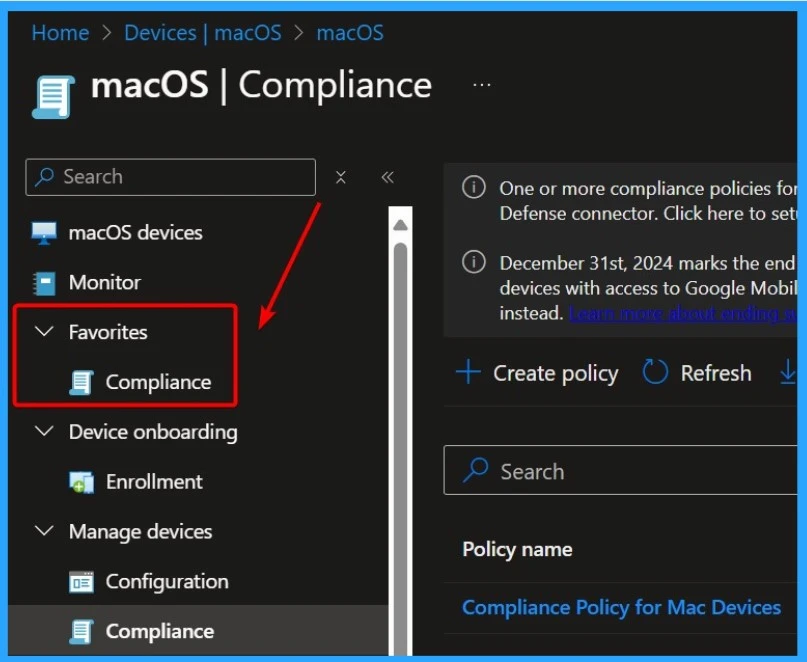
You can find the Compliance option under the Favourite section when you add compliance to your favourite list. Clicking the star button pins the blade to the top under the “Favorites” heading.
We are on WhatsApp. To get the latest step-by-step guides and news updates, Join our Channel. Click here –HTMD WhatsApp.
Author
Anoop C Nair is Workplace Technology solution architect with 25+ years of experience in global enterprise organizations such as JP Morgan, Capgemini, etc. He is Microsoft Certified Trainer. Microsoft MVP from 2015 onwards for consecutive 11 years! He also conducts Intune and modern workplace tech training for enterprise organizations. He is Blogger, Speaker, and Founder of HTMD Community and HTMD Conference. His focus is on Device Management technologies such as Intune, Windows, Cloud PC, He writes about technologies like Intune, SCCM, Windows, Cloud PC, Windows, Entra, Microsoft Security.