
Key Takeaways
- Identify application and driver compatibility risks before deploying Windows feature updates.
- Assess device readiness for a selected Windows version across your organization.
- Filter compatibility results by target operating system, asset type, and risk status.
- Improve Windows update planning and reduce upgrade-related issues.
Let’s check how to Manage Windows Feature Update Compatibility Risks Report to Ensure Successful Windows Upgrades using Intune. The Windows Feature Update Compatibility Risks Report in Microsoft Intune helps administrators identify compatibility concerns that could affect devices when upgrading to a newer version of Windows. This report provides actionable insights into applications, drivers, and other assets that may require attention before rolling out a Windows feature update.
Table of Contents
Table of Contents
Manage Windows Feature Update Compatibility Risks Report to Ensure Successful Windows Upgrades using Intune
To help prepare for update deployments, Intune offers integrated reports to help you understand compatibility risks that might impact your devices during or after an update. The report is particularly useful when planning large-scale Windows 11 upgrade deployments across an organization. By analyzing compatibility risks in advance, administrators can minimize upgrade failures, reduce user disruption, and address issues proactively. It offers a summarized view of risks across managed devices, making it easier to prioritize remediation efforts.
- Windows Feature Update Device Readiness Intune Report
- Intune Reporting Issue: Expedite Windows Security Patch Deployment
- List of Intune Default Reports Reporting Strategies Advanced Reporting Options
Let’s Check Windows Update Compatibility Intune Report
To use these reports, you must first ensure that prerequisites are met and that devices are properly configured for data collection. The Windows feature update compatibility risks report provides a summary of the compatibility risks across your organization associated with an upgrade or update to a chosen version of Windows.
- Login to the MS Intune Admin Center
- Go to Reports > Windows updates
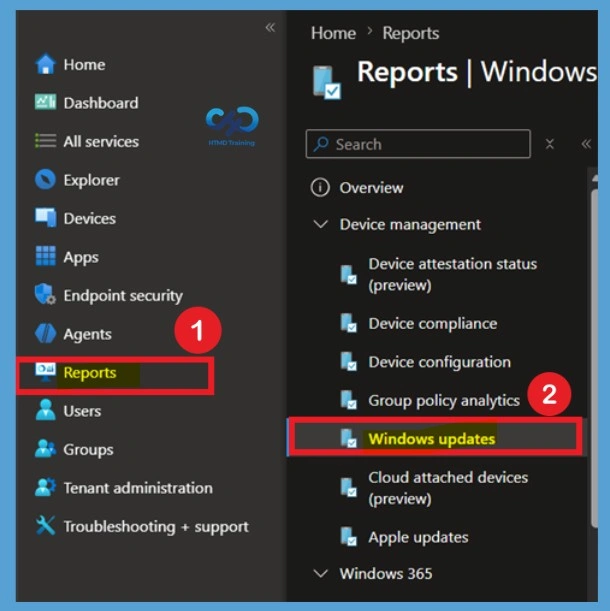
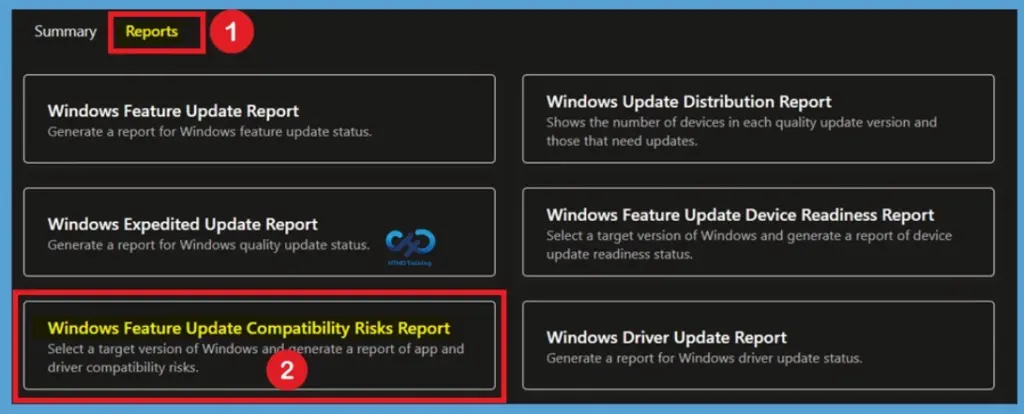
Open the Reports Tab
Navigate to the Reports tab from the Windows Updates page in the Intune admin center. This tab provides access to various Windows Update reporting options that help administrators monitor update deployments, device readiness, and compatibility information across managed devices.

- Here, Click on the Reports Tab
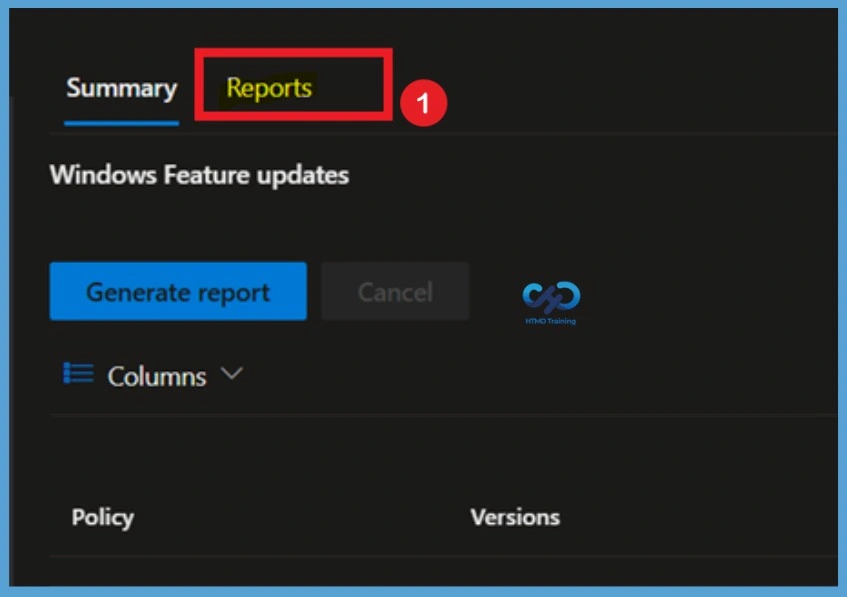
Know the Report Section
Clicking the Reports tab displays multiple report categories related to Windows feature updates, expedited updates reports, driver updates, and compatibility risks. These reports help identify devices that may experience issues before deploying a new Windows version.
- Windows Feature Update Report– Generate a report for Windows feature update status.
- Windows Expedited Update Report – Generate a report for Windows quality update status.
- Windows Feature Update Compatibility Risks Report – Select a target version of Windows and generate a report of app and driver compatibility risks.
- Windows Update Distribution Report – Shows the number of devices in each quality update version and those that need updates.
- Windows Feature Update Device Readiness Report – Select a target version of Windows and generate a report of device update readiness status.
- Windows Driver Update Report – Generate a report for Windows driver update status.
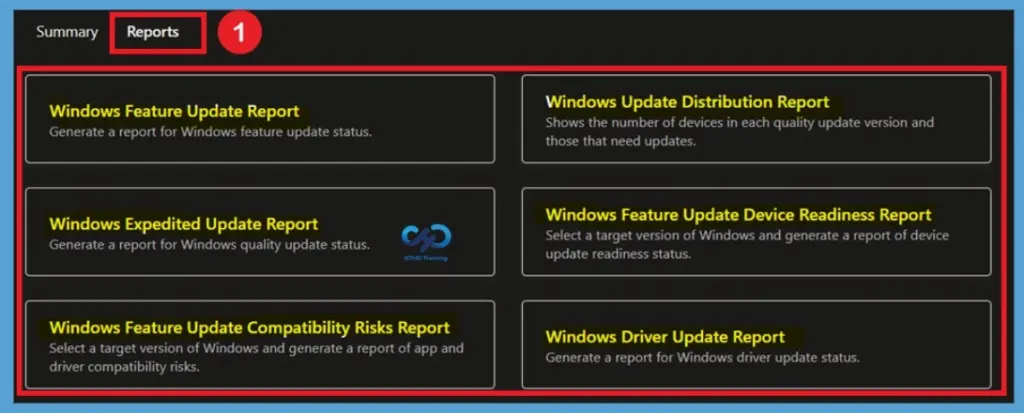
Select the Windows Feature Update Compatibility Risks Report
From the available reports, click Windows Feature Update Compatibility Risks Report. This report is designed to identify potential application and driver compatibility issues that could prevent devices from successfully upgrading to a selected Windows feature update version.
The compatibility risks report provides valuable insights into devices that may require remediation before an update rollout. Using this report allows administrators to proactively assess upgrade risks and plan feature update deployments more effectively.
Select the Target Operating System
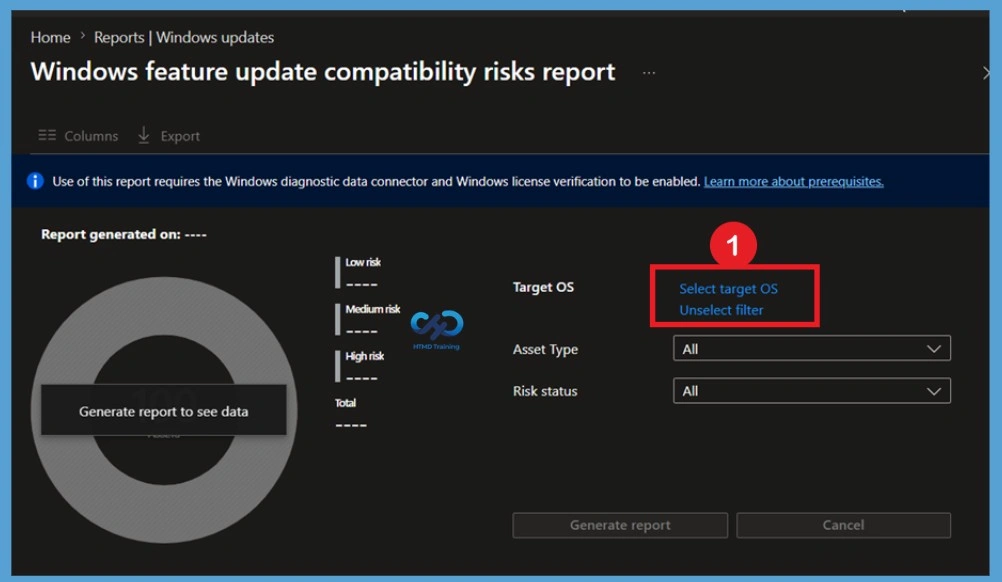
On the compatibility risks report page, click Select target OS to choose the Windows feature update version that you want to evaluate. The selected target OS determines which compatibility checks will be performed against your managed devices.
Selecting a target operating system enables Intune to compare device hardware, drivers, and applications against the requirements of the chosen Windows version. This helps ensure that devices are ready for the upgrade and highlights any compatibility concerns.
Note – To ensure the accuracy of insights, confirm that your selected OS version matches the version of Windows you intend to deploy.
Choose the Required Windows Version
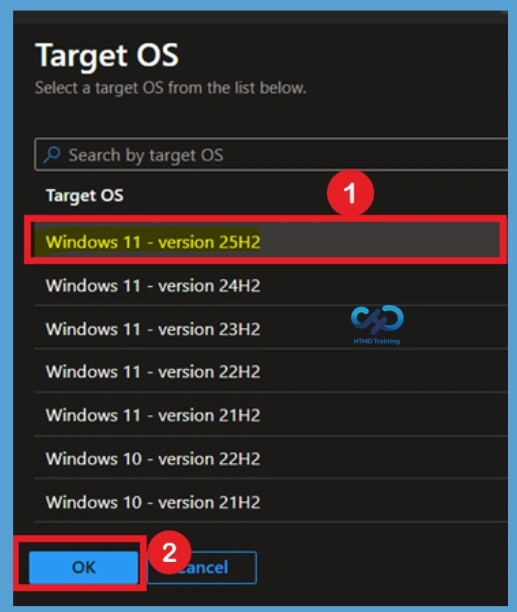
A list of supported Windows versions will appear. Select the required Windows version, such as Windows 11 version 25H2, and click Ok to confirm your selection. You can choose any available Windows version based on your organization’s update plans.
After confirming the selection, the target OS will be applied to the report configuration. Once selected, you can proceed with generating the compatibility report to review device readiness and identify any risks associated with upgrading to the chosen Windows feature update version.
Generate the Compatibility Risks Report
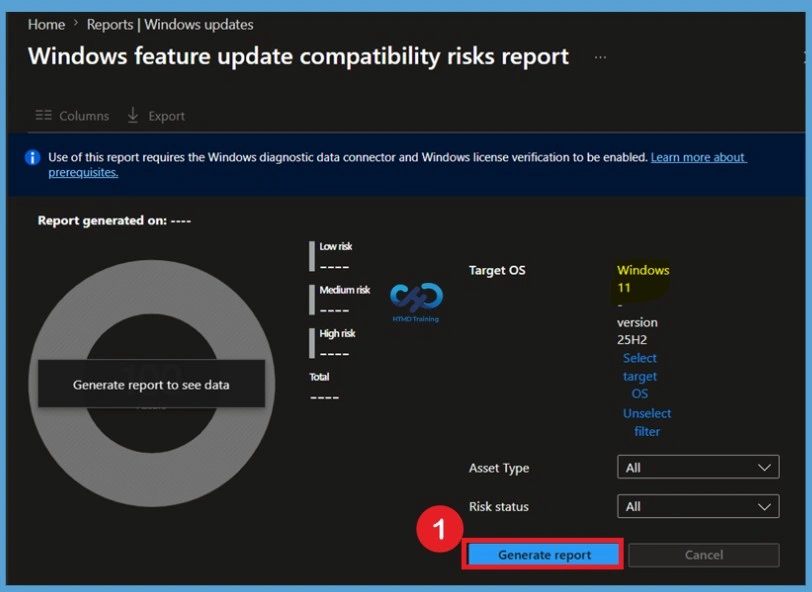
After selecting the target Windows version and configuring the optional filters, click Generate report to create the Windows Feature Update Compatibility Risks Report. Intune begins collecting and analyzing compatibility data for applications, drivers, and other assets associated with the selected Windows feature update version.
- Once the process completes “Reports successfully generated”, you will get a success message – Generating Windows feature update compatibility risks report for selected scope tags, target OS, asset type, and risk status.
- If you’d like to regenerate the report with different settings or pull the latest data, follow the steps above and click Generate again.
When you generate a report, the data in the report is cached on a per-user basis. Other Intune users in your organization will not be able to see the report you have generated.
Customize the Report Columns
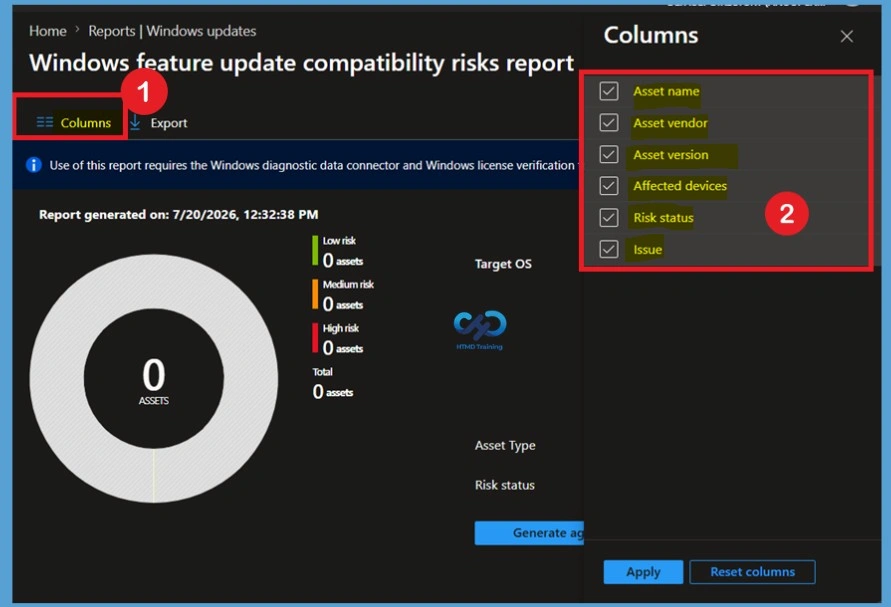
Click the Columns option to customize the information displayed in the generated report. The Columns pane allows administrators to select which report attributes should be visible based on their reporting and troubleshooting requirements. Use the Columns property to add or remove columns from the generated report. Click on the Columns, and A flyout displays. Here you can Check or Uncheck the columns you want to include.
The following columns are available in this report:
| Columns Options | Info |
|---|---|
| Asset type | The type of asset that has a compatibility risk. Options include Application, Driver, and Other. |
| Asset name | The name of the asset with a compatibility risk, such as the application name. |
| Asset vendor | The name of the vendor who publishes the asset with a compatibility risk. |
| Asset version | The version of the asset with a compatibility risk. |
| Affected devices | The number of enrolled devices that might be impacted by this compatibility risk. |
| Risk status | A summary of the severity of the compatibility risk. Most compatibility risks are medium risk if they might block the upgrade. |
| Issue | A description of the compatibility risk that has been identified |
Export Windows Update Compatibility Intune Report For App and Driver
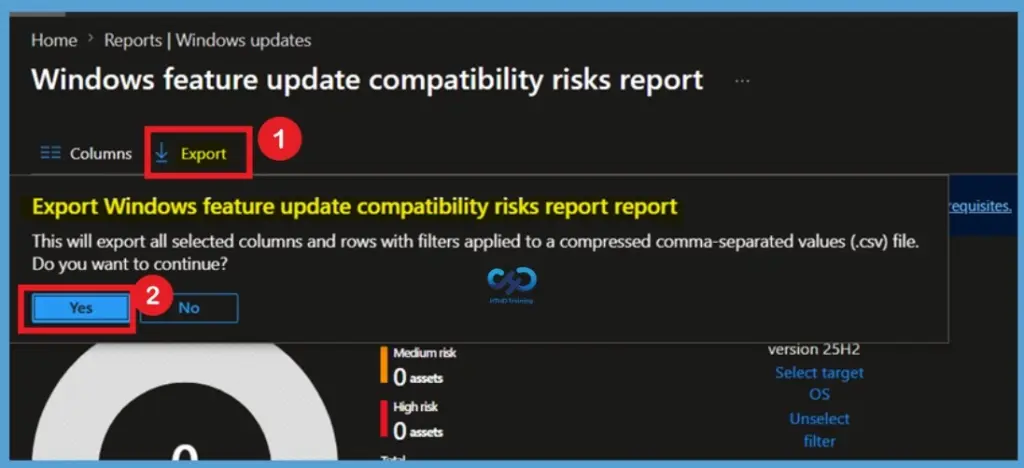
Once the report has been generated, click the Export option to download the compatibility risk data for offline review and documentation. Intune exports the report as a compressed CSV file containing all the available compatibility information based on the selected report filters. You can quickly export reporting data generated. Click on the Export.
- The popup will appear with the following message when exporting generated Windows feature update device readiness report, Click Yes. This will export data to a compressed comma-separated values (.csv) file.
- A notification will appear automatically in the top right-hand corner with the message Export is in progress, and you will get a success message once the process completes.
Need Further Assistance or Have Technical Questions?
Join the LinkedIn Page and Telegram group to get the latest step-by-step guides and news updates. Join our Meetup Page to participate in User group meetings. Also, join the WhatsApp Community and the WhatsApp channel to get the latest news on Microsoft Technologies. We are there on Reddit as well
Author
About Author – Jitesh, Microsoft MVP, has over six years of working experience in the IT Industry. He writes and shares his experiences related to Microsoft device management technologies and IT Infrastructure management. His primary focus is Windows 10/11 Deployment solution with Configuration Manager, Microsoft Deployment Toolkit (MDT), and Microsoft Intune.