
Key Takeaways
- Generic product keys are for installation or edition upgrade only.
- They do not permanently activate Windows 11.
- A valid product key or digital license is required for full activation.
- Windows 10 product keys usually work for Windows 11.
- Product keys can be retrieved using CMD, Registry, WMI, or PowerShell.
- Unactivated Windows shows warnings and limits personalization features.
Microsoft provides generic product keys for Windows 11 to help users install or test different editions, such as Home or Pro. These keys, like VK7JG-NPHTM-C97JM-9MPGT-3V66T for Pro or YTMG3-N6DKC-DKB77-7M9GH-8HVX7 for Home, are not activation keys. They only allow you to complete the installation or upgrade process, but they do not permanently activate Windows. After installation using a generic key, Windows will run normally, but it will remain in an unactivated state until you enter a valid purchased product key or activate it using a digital license.
Table of Content
Table of Contents
How to Find Windows 11 Product Key from an Existing Device
If you forget the product key used to activate Windows 11, you can retrieve it directly from your existing device. This is helpful when you are planning to reinstall Windows or activate it again and no longer have the original key stored elsewhere. In many cases, a valid Windows 10 product key will also work for Windows 11. You can recover the product key using simple methods as follows.
| Find Windows 11 Product Key |
|---|
| Command Prompt (CMD) |
| Registry – GUI and Command-Line. |
| WMI – Command-Line and WMI Explorer. |
| PowerShell command. |
- How to Check Your Windows 11 Edition
- Easy Methods to Know the Version of Installed Apps in Windows 11
- Windows 10 Version Numbers Build Numbers Major Minor Build Rev
Windows 11 Activation and Unactivated Limitations
After installing Windows 11 using a USB bootable media and entering a product key, activation is the next important step. Activation confirms that your copy of Windows is genuine and properly licensed, allowing you to use it permanently and access all available features.
- Although Windows 11 can run temporarily without activation for testing purposes (typically for a few days), it will display warning messages and an “Activate Windows” watermark on the desktop.
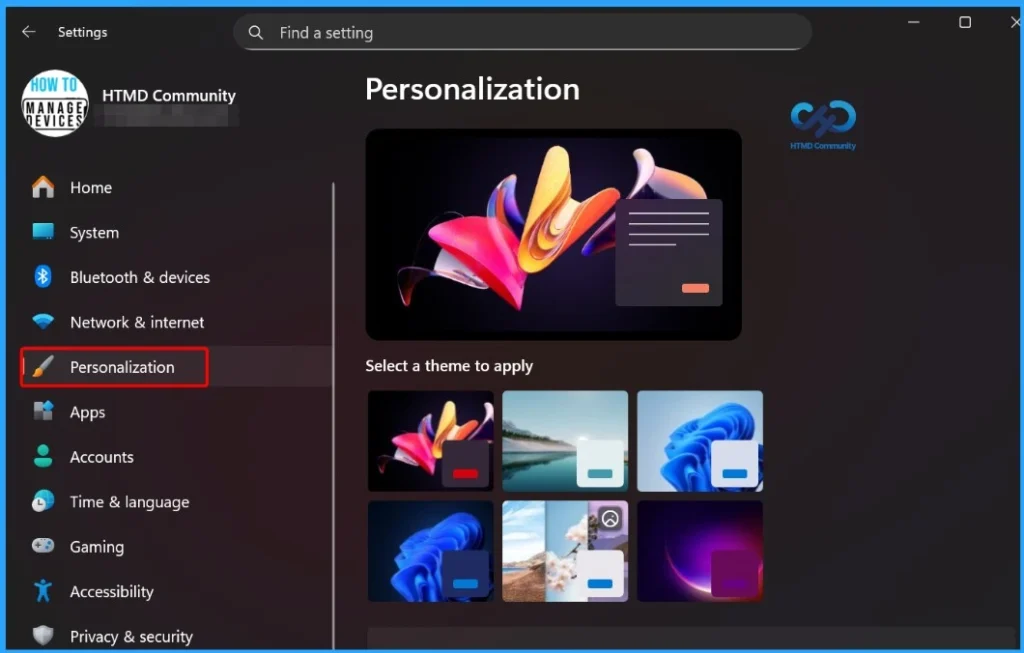
- In the unactivated state, certain personalization features such as dark mode, themes, and wallpaper settings cannot be changed until the system is successfully activated.
What Are Generic Windows 11 Product Keys?
Microsoft provides generic product keys for Windows 11 to help users install and test different editions of the operating system. These keys are freely available and are mainly intended for evaluation, lab environments, or temporary setups. The table below shows more details.

| Category | Details |
|---|---|
| Product | Windows 11 |
| Purpose of Generic Keys | Used to install or test specific editions (Home, Pro, Enterprise). |
| Cost | Freely available from Microsoft documentation. |
| Common Use Cases | Evaluation, lab environments, virtual machines, temporary setups. |
| Activation Status | Do NOT activate Windows permanently. |
| What They Allow | Complete installation or upgrade to a selected edition. |
| What They do not Allow | Permanent activation or removal of limitations. |
| Activation Requirement | Requires a valid production license key or digital license. |
| Server Availability | Similar generic keys available for Windows Server 2022 and other supported Windows Server versions. |
List of Windows 11 Generic Product Keys
Let’s find out the list of free generic Windows 11 product keys from the following list. You have different keys for different versions of Windows 11. You can also get the Generic KMS licensing key details from the Microsoft documentation page, as explained below.
| Windows 11 Product Keys | List of Generic Key |
|---|---|
| Windows 11 Education | YNMGQ-8RYV3-4PGQ3-C8XTP-7CFBY |
| Windows 11 Enterprise | XGVPP-NMH47-7TTHJ-W3FW7-8HV2C |
| Windows 11 Pro Education | 8PTT6-RNW4C-6V7J2-C2D3X-MHBPB |
| Windows 11 Pro | VK7JG-NPHTM-C97JM-9MPGT-3V66T |
| Windows 11 Home | YTMG3-N6DKC-DKB77-7M9GH-8HVX7 |
| Windows 11 Home Home Single Language | BT79Q-G7N6G-PGBYW-4YWX6-6F4BT |
| Windows 11 Home Country Specific | N2434-X9D7W-8PF6X-8DV9T-8TYMD |
| Windows 11 Pro for Workstations | DXG7C-N36C4-C4HTG-X4T3X-2YV77 |
| Windows 11 Enterprise N | WGGHN-J84D6-QYCPR-T7PJ7-X766F |
| Windows 11 Enterprise G N | FW7NV-4T673-HF4VX-9X4MM-B4H4T |
| Windows 11 Education N | 84NGF-MHBT6-FXBX8-QWJK7-DRR8H |
| Windows 11 Pro Education N | GJTYN-HDMQY-FRR76-HVGC7-QPF8P |
| Windows 11 Pro N | 2B87N-8KFHP-DKV6R-Y2C8J-PKCKT |
| Windows 11 Pro for Workstations N | WYPNQ-8C467-V2W6J-TX4WX-WT2RQ |
| Windows 11 Home N | 4CPRK-NM3K3-X6XXQ-RXX86-WXCHW |

KMS Client Generic Product Key
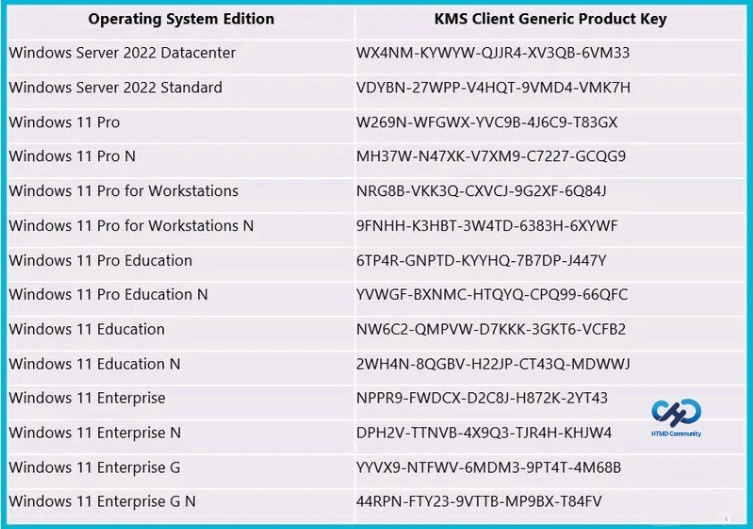
Microsoft has also shared generic Windows 11 product keys that work with the Windows KMS (Key Management Service) activation method. KMS is an on-premises activation service that many organizations have used for years to activate Windows devices inside their network. The Generic Volume License Keys (GVLKs) for different editions of Windows 11 and Windows Server 2022 are listed in the table below.
| Operating System Edition | KMS Client Generic Product Key |
|---|---|
| Windows Server 2022 Datacenter | WX4NM-KYWYW-QJJR4-XV3QB-6VM33 |
| Windows Server 2022 Standard | VDYBN-27WPP-V4HQT-9VMD4-VMK7H |
| Windows 11 Pro | W269N-WFGWX-YVC9B-4J6C9-T83GX |
| Windows 11 Pro N | MH37W-N47XK-V7XM9-C7227-GCQG9 |
| Windows 11 Pro for Workstations | NRG8B-VKK3Q-CXVCJ-9G2XF-6Q84J |
| Windows 11 Pro for Workstations N | 9FNHH-K3HBT-3W4TD-6383H-6XYWF |
| Windows 11 Pro Education | 6TP4R-GNPTD-KYYHQ-7B7DP-J447Y |
| Windows 11 Pro Education N | YVWGF-BXNMC-HTQYQ-CPQ99-66QFC |
| Windows 11 Education | NW6C2-QMPVW-D7KKK-3GKT6-VCFB2 |
| Windows 11 Education N | 2WH4N-8QGBV-H22JP-CT43Q-MDWWJ |
| Windows 11 Enterprise | NPPR9-FWDCX-D2C8J-H872K-2YT43 |
| Windows 11 Enterprise N | DPH2V-TTNVB-4X9Q3-TJR4H-KHJW4 |
| Windows 11 Enterprise G | YYVX9-NTFWV-6MDM3-9PT4T-4M68B |
| Windows 11 Enterprise G N | 44RPN-FTY23-9VTTB-MP9BX-T84FV |
Command Prompt Method to Find Out the Windows 11 Product Keys
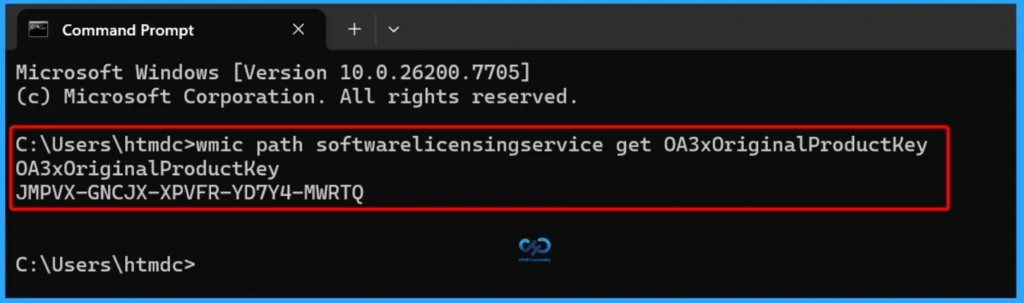
You can retrieve the product key for Windows 11 using the Command Prompt, open CMD with administrative privileges and run the command shown below. This command queries the system’s licensing information and displays the original product key stored in the device firmware (if available).
wmic path softwarelicensingservice get OA3xOriginalProductKey
Find the Windows 11 Product Key using the Registry
Let’s use the registry to find the Windows 11 product key. Two methods are available for finding the product key from an existing Windows 11 device.
- Registry.exe -> GUI
- Command-line option
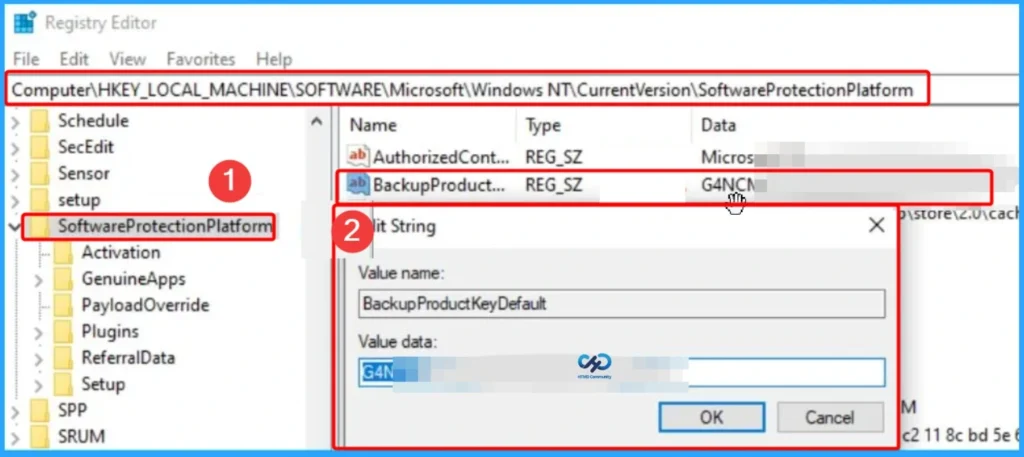
Let’s look at the Registry application GUI (Registry.exe) and Navigate to the following Registry path on Windows 11 Device to find the product key.
- Product Key -> Computer\HKEY_LOCAL_MACHINE\SOFTWARE\Microsoft\Windows NT\CurrentVersion\SoftwareProtectionPlatform ->
- BackupProductKeyDefault
To find a Windows 11 product key on an existing device, try running the PowerShell command from the admin command prompt. You can also use the Windows Terminal from Windows 11 OS.
(Get-ItemProperty -Path "HKLM:\SOFTWARE\Microsoft\Windows NT\CurrentVersion\SoftwareProtectionPlatform" -Name BackupProductKeyDefault).BackupProductKeyDefault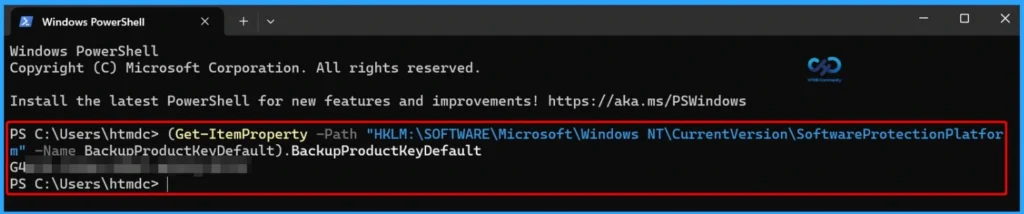
WMI Method to Find the Windows 11 Product Key
Let’s find out Windows 11 product keys using the WMI Method. I have shared the two options below to find the license key details for the Windows System.
- WMI Explorer
- WMI Command Line
You can use the WMI Explorer tool, created by Microsoft Employee Vinay. You can download the Tool from Vinay Pamnani: https://github.com/vinaypamnani/wmie2/releases.
- Launch the WMI Explorer tool
- Connect to the location device by just clicking on the Connect button.
- Click on Root\CIMV2 namespace.
- Click on the EXECUTE button at the bottom right screen to launch the WMI query search window.
- In the search box, enter the following query -> Output view -> List View.
- Click on the Execute button to get the results (Windows 11 product key).
select * from SoftwareLicensingService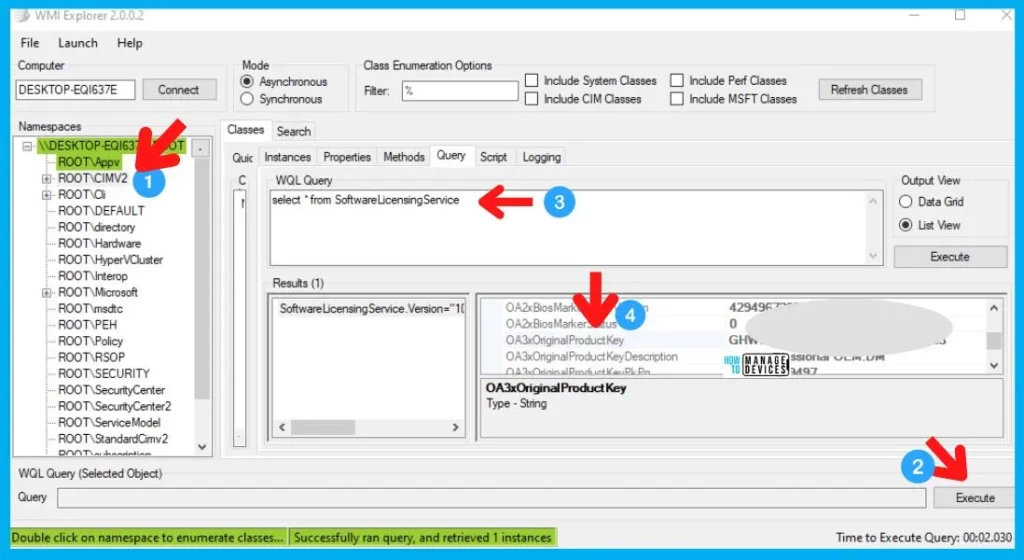
Retrieve Windows 11 Product Key Details with PowerShell via WMI
You can use a PowerShell command to retrieve product key details from a Windows 11 device using WMI (Windows Management Instrumentation). This method allows you to quickly check licensing information directly from the system without using additional tools. To run the command successfully, make sure to open PowerShell with administrator privileges.
(Get-WmiObject -Query "select * from SoftwareLicensingService").OA3xOriginalProductKey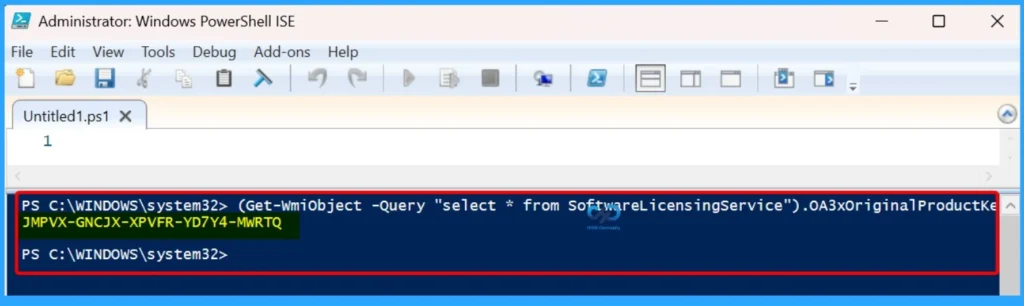
Need Further Assistance or Have Technical Questions?
Join the LinkedIn Page and Telegram group to get the latest step-by-step guides and news updates. Join our Meetup Page to participate in User group meetings. Also, join the WhatsApp Community and the Whatsapp channel to get the latest news on Microsoft Technologies. We are there on Reddit as well.
Author
Anoop C Nair has been Microsoft MVP for 10 consecutive years from 2015 onwards. He is a Workplace Solution Architect with more than 22+ years of experience in Workplace technologies. He is a Blogger, Speaker, and Local User Group Community leader. His primary focus is on Device Management technologies like SCCM and Intune. He writes about technologies like Intune, SCCM, Windows, Cloud PC, Windows, Entra, Microsoft Security, Career, etc.
The KMS activation is only for 180 days, after 180 days, you need to activate it again , it is troublesome, and if you find a KMS key online , it has as risk of black screen if the key is blocked !
I get the retail server 2022 datacenter product key from the Microsoft partner online store keyingo.com, and it is easier to activate with the retail key, and you wont have any problems in the future too
I have a new Acer laptop with Windows 11 preinstalled and activated. There was no label on the computer nor on the box with the product key, so I tried the methods above. The “wmic” command and the “powershell” command give the same Original Product Key, but different from the one in the registry (BackupProductKeyDefault). Which is correct?
same problem with me…
Thanks for such nice sharing. I used to solve the problem by getting a key on “onthehubstore”. It works well.
Amazing guys, than you so much
Day one I got a working key. Lets see for how many days it will work.
Thanks.
Thanks for such nice sharing. I used to solve the problem by getting a key on “softlizen store”. It works well.
I looked up my product key for Windows 11 Pro in the Registry. Why does it not match the actual product key that I used to activate my Windows 11 Pro install?
Your post is a true gem! It’s packed with useful information, and I appreciate the practical tips you’ve included. Thank you for creating such a valuable resource!
I bought from Hypest-Key , office 2021 pro plus (excell, word and other products), good price for retail keys from microsoft partner, key work all country, with coupon forhype24 , they giv good price
Method work, thanks you, activated my windows 11 pro key, and if you need retail key, got my from Hypestkey
S2keys.com work for me
Thanks, hypestkey work for me
Thanks for sharing it but people who are using non genuine, cracked or pirated operating system, Mostly facing problems and after the bogus updates their issues may become complex. I also used windows 11 pro trail with many issues on weekly basis but when I activated it there’s no more issue found. To fix it, I purchased license key from odosta store which I think is a Microsoft product reseller.
Windows 11 home keys are not working. Can you provide new keys.
i got windows 11 pro key for 13 dollars from noxkeys.
Received new working windows 11 pro at Hypestkey Softwaree
Bro, I actually spent weeks trying to figure this out and you helped me in 30 seconds
Hypestkey Softwaree worked for me too!