










Intune Read-Only Experience Learn to Create Read-Only Operators Roles Admin Access. Role-Based Access Controls (RBAC) are one of my favorite features in Microsoft Intune.
People chose Intune hybrid instead of Intune standalone because of the lack of RBAC. The Intune team introduced RBAC features into their product back in 2017. This post will teach us how to provide read-only access to the Intune console.
I have two (2) posts covering Intune role-based access controls in detail. I recommend reading them to learn more about Intune RBAC.
However, the Intune team did excellent work in including scope features in Intune RBAC. Now, it’s getting close to SCCM RBAC features. My previous posts about Intune RBAC follow.
Table of Contents
How to Provide Read-Only Access to Intune
RBAC helps Intune Admins control who can perform various Intune tasks within your enterprise. There are six (6) built-in Intune roles (RBAC roles). I use the default Intune role, “Read Only Operator,” to provide read-only access to the Intune console.
- Navigate Azure Portal – Microsoft Intune blade – Intune roles – All roles – Read-Only Operator – Assignments – Click on + Assign.
- Once you click on the “+ Assign” button, a new Read-Only Operator—Role assignments blade will be displayed.
- Enter the following information in the blade Assignment Name = Read-Only Intune Users
Assignment Description = Details of Read-Only Assignment Group
Members (Groups)# = Click on the + Add button and select the Azure AD User Group, including Intune Read-Only users (my example – Intune Read-Only Users). Scope (Groups)* = Click on + Add and select the Azure AD User or/and Device group. Only the operator would be able to manage the resources in this group. More details are below. - Save the Intune Role assignment by clicking the OK button
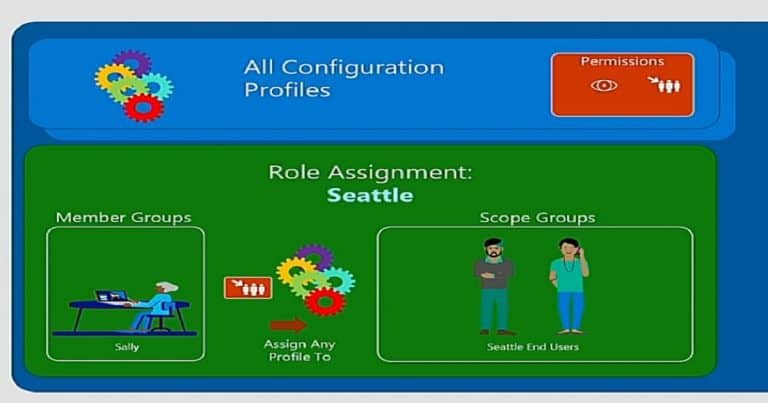
Administrators in Scope Groups Role Assignment can target policies, applications, or small
tasks to these Scope Groups. So the Intune ReadOnly user group members (in my
example screenshot) could target procedures, applications, or small functions
for the users/devices in my scoping group Intune ReadOnly. This is as per the design.
- Member Group users are the administrators assigned to this role.
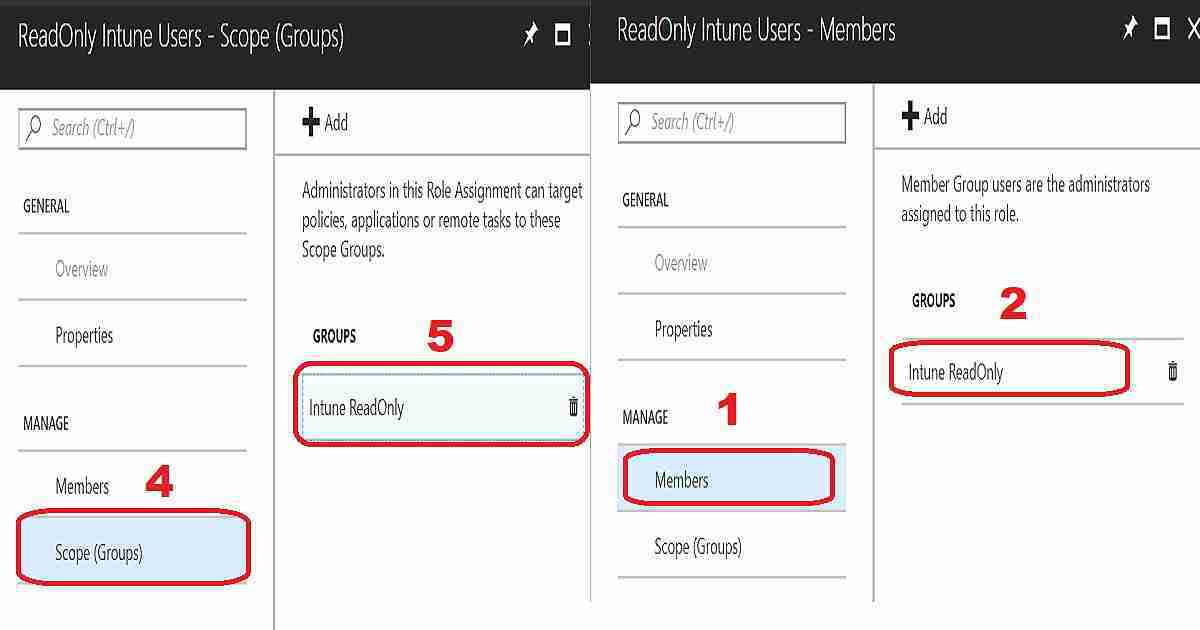
- Intune Role-Based Administration RBA Controls In Azure Portal
- Intune Application Policy Manager RBA Controls In Azure Portal
Do You know what the Intune Scope Group Is?
Do you know what the Intune scope group is? “The users or devices that a specified person (the member) can manage.” Intune ReadOnly users can manage devices or parts of their Scope Groups in the above example.
Intune Read-Only User Experience
In this scenario, the Intune read-only user is a regular user in Azure Active Directory (without any other access). However, the user has been assigned a valid Intune (EMS) license.
I will cover all the following scenarios with Intune’s read-only user experience. The video tutorial on read-only access to Intune provides more details.
Device Enrollment Experience for Read-Only User
The user has read or view access to all the device enrollment blades. However, I noticed that the Configure MDM Push Certificate blade doesn’t allow downloading the CSR file.
The Android work enrollment experience is different from Apple’s. While trying to sign up with an Intune read-only account, I can see the following error: An error occurred requesting the Android for Work signup URL.
Windows enrollment, Terms and conditions, Enrollment restrictions, Device categories, Corporate device identifiers, and Device enrollment managers also work as expected for Intune read-only users.
Device Compliance Experience for Read-Only Users
The device compliance experience is different from the device enrollment experience. Read-only users can change the compliance policy schedule time for actions for non-compliance, but it never gets saved. Instead, it gives an error while trying to save the configuration. So we are fine!
As per my testing, the read-only user cannot assign the compliance policy to any group. For more details, refer to the Read-only Access to Intune video tutorial. However, the read-only user has access to check the status of the compliance policy on devices.
Devices Blade Experience for Intune Read-Only User
View access for the device’s blade is intact. The user can view the properties of all devices. The Azure AD scope option may provide some opportunities to limit read-only users from checking out the properties of devices that are not in read-only users’ scope.
Also, read-only users cannot perform remote actions on devices (such as Removing company data, Factory reset, Deletion, and Remote Lock).
Device Configuration Experience for Intune Read-Only User
Configuration profiles blade provides a classic view experience for Intune read-only users. The read-only users have view access to Overview, Properties, Assignments, Device status, User status, and Per-setting status.
The Configuration PowerShell Scripts blade provides a different experience for Intune read-only users. Like the compliance policy experience (explained above), the PowerShell scripts blade offers the option to edit or rename PowerShell script names. But we are fine with that, as Intune won’t allow read-only users to save those changes.
I had a similar experience with the PowerShell Script assignment. It allows a PowerShell script to be assigned to change the assignments, but it won’t allow the read-only user to save the changes.
Mobile Apps (Applications) Experience for Intune Read-Only User
Intune read-only users’ mobile app experience is similar to that of device enrollment. Mobile apps Manage options provide standard view access to read-only users for Apps, App configuration policies, App protection policies, App selective wipe, and iOS app provisioning profiles.
Monitor options under mobile apps give a similar view experience for App licenses, Discovered apps, App install status, App protection status, and Audit logs.
SETUP options also give a similar view experience for iOS VPP tokens, Windows enterprise certificate, Windows Symantec certificate, Microsoft Store for Business, Windows sideloading keys, Company Portal branding, App categories, and Android for Work.
Conditional Access Experience for Intune Read-Only User
The Conditional Access blade provides view access to read-only operators. I would love to see Azure AD Conditional Access What If work fine for read-only users. This would be very helpful from a learning perspective.
All the following items work fine as expected to provide standard view access.
| Conditional Access Experience for Intune Read-Only User |
|---|
| On-premises access |
| Users |
| Groups |
| Intune roles |
| Software Updates |

Useful Links
- Intune RBAC Microsoft Documentation
- Intune RBAC Import Export Script using Graph API
- Intune Apple Enrollment script samples
- Intune RBAC Mapping Spreadsheet
We are on WhatsApp now. To get the latest step-by-step guides, news, and updates, Join our Channel. Click here. HTMD WhatsApp.
Author
Anoop C Nair is Microsoft MVP from 2015 onwards for consecutive 10 years! He is a Workplace Solution Architect with more than 22+ years of experience in Workplace technologies. He is a Blogger, Speaker, and Local User Group Community leader. His main focus is on Device Management technologies like SCCM and Intune. He writes about technologies like Intune, SCCM, Windows, Cloud PC, Windows, Entra, Microsoft Security, Career etc…